7
Cover
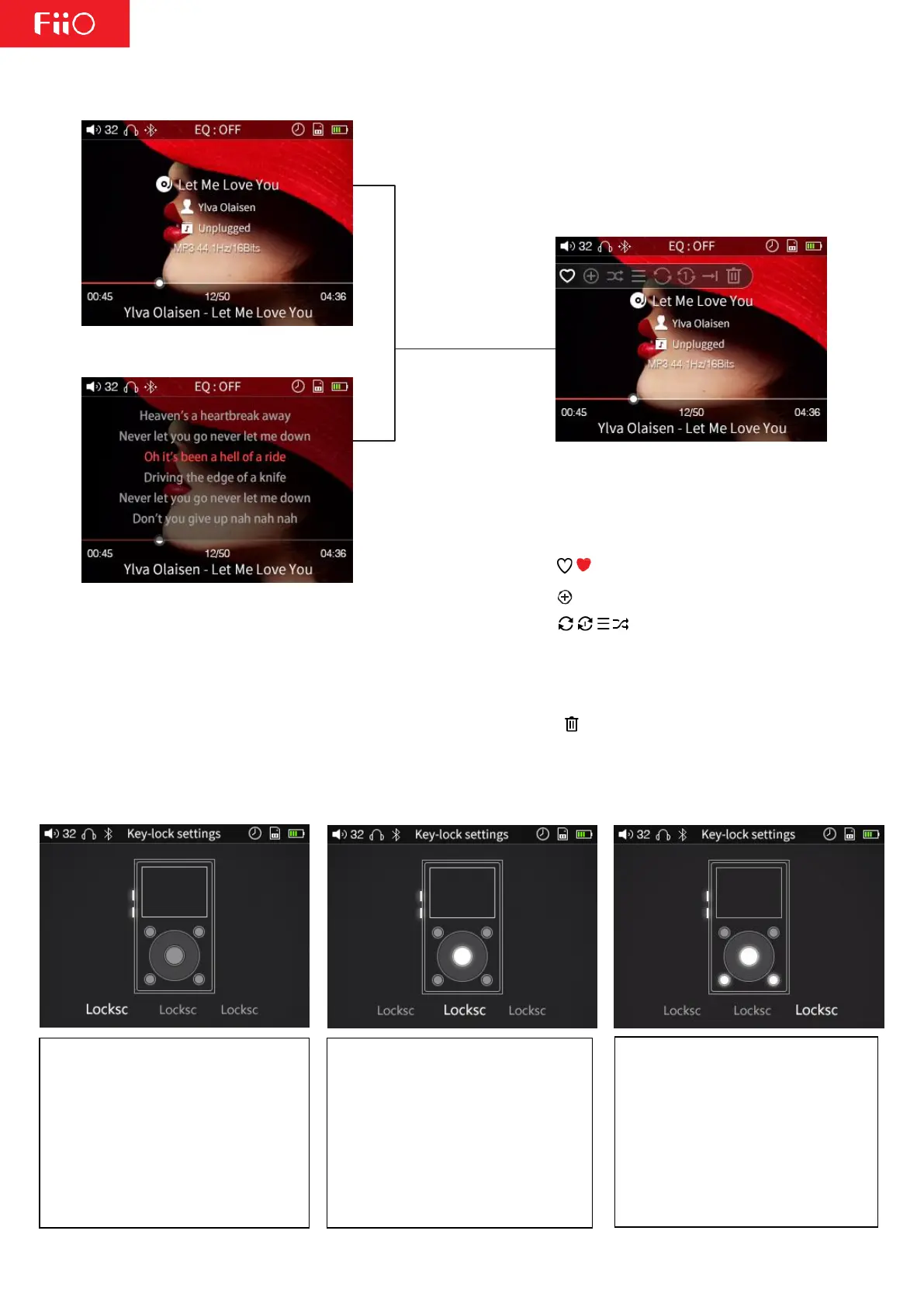
Briefly press
the sho rtcut key
Lyrics
Use the scroll wheel or
the "Previous" and "Next"
buttons to switch
between shortcuts
Add/remove from favorites
Add to Playlist
→| Select between loop
all, loop single song, sequential,
shuffle, and single play modes
respectively
Deletes the current song
2. Key Lock Settings
Lockscreen 1: In lockscreen 1 mode,
only the volume buttons are enabled
when the screen is off. Short presses
of the volume buttons change the
volume, while long presses skip tracks
(press volume up to skip to next,
volume down to skip to previous).
Lockscreen 3: In lockscreen 3 mode,
only the volume, Enter, and Previous
and Next buttons are enabled when
the screen is off. Short presses of the
volume buttons change the volume,
while long presses skip tracks. The
Previous/Next buttons will also skip
tracks. Pressing the Enter button will
pause/resume playing the song.
Lockscreen 2: In lockscreen 2 mode,
only the volume and Enter buttons
are enabled when the screen is off.
Short presses of the volume buttons
change the volume, while long
presses skip tracks. Pressing the Enter
button will pause/resume playing the
song.



 To Next Page