26-0027 Issue 12
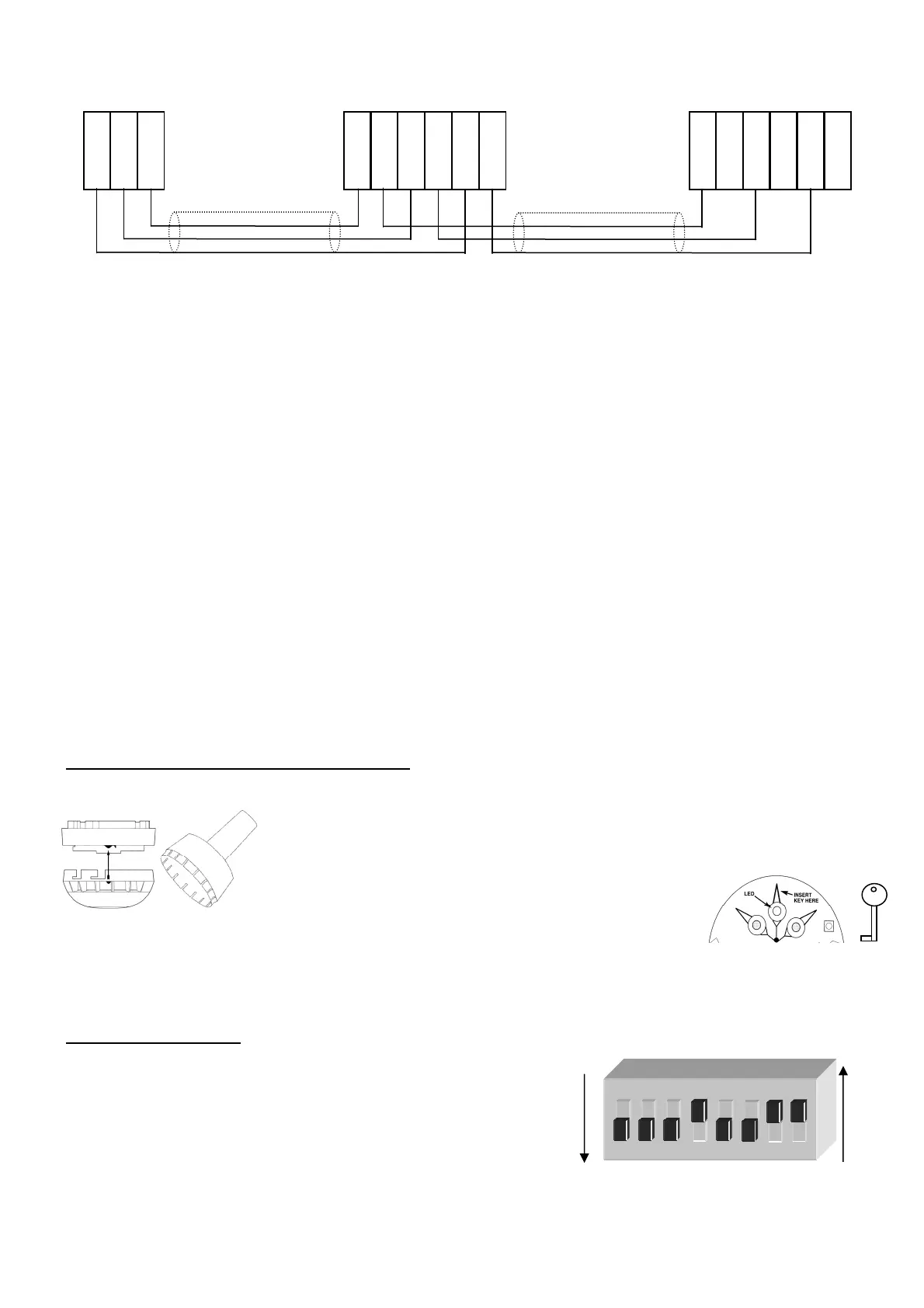
Twinflex Multipoint Detectors can be mixed on the same zone as other types of Twinflex device (eg. Twinflex
Callpoints). The above diagram shows how to make the zone positive, zone negative and screen connections
between the control panel and Twinflex Multipoint Detectors. Refer to the instruction leaflets supplied with other
Twinflex devices for their equivalent wiring/terminal labelling details.
Please note that the SCRN terminal on the detector bases should only be connected to the zone cable screen and
NOT to the building earth. The cable screen is connected to earth at the panel end only, via the zone “SCRN”
terminal (or EARTH terminal on the Twinflex V3 2/4/8 Zone panels). It is important to maintain the screen continuity
in order to protect against data corruption from interference.
Once all testing has been carried out on the cabling and ‘continuity & integrity’ has been proven, the Multipoint unit
may be assembled.
Program the onboard DIL switches as required before inserting the Electronics Module. Then locate the pins and
gently push home the module.
Remember that the device at the end of the line must have its EOL signal activated using the
relevant DIL switch. Do not use a resistor or capacitor (or another manufacturer’s End of Line
device) as the end of line, as this may prevent correct operation of the zone.
The Detector Head may then be offered up and twisted to locate until the catch operates. Remember not to force
this item. If the Electronics Module is correctly located then the Detector Head should locate with very little force.
Tamper Resistance and Head Removal
The Multipoint detector incorporates a tamper resistant locking mechanism that
prevents its removal from the base without the use of a special tool. To remove the
device the tool should be offered up to the detector and turned anti-clockwise
allowing the detector to be removed from the base.
If required the Electronics Module may be removed by
inserting the Key into the triangular slot adjacent to the
LED and then pulling to ease the Module out. Do not
pull on the optical transmitter and receiver pair as you
may misalign them.
DIL Switch Settings
The detector DIL switches may be used to program the operation of
the Multipoint Detector. They may be altered when the device is
removed from the base.
If a heat detection mode is selected then use the ‘HEAT’ labels
supplied to label the base of the detector clearly.
The last device on the circuit must have the EOL signal enabled
(switch number 1 in the ‘ON’ position).
SWITCH OFF
SWITCH ON
1 2 3 4 5 6 7 8
O N
SCRN
ZONE -VE
ZONE +VE
+ Line In
+ Line Out
OV In
OV Out
SCRN
SCRN
+ Line In
+ Line Out
OV In
OV Out
SCRN
SCRN
TWINFLEX MULTIPOINT TWINFLEX MULTIPOINT
CONTROL PANEL
OPTICAL CHAMBER & HEAD
ELECTRONICS MODULE &
REMOVAL KEY



 To Next Page
 Loading...