6
Note: The
system will make a hissing, gurgling noise when filtering water. After a
few cycles this noise should dissipate.
Congratulations! You now have an endless supply of USP-quality
water, freeing you from buying bottled water and performing manual
reconstitution. With the proper care, your FillPure/Fillmaster system
will be an essential part of your pharmacy for years to come.
Setup for First Use
Normal Startup
After installing the battery, press the START key to begin startup. No user interaction is required,
but you should observe the following:
• The System Power light will flash to indicate that the battery is functioning properly and
in good condition.
• The Service Required light will flash to indicate that the water line pressure is adequate
and various performance checks have been completed successfully.
• Y
ou will see startup messages displayed. When startup is successfully completed, you
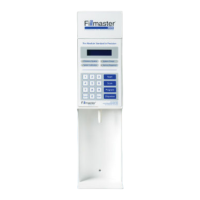
will see “Select Key Enter Amount” displayed on the Fillmaster screen. This is the main
screen.
• If the Filtration System light remains illuminated after startup, call Fillmaster Technical
Support at 800-884-5771 for assistance.


 To Next Page