7
Filter Replacement
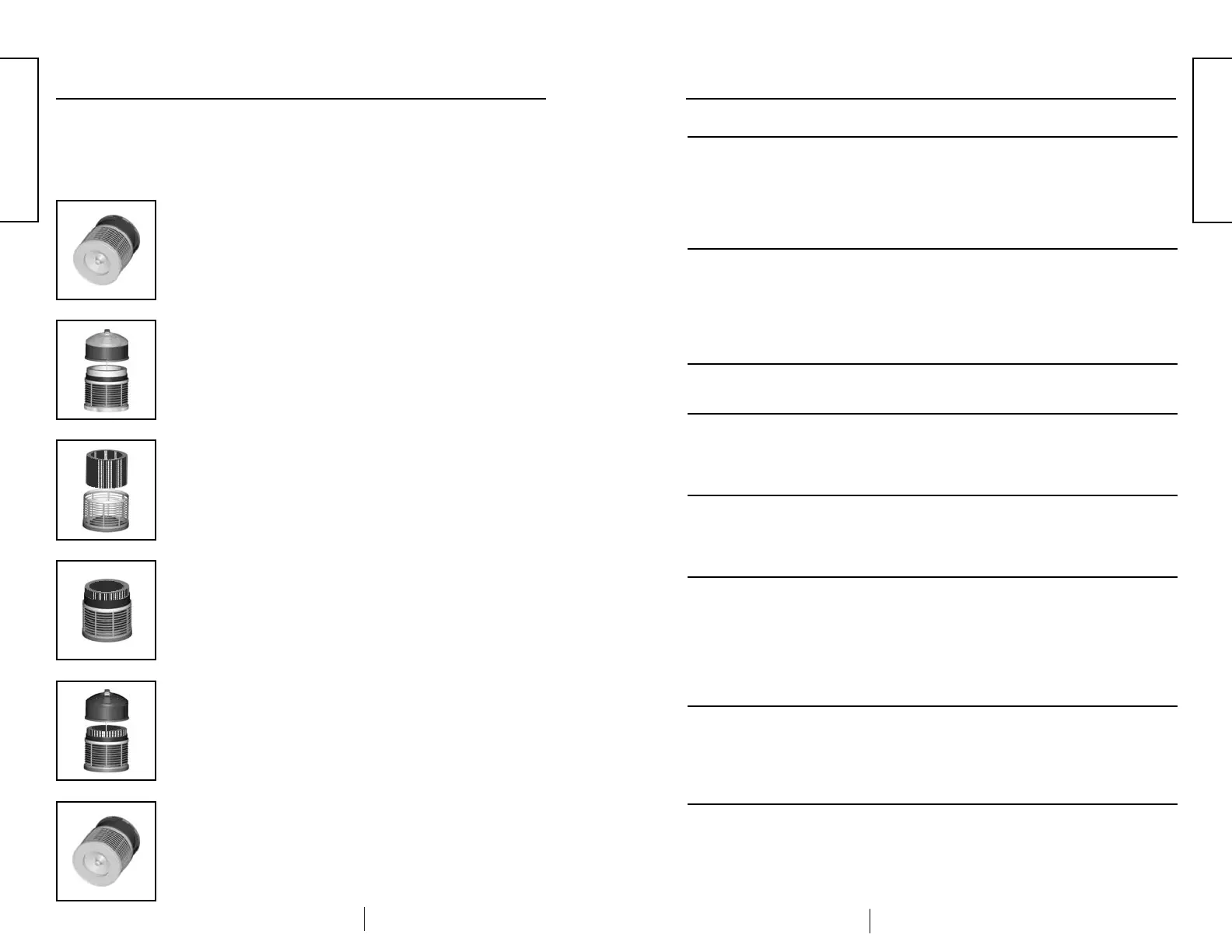
❸
Remove the Medi-Filter
®
Cartridge and Enviropure
®
Charcoal Filter. If only replacing the Enviropure
®
Charcoal Filter, remove the old charcoal filter from the
Medi-Filter
®
Cartridge and discard it.
Note: The charcoal filter is fastened with velcro.
❹
Place the new Enviropure
®
Charcoal Filter around the
outside of the Medi-Filter
®
Cartridge and fasten with the
velcro. If also replacing the Medi-Filter
®
Cartridge, fasten the
new Enviropure
®
Charcoal Filter to the new Medi-Filter
®
Cartridge. Return the filters to the unit.
❺
Replace the top motor assembly.
❻
Place the unit on its side to secure the retaining nut on
the bottom of the unit. Return the unit to its upright
position to resume use.
❶
After unplugging the Defender
®
, place the unit on its
side and remove the retaining nut on the bottom of the
unit by turning counterclockwise.
❷
Return the unit to its upright position and lift off the top
motor assembly.
Prompt filter replacement will prevent any potential damage to your Defender
®
that
may result from its continued operation with a clogged filter condition.
To Replace your Filter(s):
8
Troubleshooting Guide
Condition Possible Cause: Corrective Action:
Green indicator on On/Off
power switch will not
illuminate.
Green Power On Indicator
(leaf) on front panel will
not illuminate.
Red Filter Replacement
Indicator is flashing.
Red Filter Replacement
Indicator is illuminated.
All motor speed indicators
flashing, unit will not run.
No motor speed indicators
are flashing, unit will not
run.
One motor speed indicator
is flashing, unit is running.
One moor speed indicator
is flashing, unit will not
run.
Unit is not supplied with
power.
Control panel is not
supplied with power, OR
control panel is defective.
Time to order replacement
filter.
Time to replace filter and
reset timer.
Unit is operating in
program mode and is
currently programmed to
be off.
Unit is operating in
program set-up mode.
Unit is operating in
program mode and is
currently programmed to
operate at the speed shown
by the indicator.
Unit is operating in
program set-up mode.
• Make sure unit is
plugged into outlet.
• Check outlet for power.
• Check unit for damaged
power cord.
• Unit requires service.
• Make sure power switch
is in the ON position.
• Make sure green indica-
tor on power switch is
illuminated.
• Unit requires service.
• See filter replacement
instructions on page 6 .
• This is a normal
operating condition, see
Filter Replacement
Instructions on Page 6 & 7.
• This is a normal operat-
ing condition, see pro-
gramming instructions
on page 4.
• This is a normal operat-
ing condition, see pro-
gramming instructions
on page 4.
• Press the Down Arrow
Button once to select high
speed.
• This is a normal operat-
ing condition, see pro-
gramming instructions
on page 4.
• This is a normal operat-
ing condition, see pro-
gramming instructions
on page 4.
ENGLISH
ENGLISH
Green indicator on On/Off
power switch will not
illuminate.
Green Power On Indicator
(leaf) on front panel will
not illuminate.
All motor speed indicators
flashing, unit will not run
No motor speed indicators
are flashing, unit will not
run.
One motor speed indicator
is flashing, unit is running.
One motor speed indicator
is flashing, unit will not
run.


 To Next Page
 Loading...