Patent Pending
Note: All power connections to be installed to local/national codes by a Certified Electrician. Finelite, Inc. • 30500 Whipple Road • Union City, CA 94587-1530 • (510) 441-1100 • Fax: (510) 441-1510 • www.finelite.com
5 of 13
© 2018 FINELITE, INC. ALL RIGHTS RESERVED. Form CE - 98532. 03/18
HP-2 / HP-4 / HP-6 Recessed or Regressed Spackle & Visible Flange Mitered Corner
Installation Instructions
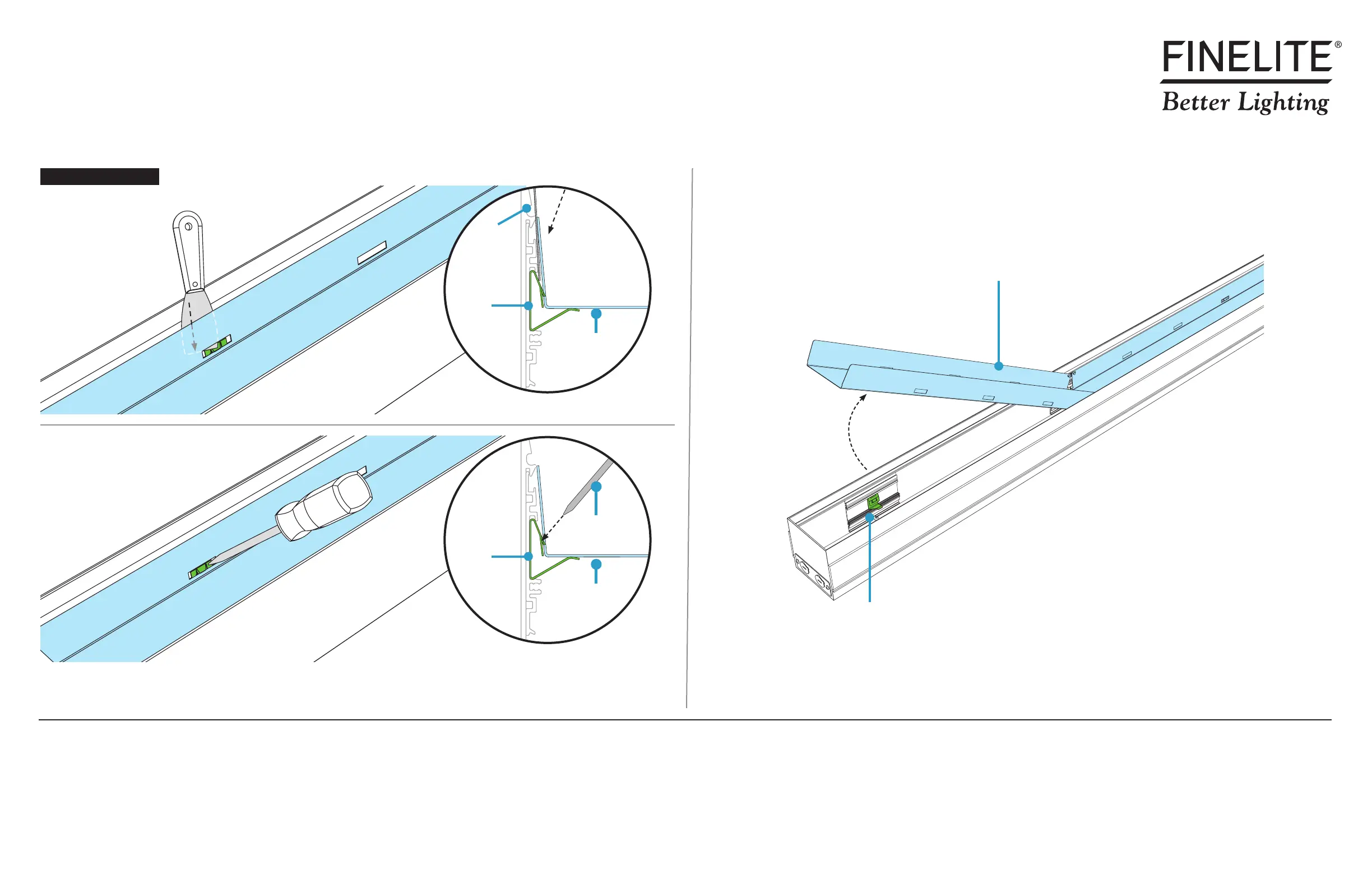
• Carefully rotate backplate out and let hang from luminaire body.
This is a hypothetical build to show the capabilities of this luminaire family and mount type. Your build may vary.
Step 3 - Opening Luminaires
Backplate
• Open all backplates for access to mounting points.
• Release the backplates from clips by sliding the blade of a putty knife behind backplate edges.
• To use a flathead screwdriver: From inside backplate, press end of screwdriver against the clip until the backplate is released.
Backplate
Backplate
Flathead
Screwdriver
Clip
Backplate
Putty Knife Option
Flathead Screwdriver Option
Putty
Knife
Clip
Backplate
Clip
Release Backplates


 To Next Page