Camera Settings - Cloud
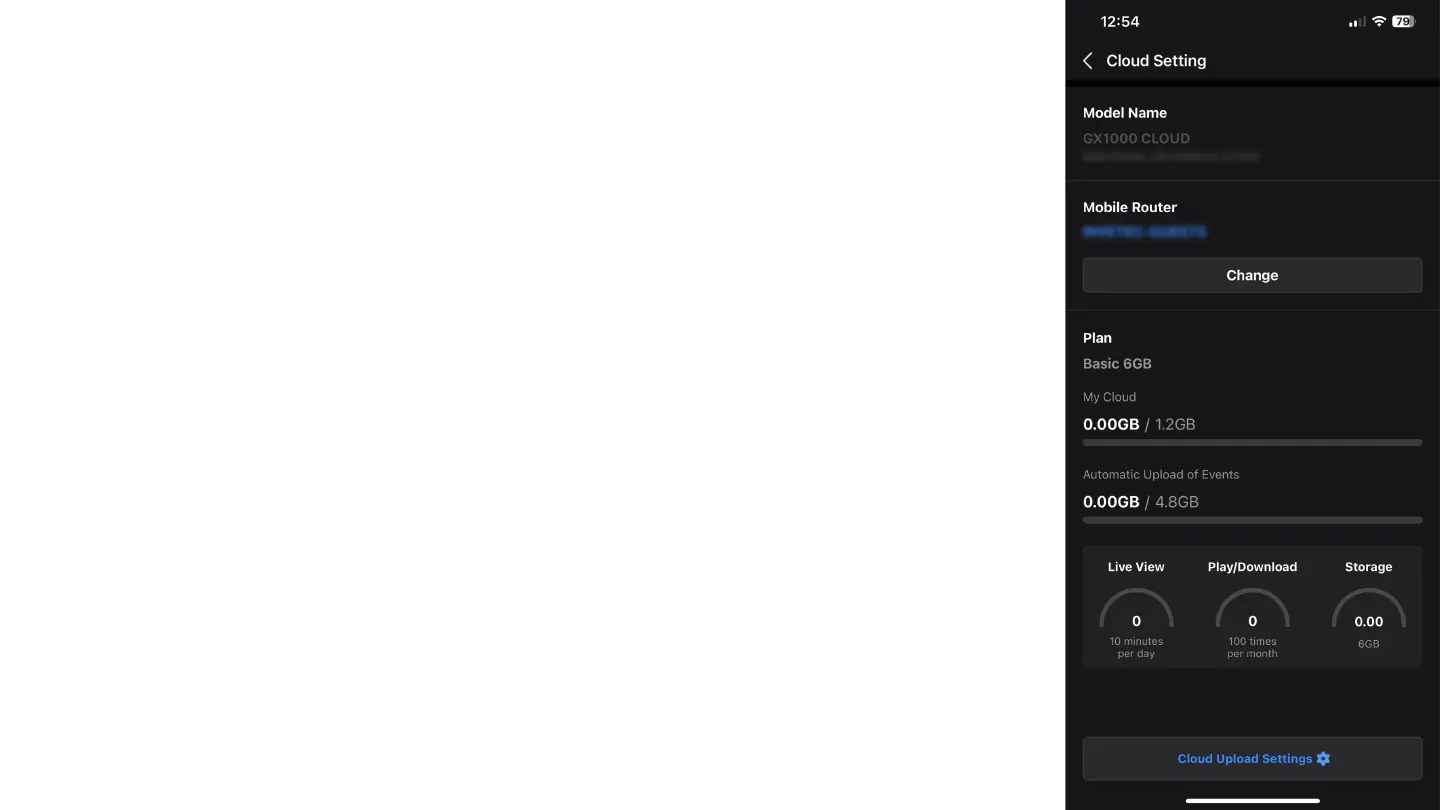
In the "Cloud" tab, you can manage your cloud settings and monitor your subscription and
available data. The options include:
Mobile Router: Displays the name of the mobile router the camera is connected to. You can
change the router by pressing the "Change" button.
Plan: Displays your subscription plan. In the image, we see the "Basic 6GB" plan with the
following information:
My Cloud: Shows the usage of your personal cloud storage space (e.g., 0.00GB / 1.2GB).
Automatic Upload of Events: Shows the usage of storage space for automatic event uploads (e.g.,
0.00GB / 4.8GB).
Live View: Shows the remaining time you can use the Live View service.
Play/Download: Shows the remaining number of times you can play or download videos.
Storage: Shows the available storage space.
Cloud Upload Settings: Press this button to manage your cloud upload settings.



 To Next Page