EasyManua.ls Logo

Finicare FC-IR202 - Display and Operation; Display Description; How to Use the Thermometer

Finicare FC-IR202
11 pages
Print Icon
To Next Page IconTo Next Page
To Previous Page IconTo Previous Page
Loading...
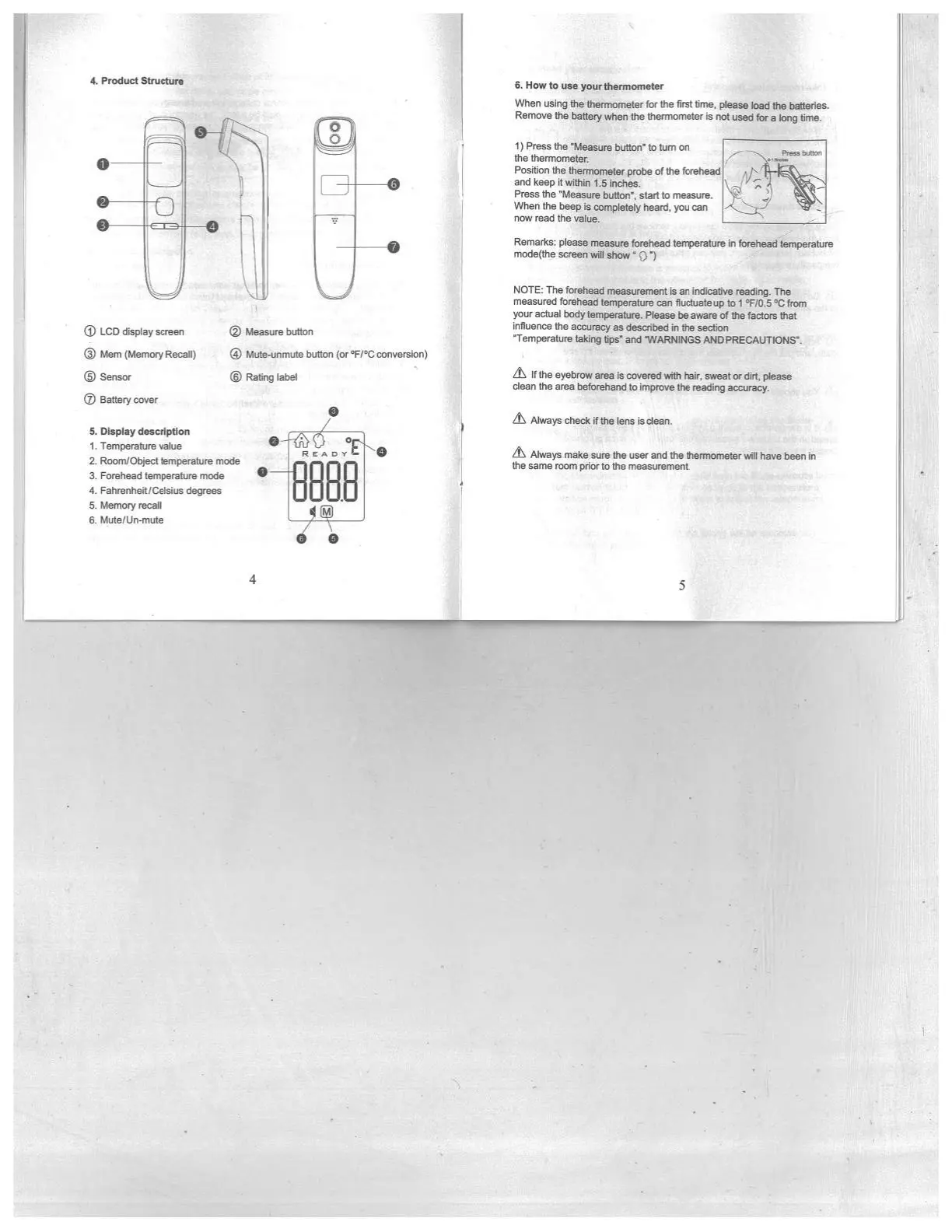
6.
How
to
use
yourthermorneter
When
using
the
thermometer
for
the
first
tine,
please
toad
the
batteries
Remove
the battery
when
the
thermometer
is
not
used
for
a
long
time.
1)
Press
the
‘Measure
button’
to
turn
on
EEE”w
eaor
the
thermometer.
Position the
thermometer
probe
of
the
forehead
andkeepilwitpa15inches
Press
the
‘Measure
oufloli’,
stnl
to
meeaure
When
the
beep
is
cemplotely
heard.
you
can
now
read
the
value.
L_i
Remarks:
please
measure
forehead
temperature
in
forehead
temperature
mode(lhe
screen
wiN
show’
(1’)
NOTE:
The
forehead
measurement
is
an
indicative
readng
The
measured
forehead
temperature
can
Iluctuateup
to
I
°F/O.5
‘C
from
your
actual
bodytemperature.
Fiease
be
aware
of
the
factors
that
influence
the
accuracy
as
described
in
the
section
‘Temperature
t(ing
hps’
and
‘WARNINGS
AND
PRECAtJTIONS’.
Lt\
If
the
eyebrow
area
is
covered
with
her,
sweat
or
dirt
please
dean
the
area
beehand
to
improve
the
reading
accuracy.
Always
cheek
1
the
lens
is
dean.
its
Always
make
sure
the
user
and
the
thermometer
will
have
been
in
the
same
room
prior
to
the
measurement.
4.
Product
Structure
Measure
button
t3)
LCD
display
screen
(j)Men
(Memory
Recat)
G)
Mute-unrrute
button
(or
‘F/’C
conversion)
‘S
Sensor
®
Ratkig
label
0
Battery
cover
5.
Display
description
I.
Temperature
value
2.
Room/Object
temperature
mode
3.
Forehead
temperature
mode
4.
Fahrenheit/Celsius
degrees
5.
Memory
recall
6.
Mute/Un-mute

Related product manuals