EasyManua.ls Logo

Finicare FC-IR202 - After a Measurement; Read Your Temperature; Switching between Mute and Unmute; Checking 35 Sets of Memory Data

Finicare FC-IR202
11 pages
Print Icon
To Next Page IconTo Next Page
To Previous Page IconTo Previous Page
Loading...
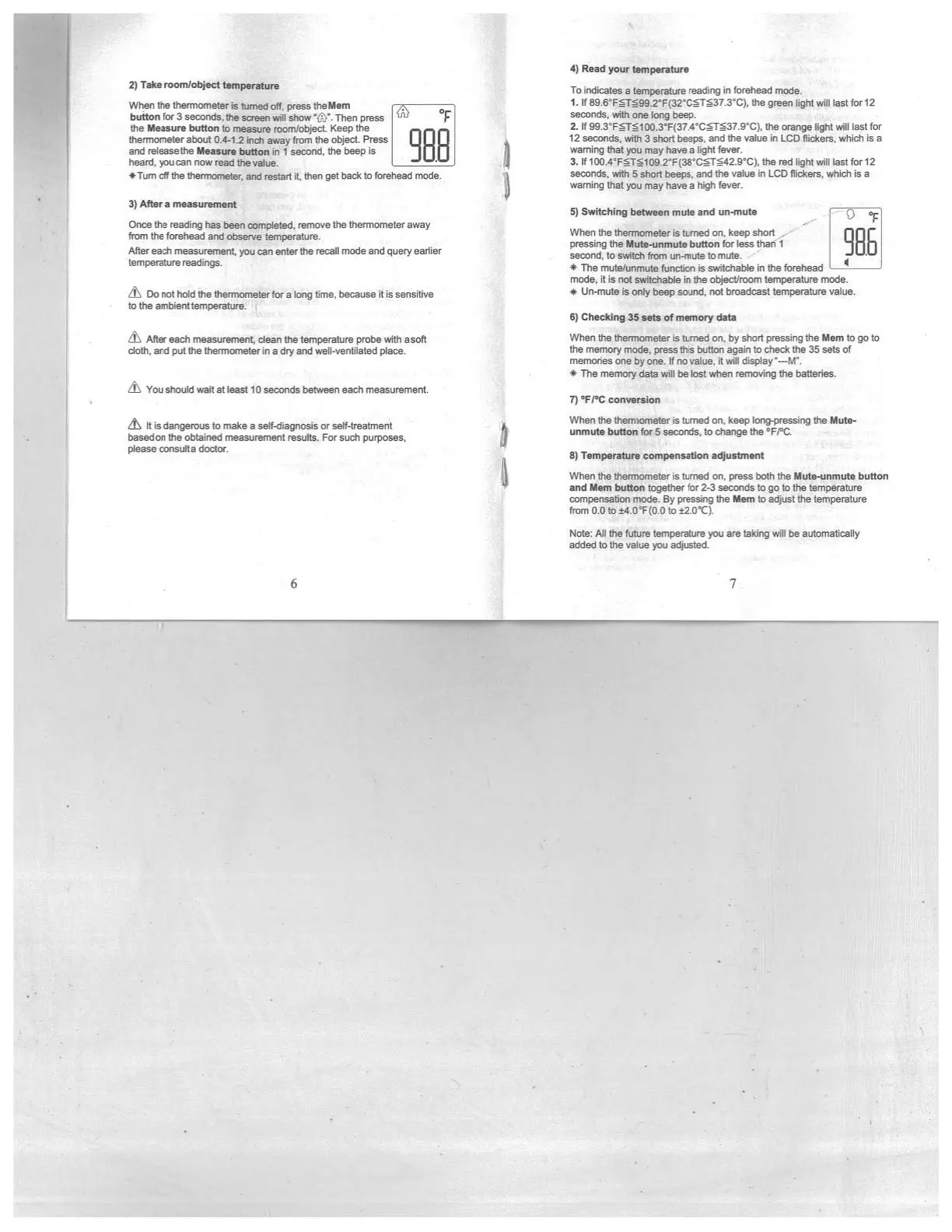
4)
Read
your
temperature
2)
rake
raom!object
temperature
When
the
thermometer
is
turned
off
press
theMem
button
for
3
seconds,
the
screen
will
show
‘ti’.
Then
press
°F
the
Measure button
to
measure
room/object.
Keep the
thermometer
about
0.4’l
.2
inch
away
from
the
object.
Press
and
releasethe
Measure
button
in
I
second,
the
beep
is
heard,
you
can
now
read
the
value.
*Tum
off
the
thermometer,
and
restart
it,
then get
back
to
forehead
mode.
3)
After
a
measurement
Once
the
reading
has
been
completed,
remove
the
thermometer
away
from
the
forehead
and
observe
temperature.
After
each
measurement,
you
can
enter
the
recall
mode
and
query earlier
temperature
readings.
&
Do
not
hold
the
thermometer
for
a
long
time,
because
it
is
sensitive
to
the
ambient
temperature.
After
each
measurement,
clean
the
temperature
probe
with
asolt
cloth,
and
put
the
thermometer
in
a
dry
and
well.ventilaled
place.
You
should
waft
at
least
ID
seconds beoseen
each
measurement
As
It
a
dangerous
to
make
a
self’diagiosis
or
self-treatment
basedon
the
obtained
measurement
results.
For
such
purposes,
please
consulta
doctcr.
To
indicates
a
temperature
reading
in
forehead
mode.
1.
If
89.6’FT99.2’F(32’CTh37.3’C).
the
green
light
will
last
for
12
seconds,
with
one
tong
beep.
2.
If
99.3’FTID0.3’F(37.4’CT37.9’C).
the
orange
light
will
last
for
12
seconds,
with
3
short
beepa,
and
the
value
in
LCD
flickers,
which
is
a
warning
that
you
may
have
a
light
fever.
3.
If
1
00.4’FTI
Dg.2’F(38’CT42.9’C),
the
red
light
will
last
for
12
seconds,
with
5
short
beeps,
and
the value
in
LCD
flickers,
which
is
a
waming
that
you
may
have
a
high
fever.
5)
Switching
between
mute and
unmute
Q
When the
thermometer
is
turned
on,
keep
ahort
pressing
the
Mute-unmuto
button
for
less
than
1
second,
to
switch
from
un-mute
to
mute.
-
*
The
mute/unmute
function
is
switchable
in
the
forehead
-
-_________
mode,
it
is
not
switchable
in
the
object/room
temperature
mode.
*
Un.mute
is
only
beep
sound,
not
broadcast
temperature
value.
6)
Checking
35
sets
of
memory
data
When
the
thermometer
is
turned
on,
by
short
pressing
the
Mem
to
go
to
the
memory
mode,
press
this
button
again
to
check
the
35
sets
of
memories
one
by
one.
If
no
value,
it
will
display
‘---M”.
*The
memory
data
adIl
be
inst
when
rem&ng
the
batteries.
7)
‘FI°C
conversion
When
the
thonnonieter
is
turned
on,
keep
Iong-pres&ng
the
Mute
unmute
button
for
5
seconds,
to
change
the
5FPC
B)
Tonnpecatare
compensation
adjustment
When
the
thermometer
is
turned
on,
press
both
the
Mute-wimuto
button
and
Men.
button
together
for
2-3
seconds
to
go
to
the
temperature
connoermation
mode.
By
p’esstng
the
Men.
to
a<uat
The
temperature
from
0.0
to
t4.O’F(D.D
to
z2
DC).
Note:
Afl
the
future
tempemtue
you
are
taking
etIl
be
automaficetly
added
to
the
value
you
adjusted.
:4
t
.1
6
7
1.
7?
S

Related product manuals