English - 8 -
your PC to enable PC audio. Connect the audio cable between AUDIO INPUTS on the TV and audio
outputs of your device to enable component audio.
Subwoofer Out5. is for connecting an external, active subwoofer to the set to give a much deeper bass
effect. Use an appropriate RCA cable to connect the set to a subwoofer unit.
S/PDIF Digital Out6. outputs digital audio signals of the currently watched source.
Use a digital optic cable to transfer audio signals to a device that has S/PDIF input.
RF Input 7. connects to an aerial and cable antenna system.
Note that if you use a decoder or a media recorder, you should connect the aerial cable through the
device to the television with an appropriate antenna cable, as shown in the illustration in the following
pages.
HDMI 3: HDMI Input.8.
HDMI 2: HDMI Input.9.
HDMI 1: HDMI Input.10.
HDMI Inputs are for connecting a device that has an HDMI socket. Your LCD TV is capable of
displaying High Defi nition pictures from devices such as a High Defi nition Satellite Receiver or DVD
Player. These devices must be connected via the HDMI sockets or Component Socket. These sockets
can accept either 720p or 1080p (optional) signals. No sound connection is needed for an HDMI to
HDMI connection.
PC Input11. is for connecting a personal computer to the TV set.
Connect the PC cable between the PC INPUT on the TV and the PC output on your PC.
Ethernet input (for service and Internet connectivity).12.
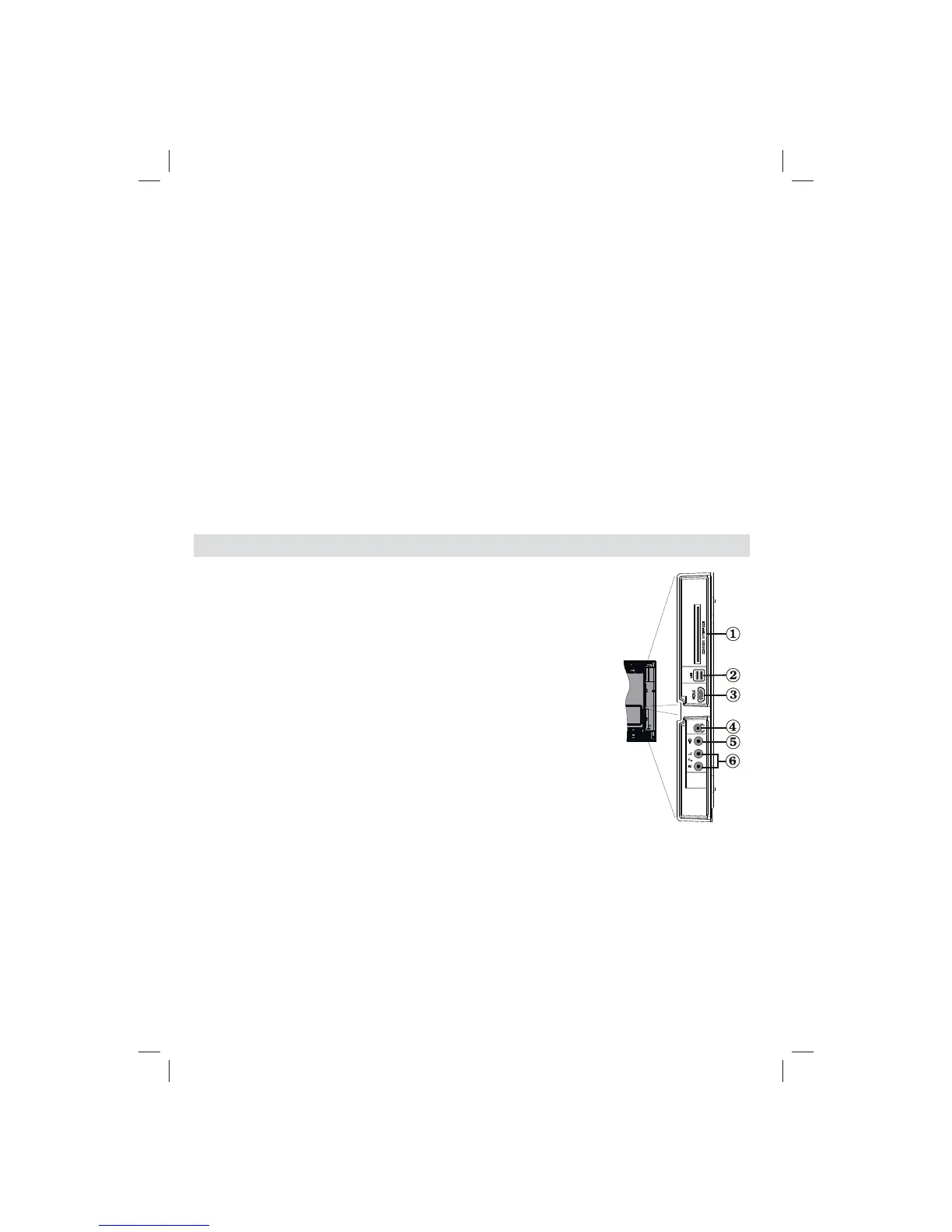
Viewing the Connections - Side Connectors
CI Slot is used for inserting a CI card. A CI card allows you to view all the 1.
channels that you subscribe to. For more information, see “Conditional
Access” section.
Side USBs2.
Side HDMI Input is for connecting a device that has an HDMI socket.3.
Headphone jack is used for connecting an external headphone to the 4.
system. Connect to the HEADPHONE jack to listen to the TV from
headphones (optional).
Video Input is used for connecting video signals of external devices.Connect the video 5.
cable between the VIDEO IN socket on the TV and the VIDEO OUT jack on your device.
Audio Inputs are used for connecting audio signals of external 6.
devices. Connect the audio cable between the AUDIO INPUTS
on the TV and the AUDIO OUTPUT jacks on your device.
Note: If you connect a device to the TV via the VIDEO INPUT, you should also
connect your device with an audio cable to the AUDIO INPUTS of the TV to enable
audio.
5Vdc-Max500mA
01_MB70_[GB]_DVBTC_GOLD_GOLD11_5112UK_32905W_10075979_50201662.indd 801_MB70_[GB]_DVBTC_GOLD_GOLD11_5112UK_32905W_10075979_50201662.indd 8 02.12.2011 09:33:3902.12.2011 09:33:39


 To Next Page