12 | P a g e
Wireless Bluetooth®
To create a new Bluetooth pairing
1. Turn off the Headset, then turn on the Headset.
2. The Headset will enter Bluetooth pairing mode for 10 minutes.
3. Enter connectivity options on your Bluetooth device and search for new
devices. Once the search is complete select Sonetics-HS##. If prompted for a
password, enter four zeros (0000).
To answer or hang up a call
Quickly press and release the menu button.
Wireless DECT7
DECT7 headsets have the ability to use the Sonetics DECT, DECT6, DECT7 and IP-
DECT7 wireless bases for communication. Protected regional frequencies in each
region ensure interference free operation.
Pairing a DECT7 Headset
DECT7 Wireless Headsets use a semi-permanent link to a DECT7 Base Station or IP-
DECT7 system. No additional steps are required once a Headset has been paired.
Each time thereafter, the Headset will remember the Wireless Base Station and
automatically reconnect.
To Create a New DECT Pairing
1. Turn off the Headset.
2. Put the Wireless Base Station into Pairing Mode.
3. Hold down the PTT and power buttons to turn on the Headset.
4. Keep holding the PTT and Power buttons until the LED begins to flash
Red/Green .
5. Release the PTT button.
6. If successful, the LED will begin to flash Green .
7. If not, repeat all steps.
To erase a DECT pairing, follow the pairing sequence above without putting the
Wireless Base Station into pairing mode.
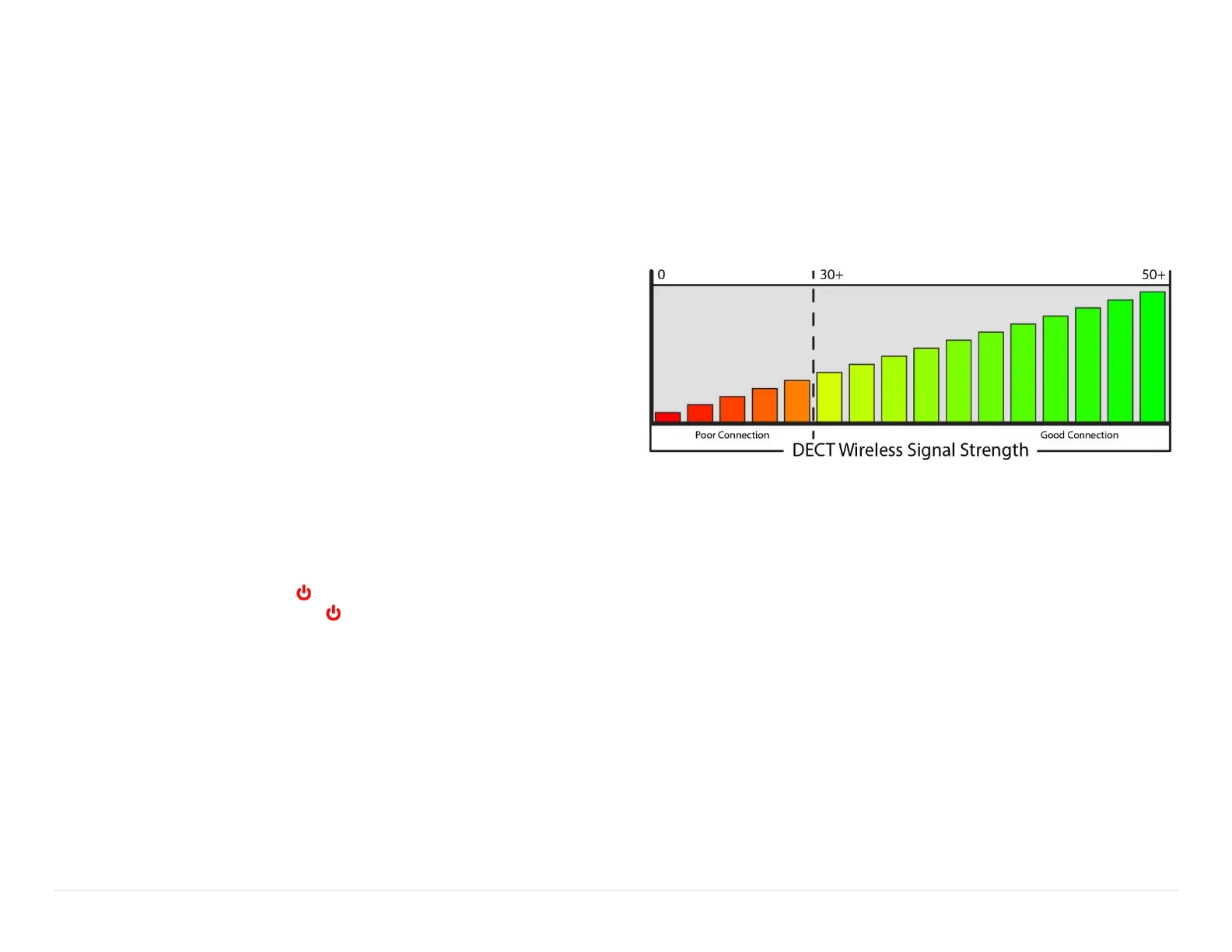
DECT Signal Strength
To use signal strength reporting
1. Make sure your headset has a DECT wireless connection.
2. Enter the Advanced Menu
3. Use the menu button to scroll through settings until you hear "Radio Off".
4. Use the or minus – buttons to change the setting to "Radio On".
5. If the headset has a DECT connection, it will announce the signal strength every
10 seconds. If no DECT connection is present, there will be no announcement.
6. To exit, cycle power on the headset.


 To Next Page