7
SYSTEM ORIENTATION
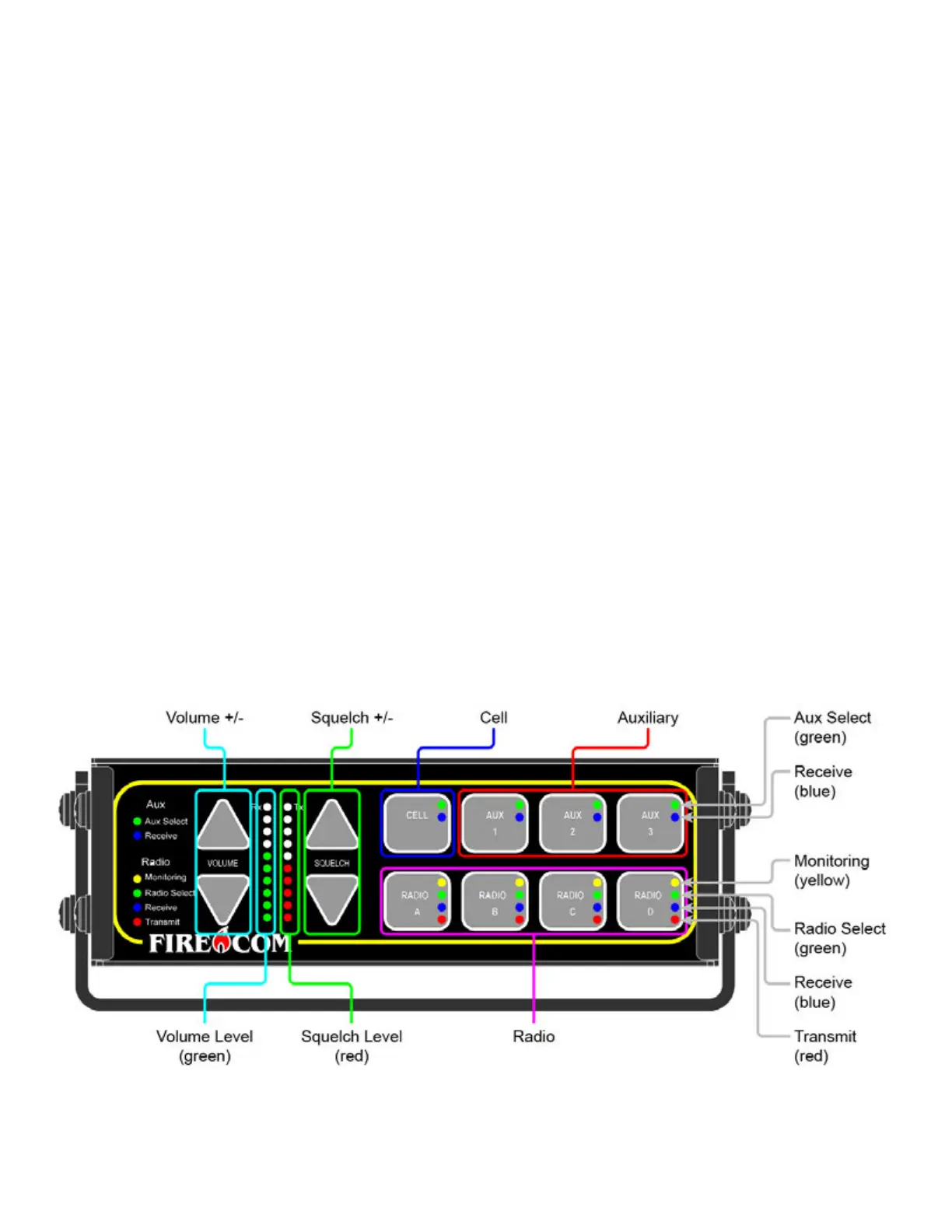
5000D SERIES FRONT PANEL CONTROLS:
VOLUME UP & VOLUME DOWN BUTTONS:
• Adjust the master volume for the Intercom System.
VOLUME INDICATOR LED'S:
• 10 green LED’s which indicate the master volume level setting. There are 3 volume changes between lights.
SQUELCH LEVEL INDICATOR LED'S:
• 10 red LED’s which indicate the master volume level setting. There are 3 volume changes between lights.
SQUELCH LEVEL UP & SQUELCH LEVEL DOWN BUTTONS:
• 10 red LED’s which indicate the master volume level setting. There are 3 volume changes between lights.
RADIO SELECT LED BUTTONS:
• Green LED:
o The green LED indicates which radio is the transmit radio.
• Yellow LED:
o All active radios are indicated with a yellow LED.
• Red LED:
o The red LED provides indication that a radio transmission is occurring.
• Blue LED:
o The blue LED indicates audio traffic on a radio.
AUX & CELL BUTTONS:
• Green LED:
o The Digital Intercom lights a green LED to indicate an active Aux port.
• Blue LED:
o The blue LED provides indication that there is audio traffic on an Aux port.
Figure 3



 To Next Page