Meet Firefly
™
!
ire
y
™
is a wireless phone de
igned just
or kids. It has a special keypad so you don’t have to
emember or dial an
numbers. The Fire
hone also has lots o
other awesome
eatures and
t
s rea
y easy to use.
Firefl y
™
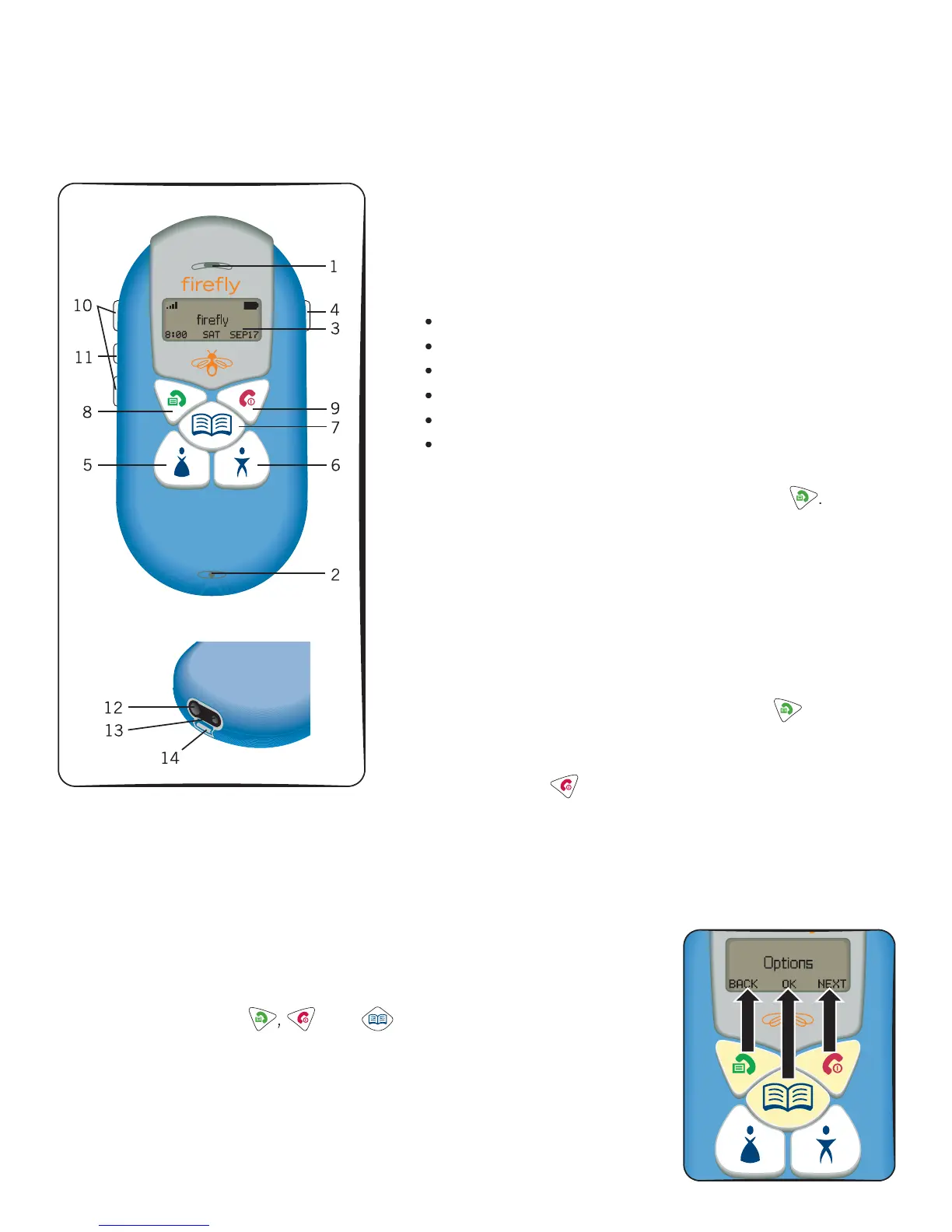
Parts – and what they do
Earp
ece
ets you
ear ca
ers
2. M
crophone Lets callers hear you
. Dis
la
Lets
ou
et in
ormation and make choices. You can:
check the name and number o
who you want to call
see who’s calling you
check the date and time
see how strong your battery is
see how strong the phone’s signal is
choose your phone’s display colors and sounds
mer
enc
utto
Press and hold
or
seconds i
ou
nee
to ma
e an emergency ca
, t
en pres
. Mom Call Ke
Press this key to call your mom, or any
other s
ecial
erson’s number stored here
. Dad
all Ke
ress t
s
e
to ca
our
a
, or an
ot
er
spec
a
person
s num
er store
ere
. Phone Book Ke
This is where you can store up to 20
a
t
ona
one num
ers.
.
end Ke
ress t
s
e
w
en
ou want to ma
e or
answer a call. You can also press and hol
vi
w
the Fire
hone’s menus
.
n
ey
ress t
s
e
to en
our ca
s.
ou can a
so
press an
o
to turn your Firefl y phone on or off.
10
Volume Button
Use these buttons to control how loud voices and rings are on your phone
. Firefl
irework
Butto
Press this button to start the Fire
Fireworks
.
harger Port
s
s w
ere
our
one
u
s
n to rec
ar
e
ts
atter
.
1
.
r
ug your
ea
set
n
ere
14.
ccessor
Hoo
Other Firefl
ri
n
h
h
r
se the Fire
hone’
an
to select menu choices


 To Next Page