EasyManua.ls Logo

Fireye InSight 4 Series - User Manual

Fireye InSight 4 Series
59 pages
Print Icon
To Next Page IconTo Next Page
Loading...
© 2020 Carrier 1
CU
-120
June 23, 2020
TYPE 95 Series 4
Integrated Flame
Scanner
SIL3
DESCRIPTION
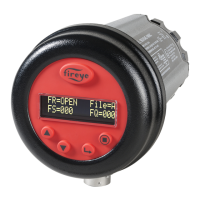
The Fireye InSight Series 4 scanner belongs to an established family of versatile fully microprocessor based,
integrated flame scanners. The InSight Series 4 scanner holds multiple worldwide safety agency approvals (see
Model Listings for full details).
The InSight Series 4 scanners utilize advanced techniques for discrimination and integrate the flame detection,
amplification, safety determination and flame switch functions into a single detection head. No separate amplifier or
flame switch module is therefore required to interface with the main burner management system.
InSight Series 4 incorporates the superior detection and discrimination elements of the popular InSight II product
with some enhanced features.
The scanner measures the amplitude of the modulations (the flame “flicker”) that occur within the targeted flame.
During the scanner set-up procedure, the modulation frequency that yields the best flame ON/OFF discrimination is
selected. The appropriate modulation frequency and sensor gain can be either manually or automatically selected.
InSight Series 4 is a solid state detector scanner utilizing either UV or IR detector, and two different available
connectors which are compatible either with the 59-608, 59-547 and 59-497 (-1WINC models) cable.
Standard features include an independently adjustable Flame Relay, 21 choices of modulation frequency, adjustable
sensor gain, adjustable flame relay ON/OFF thresholds, a 4-20 mA analog signal strength output, Fault Relay, four
selectable programmable files (e.g. for different fuels or firing rates), and Auto Config capability with manual
override. Remote communication capability is available via optional “Fireye Explorer” PC software (CU-109).
These InSight Series 4 sensors have a two-line by sixteen-character alpha-numeric OLED display with a five-
pushbutton keypad.
The -2 models of the InSight Series 4 (e.g., 95UVS4-2, 95IRS4-2) provide a Form C flame relay output contact
(NO/NC).
Question and Answer IconNeed help?

Do you have a question about the Fireye InSight 4 Series and is the answer not in the manual?

Summary

DESCRIPTION

Safety Information

OPERATION

APPLICATION

Suitability of the InSight Series 4 for various combustion applications.

Functional safety proof test requirements

Requirements for periodic proof testing of the safety function as per IEC61508.

InSight 4 SCANNER FEATURES

DIMENSIONS

Physical dimensions and mounting details for InSight Series 4 scanners.

MODEL LISTING

SPECIFICATIONS

MECHANICAL

Mechanical properties such as housing material, weight, and mounting.

ELECTRICAL

Electrical characteristics including input power, connections, and outputs.

INSTALLATION NOTES

INSTALLATION PROCEDURE

Step-by-step guide for installing the InSight Series 4 scanner.

MECHANICAL ACCESSORIES

ELECTRICAL ACCESSORIES

Scanner Wiring

SCANNER WIRING

Precautions and recommendations for scanner cable installation to reduce noise.

Figure 12: InSight Series 4 Quick Disconnect Wiring Connections (59-547 cable)

Figure 13: WIRING DIAGRAM: 95 UVS4-1 WINC, 95 IRS4-1 WINC (with 59-608 cable)

Figure 14: WIRING DIAGRAM: 95 UVS4-1, 95 IRS4-1 (with 59-547 cable)

Figure 15: WIRING DIAGRAM: 95 UVS4-2, 95 IRS4-2 (with 59-547 cable)

Notes

Important notes pertaining to wiring diagrams and scanner operation.

REMOTE FILE SELECTION

WIRING FOR REMOTE COMMUNICATIONS

GROUNDING AND SHIELDING TECHNIQUES

PROGRAMMING THE INSIGHT Series 4 SCANNER

Overview of the keypad and display functions for programming the scanner.

INSIGHT Series 4 MENU STRUCTURE

MAIN STATUS MENU

The default display showing current scanner status and operating parameters.

CONFIG MENU

Menu for accessing sub-menus and setpoints for scanner configuration.

AUTOMATIC CONFIG MENU

Automated process for scanner calibration and setpoint selection.

MANUAL CONFIG MENUS

Menus for manually adjusting scanner setpoints like FFRT and delays.

THE MAIN STATUS MENU

THE MAIN STATUS MENU

THE MAIN STATUS MENU

Flame Relay Open;Closed

Indicates the status of the flame relay contacts based on flame quality.

File Selected

Shows the currently active configuration file (A, B, C, or D).

Flame Signal Strength

Represents the intensity of the flame flicker detected by the sensor.

Flame Quality

Indicates the perceived quality of the flame, capped at 100.

File Select Mode

Learn Status

Displays the status of the learning process for flame detection parameters.

ModBus Comms

Settings for remote communications using Modbus protocol.

Flame Relay Threshold

Factory programmed and adjustable thresholds for the flame relay.

Front End Gain

Select To Enter Error History

Procedure to access the scanner's error history log.

THE ERROR HISTORY MENU

Internal Error Messages

Warning Messages

Messages displayed for abnormal operating conditions, with their effects.

Group II Warning Messages (Can be suppressed, see Note 1)

Select To Enter Configure Menu

Navigation path to enter the scanner's configuration menu.

THE PASSWORD MENU

THE PASSWORD MENU

Password

Requirement for a four-digit password to access configuration menus.

Change Password

Procedure to modify the existing password for enhanced security.

Removing Password Protection

Steps to disable password protection for easier access during commissioning.

THE CONFIG MENU

THE CONFIG MENU (continued)

THE CONFIG MENU

File Select Mode

How to select configuration files (Key Pad, Line Inputs, Flame Relay A-B, Modbus).

Auto File Select Delay

Time delay setting for automatic switching between File A and File B.

PASSWORD

Option to change the user password for accessing configuration menus.

FS Squelch Msgs

Setting to enable or disable display of warning messages for squelched signals.

Active File

Displays the currently active configuration file for editing.

A-GAIN RANGE

Setting the internal gain range for the IR or UV sensor during AIM.

SELECT to Enter AUTOMATIC CONFIG

SELECT to Enter File Copy Menu

Access point for copying scanner configuration files between memory locations.

SELECT to Enter 4;20 Config Menu

Access point for configuring the 4-20 mA analog output parameters.

SELECT to Enter COMMS SETTINGS (Affects all files)

Access point for configuring communication settings like Modbus address and baud rate.

SELECT to Enter Man. Config

Access point for manual configuration of flame relay settings.

THE AUTO CONFIG MENU

THE AUTO CONFIG MENU

AIM SCANNER

Procedure for aiming the scanner and adjusting gain range for optimal signal.

START LEARN FR ON

Initiates the learning process for the flame ON condition.

START LEARN FR OFF

Initiates the learning process for the flame OFF condition.

Application Notes:

THE FILE COPY MENU

THE FILE COPY MENU

THE 4;20 mA MENU

THE 4;20 mA MENU

THE DATE;TIME MENU

THE DATE;TIME MENU

THE COMMS MENU

THE COMMS MENU

THE MANUAL CONFIG MENUS

MANUAL CONFIG MENUS (continued)

THE MANUAL CONFIG MENU

ACTIVE FILE

Manually selecting and editing the active configuration file.

A-GAIN RANGE

Adjusting the internal gain range for the IR or UV sensor.

A-FFRT

Setting the Flame Failure Response Time (FFRT) for the flame relay.

A-ON THRESHLD (ON THRESHOLD)

Configuring the ON threshold for the flame relay based on Flame Quality.

A-OFF THRESHLD (OFF THRESHOLD)

Configuring the OFF threshold for the flame relay based on Flame Quality.

A-USER GAIN

Adjusting the sensor gain to optimize flame signal strength.

MANUAL SET-UP IN MANUAL CONFIG MENU

Flame Relay Thresholds

INSIGHT Series 4 FACTORY DEFAULT SETTINGS, USER FILES A, B, C, D and Factory File F3

Factory Files F1, F2, F3:

INSIGHT Series 4 CONFIGURATION RECORD

A record template for saving scanner configuration settings.
INSIGHT Series 4 REPLACEMENT PROCEDURE

NOTICE

WARRANTIES

Summary

DESCRIPTION

Safety Information

OPERATION

APPLICATION

Suitability of the InSight Series 4 for various combustion applications.

Functional safety proof test requirements

Requirements for periodic proof testing of the safety function as per IEC61508.

InSight 4 SCANNER FEATURES

DIMENSIONS

Physical dimensions and mounting details for InSight Series 4 scanners.

MODEL LISTING

SPECIFICATIONS

MECHANICAL

Mechanical properties such as housing material, weight, and mounting.

ELECTRICAL

Electrical characteristics including input power, connections, and outputs.

INSTALLATION NOTES

INSTALLATION PROCEDURE

Step-by-step guide for installing the InSight Series 4 scanner.

MECHANICAL ACCESSORIES

ELECTRICAL ACCESSORIES

Scanner Wiring

SCANNER WIRING

Precautions and recommendations for scanner cable installation to reduce noise.

Figure 12: InSight Series 4 Quick Disconnect Wiring Connections (59-547 cable)

Figure 13: WIRING DIAGRAM: 95 UVS4-1 WINC, 95 IRS4-1 WINC (with 59-608 cable)

Figure 14: WIRING DIAGRAM: 95 UVS4-1, 95 IRS4-1 (with 59-547 cable)

Figure 15: WIRING DIAGRAM: 95 UVS4-2, 95 IRS4-2 (with 59-547 cable)

Notes

Important notes pertaining to wiring diagrams and scanner operation.

REMOTE FILE SELECTION

WIRING FOR REMOTE COMMUNICATIONS

GROUNDING AND SHIELDING TECHNIQUES

PROGRAMMING THE INSIGHT Series 4 SCANNER

Overview of the keypad and display functions for programming the scanner.

INSIGHT Series 4 MENU STRUCTURE

MAIN STATUS MENU

The default display showing current scanner status and operating parameters.

CONFIG MENU

Menu for accessing sub-menus and setpoints for scanner configuration.

AUTOMATIC CONFIG MENU

Automated process for scanner calibration and setpoint selection.

MANUAL CONFIG MENUS

Menus for manually adjusting scanner setpoints like FFRT and delays.

THE MAIN STATUS MENU

THE MAIN STATUS MENU

THE MAIN STATUS MENU

Flame Relay Open;Closed

Indicates the status of the flame relay contacts based on flame quality.

File Selected

Shows the currently active configuration file (A, B, C, or D).

Flame Signal Strength

Represents the intensity of the flame flicker detected by the sensor.

Flame Quality

Indicates the perceived quality of the flame, capped at 100.

File Select Mode

Learn Status

Displays the status of the learning process for flame detection parameters.

ModBus Comms

Settings for remote communications using Modbus protocol.

Flame Relay Threshold

Factory programmed and adjustable thresholds for the flame relay.

Front End Gain

Select To Enter Error History

Procedure to access the scanner's error history log.

THE ERROR HISTORY MENU

Internal Error Messages

Warning Messages

Messages displayed for abnormal operating conditions, with their effects.

Group II Warning Messages (Can be suppressed, see Note 1)

Select To Enter Configure Menu

Navigation path to enter the scanner's configuration menu.

THE PASSWORD MENU

THE PASSWORD MENU

Password

Requirement for a four-digit password to access configuration menus.

Change Password

Procedure to modify the existing password for enhanced security.

Removing Password Protection

Steps to disable password protection for easier access during commissioning.

THE CONFIG MENU

THE CONFIG MENU (continued)

THE CONFIG MENU

File Select Mode

How to select configuration files (Key Pad, Line Inputs, Flame Relay A-B, Modbus).

Auto File Select Delay

Time delay setting for automatic switching between File A and File B.

PASSWORD

Option to change the user password for accessing configuration menus.

FS Squelch Msgs

Setting to enable or disable display of warning messages for squelched signals.

Active File

Displays the currently active configuration file for editing.

A-GAIN RANGE

Setting the internal gain range for the IR or UV sensor during AIM.

SELECT to Enter AUTOMATIC CONFIG

SELECT to Enter File Copy Menu

Access point for copying scanner configuration files between memory locations.

SELECT to Enter 4;20 Config Menu

Access point for configuring the 4-20 mA analog output parameters.

SELECT to Enter COMMS SETTINGS (Affects all files)

Access point for configuring communication settings like Modbus address and baud rate.

SELECT to Enter Man. Config

Access point for manual configuration of flame relay settings.

THE AUTO CONFIG MENU

THE AUTO CONFIG MENU

AIM SCANNER

Procedure for aiming the scanner and adjusting gain range for optimal signal.

START LEARN FR ON

Initiates the learning process for the flame ON condition.

START LEARN FR OFF

Initiates the learning process for the flame OFF condition.

Application Notes:

THE FILE COPY MENU

THE FILE COPY MENU

THE 4;20 mA MENU

THE 4;20 mA MENU

THE DATE;TIME MENU

THE DATE;TIME MENU

THE COMMS MENU

THE COMMS MENU

THE MANUAL CONFIG MENUS

MANUAL CONFIG MENUS (continued)

THE MANUAL CONFIG MENU

ACTIVE FILE

Manually selecting and editing the active configuration file.

A-GAIN RANGE

Adjusting the internal gain range for the IR or UV sensor.

A-FFRT

Setting the Flame Failure Response Time (FFRT) for the flame relay.

A-ON THRESHLD (ON THRESHOLD)

Configuring the ON threshold for the flame relay based on Flame Quality.

A-OFF THRESHLD (OFF THRESHOLD)

Configuring the OFF threshold for the flame relay based on Flame Quality.

A-USER GAIN

Adjusting the sensor gain to optimize flame signal strength.

MANUAL SET-UP IN MANUAL CONFIG MENU

Flame Relay Thresholds

INSIGHT Series 4 FACTORY DEFAULT SETTINGS, USER FILES A, B, C, D and Factory File F3

Factory Files F1, F2, F3:

INSIGHT Series 4 CONFIGURATION RECORD

A record template for saving scanner configuration settings.

INSIGHT Series 4 REPLACEMENT PROCEDURE

NOTICE

WARRANTIES

Fireye InSight 4 Series Specifications

General IconGeneral
BrandFireye
ModelInSight 4 Series
CategoryScanner
LanguageEnglish

Related product manuals