EasyManua.ls Logo

Fireye InSight 95UVS4-1 - User Manual

Default Icon
59 pages
Print Icon
To Next Page IconTo Next Page
Loading...
© 2020 Carrier 1
CU
-120
June 23, 2020
TYPE 95 Series 4
Integrated Flame
Scanner
SIL3
DESCRIPTION
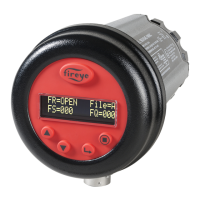
The Fireye InSight Series 4 scanner belongs to an established family of versatile fully microprocessor based,
integrated flame scanners. The InSight Series 4 scanner holds multiple worldwide safety agency approvals (see
Model Listings for full details).
The InSight Series 4 scanners utilize advanced techniques for discrimination and integrate the flame detection,
amplification, safety determination and flame switch functions into a single detection head. No separate amplifier or
flame switch module is therefore required to interface with the main burner management system.
InSight Series 4 incorporates the superior detection and discrimination elements of the popular InSight II product
with some enhanced features.
The scanner measures the amplitude of the modulations (the flame “flicker”) that occur within the targeted flame.
During the scanner set-up procedure, the modulation frequency that yields the best flame ON/OFF discrimination is
selected. The appropriate modulation frequency and sensor gain can be either manually or automatically selected.
InSight Series 4 is a solid state detector scanner utilizing either UV or IR detector, and two different available
connectors which are compatible either with the 59-608, 59-547 and 59-497 (-1WINC models) cable.
Standard features include an independently adjustable Flame Relay, 21 choices of modulation frequency, adjustable
sensor gain, adjustable flame relay ON/OFF thresholds, a 4-20 mA analog signal strength output, Fault Relay, four
selectable programmable files (e.g. for different fuels or firing rates), and Auto Config capability with manual
override. Remote communication capability is available via optional “Fireye Explorer” PC software (CU-109).
These InSight Series 4 sensors have a two-line by sixteen-character alpha-numeric OLED display with a five-
pushbutton keypad.
The -2 models of the InSight Series 4 (e.g., 95UVS4-2, 95IRS4-2) provide a Form C flame relay output contact
(NO/NC).

Question and Answer IconNeed help?

Do you have a question about the Fireye InSight 95UVS4-1 and is the answer not in the manual?

Summary

Safety Information

Operation

Suggested Proof Tests

InSight 4 Scanner Features

Specifications

Installation Notes

Installation Procedure

Scanner Wiring

Wiring for Remote Communications

Grounding and Shielding Techniques

Programming the InSight Series 4 Scanner

INSIGHT SERIES 4 MENU STRUCTURE

Config Menu

Access point for all scanner sub-menus and settings adjustments.

Automatic Config Menu

Automated process for setting sensor gain and bandpass frequency.

Manual Config Menus

Allows manual adjustment of flame relay and sensor setpoints.

The Config Menu

The Error History Menu

Internal Error Messages

Warning Messages

Informs the user of abnormal operating conditions and their effects.

The Password Menu

The Config Menu (continued)

The Auto Config Menu

The File Copy Menu

The 4;20 mA Menu

The Comms Menu

The Manual Config Menus

The Manual Config Menu

Manual Set-up in Manual Config Menu

Flame Relay Thresholds

Factory Default Settings

Insight Series 4 Configuration Record

Insight Series 4 Replacement Procedure

Summary

Safety Information

Operation

Suggested Proof Tests

InSight 4 Scanner Features

Specifications

Installation Notes

Installation Procedure

Scanner Wiring

Wiring for Remote Communications

Grounding and Shielding Techniques

Programming the InSight Series 4 Scanner

INSIGHT SERIES 4 MENU STRUCTURE

Config Menu

Access point for all scanner sub-menus and settings adjustments.

Automatic Config Menu

Automated process for setting sensor gain and bandpass frequency.

Manual Config Menus

Allows manual adjustment of flame relay and sensor setpoints.

The Config Menu

The Error History Menu

Internal Error Messages

Warning Messages

Informs the user of abnormal operating conditions and their effects.

The Password Menu

The Config Menu (continued)

The Auto Config Menu

The File Copy Menu

The 4;20 mA Menu

The Comms Menu

The Manual Config Menus

The Manual Config Menu

Manual Set-up in Manual Config Menu

Flame Relay Thresholds

Factory Default Settings

Insight Series 4 Configuration Record

Insight Series 4 Replacement Procedure

Fireye InSight 95UVS4-1 Specifications

General IconGeneral
BrandFireye
ModelInSight 95UVS4-1
CategoryScanner
LanguageEnglish

Related product manuals