EasyManua.ls Logo

Fireye InSight 95UVS4-1CEX - User Manual

Default Icon
59 pages
Print Icon
To Next Page IconTo Next Page
Loading...
© 2020 Carrier 1
CU
-120
June 23, 2020
TYPE 95 Series 4
Integrated Flame
Scanner
SIL3
DESCRIPTION
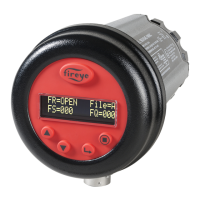
The Fireye InSight Series 4 scanner belongs to an established family of versatile fully microprocessor based,
integrated flame scanners. The InSight Series 4 scanner holds multiple worldwide safety agency approvals (see
Model Listings for full details).
The InSight Series 4 scanners utilize advanced techniques for discrimination and integrate the flame detection,
amplification, safety determination and flame switch functions into a single detection head. No separate amplifier or
flame switch module is therefore required to interface with the main burner management system.
InSight Series 4 incorporates the superior detection and discrimination elements of the popular InSight II product
with some enhanced features.
The scanner measures the amplitude of the modulations (the flame “flicker”) that occur within the targeted flame.
During the scanner set-up procedure, the modulation frequency that yields the best flame ON/OFF discrimination is
selected. The appropriate modulation frequency and sensor gain can be either manually or automatically selected.
InSight Series 4 is a solid state detector scanner utilizing either UV or IR detector, and two different available
connectors which are compatible either with the 59-608, 59-547 and 59-497 (-1WINC models) cable.
Standard features include an independently adjustable Flame Relay, 21 choices of modulation frequency, adjustable
sensor gain, adjustable flame relay ON/OFF thresholds, a 4-20 mA analog signal strength output, Fault Relay, four
selectable programmable files (e.g. for different fuels or firing rates), and Auto Config capability with manual
override. Remote communication capability is available via optional “Fireye Explorer” PC software (CU-109).
These InSight Series 4 sensors have a two-line by sixteen-character alpha-numeric OLED display with a five-
pushbutton keypad.
The -2 models of the InSight Series 4 (e.g., 95UVS4-2, 95IRS4-2) provide a Form C flame relay output contact
(NO/NC).
Question and Answer IconNeed help?

Do you have a question about the Fireye InSight 95UVS4-1CEX and is the answer not in the manual?

Summary

DESCRIPTION

SAFETY INFORMATION

General Warning and Responsibility

Equipment can cause severe injury/death; owner responsible for compliance and safe operation.

Installation, Operation, and Maintenance

Requires trained personnel, manual reading, verification; no user serviceable parts.

Electrical Safety and Fault Handling

Isolate power, do not override interlocks, correct faults before operation.

Functional Safety Classification

Classified as Type B device per IEC 61508; check UL Online Certification Directory.

APPLICATION AND SAFETY REQUIREMENTS

Best for applications needing sophistication, flexibility, and remote communications.

Functional Safety Proof Testing

Requirement for periodic proof testing of safety functions as a SIL3 capable product.

SUGGESTED PROOF TESTS

Basic Proof Test Procedures

Active Flame OFF, Active False Flame tests, and alternative steps for critical processes.

Verification Caution

Verify flame detection/discrimination by burner cycling; ensure relay de-energizes on flame out.

HAZARDOUS AREA HOUSING

Electrostatic Discharge Hazard

Warning regarding risk of electrostatic discharge when handling in explosive atmospheres.

MODEL LISTING AND APPROVALS

Part Number and Feature Matrix

Lists part numbers, sensor types, connector types, and agency approvals.

Hazardous Location Certifications

Details ATEX, DEMKO, IECEx certifications for hazardous locations.

INSTALLATION GUIDELINES

Scanner Sighting and Location

Mount to view primary combustion zone; aim for optimal signal strength.

Burner Anatomy Considerations

Avoid ignitor flame detection; ensure unrestricted view by trimming obstructions.

WARNING: Eye Protection Required

Wear protective filtered lenses when viewing flame due to potential eye damage.

SCANNER MOUNTING AND SIGHTING

ELECTRICAL ACCESSORIES

Hazardous Area Wiring Precautions

Precautions for hazardous locations: set screw tightening, retainer installation.

SCANNER CABLE AND WIRING

Wiring Noise and Power Precautions

Keep cable away from noise sources; use correct 24 Vdc power supply.

REMOTE FILE SELECTION

Programmable Memory Files

Scanner has four files (A, B, C, D) for different operating conditions.

File Selection Methods

Key Pad, Line Inputs, Flame Relay A-B, or Modbus (Comms) for file selection.

REMOTE COMMUNICATIONS WIRING

RS485 Interface and Software

Uses RS485 for remote communication with PC and Fireye software.

GROUNDING AND SHIELDING

Safety Precautions Near High Energy Sources

Keep cable 12" away, use safety ground, isolate scanner and cooling air.

SCANNER PROGRAMMING AND OPERATION

Keypad and Display Interface

Uses 2-line OLED display and five buttons for navigation and settings.

INSIGHT SERIES 4 MENU STRUCTURE

Primary Menu Navigation

Access five primary menus via keypad: Main Status, Config, Auto Config, Manual Config.

MAIN STATUS MENU

Default display showing operating status; view error history.

CONFIG MENU

Access sub-menus and setpoints; requires password (default 0205).

AUTOMATIC CONFIG MENU

Guides calibration: AIM, Learn ON/OFF, gain/bandpass selection.

MANUAL CONFIG MENUS

Allows manual adjustment of FFRT, thresholds, time delays, and other setpoints.

SCANNER MENU NAVIGATION

MAIN STATUS MENU DETAILS

CONFIGURATION PARAMETERS

ADVANCED SCANNER FUNCTIONS

Front End Gain (FEG) Control

Manages gain (5-255) for signal measurement; affects Flame Quality.

Error History Access and Interpretation

Access error history to view codes, dates, times; reset scanner via PROGRAM key.

ERROR HISTORY MENU

ERROR AND WARNING MESSAGES

Group I Warning Messages (Always Active)

Warnings for low/high temperature, IR sensor saturation, and FLAME SIGNAL SET TO 0.

GROUP II WARNING MESSAGES

FEG Range and Light Check Warnings

Warnings for FEG out-of-limits or failed light checks.

Excessive Signal Warnings

Warnings for too much IR/UV signal; adjust Gain Range or use orifice.

ACCESSING THE CONFIGURATION MENU

Password Entry Screen

Press SELECT key to access password entry before configuration.

PASSWORD MENU OPERATION

Entering and Changing Passwords

Procedure for entering or changing the four-digit password.

PASSWORD MANAGEMENT

Password Requirement and Default

Four-digit password required for CONFIG menus; default is 0205.

Password Change Procedure

Steps to change the password, including removing protection by setting to "0000".

CONFIGURATION MENU OPTIONS

File Select Mode Configuration

Set file selection method: Key Pad, Line Inputs, Modbus Comms, Flame Relay.

Password and Temperature Settings

Options to change password and reset maximum temperature.

CONFIGURATION MENU SUB-MENUS

Manual Flame Relay Config Access

Link to access manual configuration for Flame Relay settings.

CONFIGURATION MENU PARAMETERS

Password and Temp Settings

Change password and reset maximum temperature recorded.

CONFIGURATION MENU SELECTIONS

Automatic Configuration Menu

Guides through AIM, Gain Range, Learn ON/OFF for calibration.

Manual Configuration Menu

Manually configure Flame Relay settings.

AUTO CONFIG MENU OPERATIONS

Starting Learn Flame ON;OFF

Initiates learning Flame ON and Flame OFF conditions for calibration.

AUTO CONFIGURATION PROCEDURE

Auto Configuration Process Steps

Three steps: set gain/AIM, Learn ON, Learn OFF for optimal discrimination.

Aim Scanner for Optimal Signal

Aim scanner at primary combustion zone (1/3) for peak signal; adjust Gain Range.

Learn Flame ON;OFF Procedures

Procedures to learn Flame ON and Flame OFF conditions for scanner calibration.

AUTO CONFIGURATION APPLICATION NOTES

Optimal Discrimination Achievement

Optimal gain/bandpass selected after both Learn ON and Learn OFF procedures are performed.

MANUAL CONFIG MENU OPTIONS

Flame Failure Response Time (FFRT)

Set FFRT (1-6s); default 1s. >4s violates FM Approval.

Flame Relay Threshold Settings

Set ON Threshold (5-100) and OFF Threshold (0-95); defaults 40/20.

MANUAL CONFIGURATION PARAMETERS

MANUAL CONFIGURATION MENU DETAILS

Parameter Settings Overview

Set Active File, Gain Range, FFRT, Thresholds, Time Delay, BAND, User Gain, FEG settings.

FFRT, ON;OFF Thresholds, and Delay

Configure FFRT, ON/OFF thresholds, and On Time Delay for flame relay control.

MANUAL SET-UP PROCEDURE

Recording Target Flame Signals

Record signal strength at all 21 bands with target flame ON (low fire) and OFF.

Optimal Band and Gain Selection

Select band yielding best ON/OFF ratio and stability; adjust user gain for thresholds.

FLAME RELAY THRESHOLD SETTINGS

Factory Default Thresholds and Recommendations

Factory defaults ON=40, OFF=20; recommended ON signal >=150.

CAUTION: Verification of Settings

Verify flame detection/discrimination by burner cycling; ensure relay de-energizes on flame out.

FACTORY DEFAULT SETTINGS

INSIGHT SERIES 4 REPLACEMENT PROCEDURE

Procedure Overview and Prerequisites

Steps for replacing a damaged scanner using the Configuration Record.

Install New Scanner and Enter CONFIG Menu

Install scanner, apply power, enter password, and access CONFIG menu.

Manually Enter Configuration Data

Input values from Configuration Record into the new scanner.

Perform START LEARN ON Procedure

Initiate "START LEARN ON" via AUTO CONFIG menu.

Verify Scanner Operation

Turn burner ON/OFF to verify flame detection and discrimination.

Summary

DESCRIPTION

SAFETY INFORMATION

General Warning and Responsibility

Equipment can cause severe injury/death; owner responsible for compliance and safe operation.

Installation, Operation, and Maintenance

Requires trained personnel, manual reading, verification; no user serviceable parts.

Electrical Safety and Fault Handling

Isolate power, do not override interlocks, correct faults before operation.

Functional Safety Classification

Classified as Type B device per IEC 61508; check UL Online Certification Directory.

APPLICATION AND SAFETY REQUIREMENTS

Best for applications needing sophistication, flexibility, and remote communications.

Functional Safety Proof Testing

Requirement for periodic proof testing of safety functions as a SIL3 capable product.

SUGGESTED PROOF TESTS

Basic Proof Test Procedures

Active Flame OFF, Active False Flame tests, and alternative steps for critical processes.

Verification Caution

Verify flame detection/discrimination by burner cycling; ensure relay de-energizes on flame out.

HAZARDOUS AREA HOUSING

Electrostatic Discharge Hazard

Warning regarding risk of electrostatic discharge when handling in explosive atmospheres.

MODEL LISTING AND APPROVALS

Part Number and Feature Matrix

Lists part numbers, sensor types, connector types, and agency approvals.

Hazardous Location Certifications

Details ATEX, DEMKO, IECEx certifications for hazardous locations.

INSTALLATION GUIDELINES

Scanner Sighting and Location

Mount to view primary combustion zone; aim for optimal signal strength.

Burner Anatomy Considerations

Avoid ignitor flame detection; ensure unrestricted view by trimming obstructions.

WARNING: Eye Protection Required

Wear protective filtered lenses when viewing flame due to potential eye damage.

SCANNER MOUNTING AND SIGHTING

ELECTRICAL ACCESSORIES

Hazardous Area Wiring Precautions

Precautions for hazardous locations: set screw tightening, retainer installation.

SCANNER CABLE AND WIRING

Wiring Noise and Power Precautions

Keep cable away from noise sources; use correct 24 Vdc power supply.

REMOTE FILE SELECTION

Programmable Memory Files

Scanner has four files (A, B, C, D) for different operating conditions.

File Selection Methods

Key Pad, Line Inputs, Flame Relay A-B, or Modbus (Comms) for file selection.

REMOTE COMMUNICATIONS WIRING

RS485 Interface and Software

Uses RS485 for remote communication with PC and Fireye software.

GROUNDING AND SHIELDING

Safety Precautions Near High Energy Sources

Keep cable 12" away, use safety ground, isolate scanner and cooling air.

SCANNER PROGRAMMING AND OPERATION

Keypad and Display Interface

Uses 2-line OLED display and five buttons for navigation and settings.

INSIGHT SERIES 4 MENU STRUCTURE

Primary Menu Navigation

Access five primary menus via keypad: Main Status, Config, Auto Config, Manual Config.

MAIN STATUS MENU

Default display showing operating status; view error history.

CONFIG MENU

Access sub-menus and setpoints; requires password (default 0205).

AUTOMATIC CONFIG MENU

Guides calibration: AIM, Learn ON/OFF, gain/bandpass selection.

MANUAL CONFIG MENUS

Allows manual adjustment of FFRT, thresholds, time delays, and other setpoints.

SCANNER MENU NAVIGATION

MAIN STATUS MENU DETAILS

CONFIGURATION PARAMETERS

ADVANCED SCANNER FUNCTIONS

Front End Gain (FEG) Control

Manages gain (5-255) for signal measurement; affects Flame Quality.

Error History Access and Interpretation

Access error history to view codes, dates, times; reset scanner via PROGRAM key.

ERROR HISTORY MENU

ERROR AND WARNING MESSAGES

Group I Warning Messages (Always Active)

Warnings for low/high temperature, IR sensor saturation, and FLAME SIGNAL SET TO 0.

GROUP II WARNING MESSAGES

FEG Range and Light Check Warnings

Warnings for FEG out-of-limits or failed light checks.

Excessive Signal Warnings

Warnings for too much IR/UV signal; adjust Gain Range or use orifice.

ACCESSING THE CONFIGURATION MENU

Password Entry Screen

Press SELECT key to access password entry before configuration.

PASSWORD MENU OPERATION

Entering and Changing Passwords

Procedure for entering or changing the four-digit password.

PASSWORD MANAGEMENT

Password Requirement and Default

Four-digit password required for CONFIG menus; default is 0205.

Password Change Procedure

Steps to change the password, including removing protection by setting to "0000".

CONFIGURATION MENU OPTIONS

File Select Mode Configuration

Set file selection method: Key Pad, Line Inputs, Modbus Comms, Flame Relay.

Password and Temperature Settings

Options to change password and reset maximum temperature.

CONFIGURATION MENU SUB-MENUS

Manual Flame Relay Config Access

Link to access manual configuration for Flame Relay settings.

CONFIGURATION MENU PARAMETERS

Password and Temp Settings

Change password and reset maximum temperature recorded.

CONFIGURATION MENU SELECTIONS

Automatic Configuration Menu

Guides through AIM, Gain Range, Learn ON/OFF for calibration.

Manual Configuration Menu

Manually configure Flame Relay settings.

AUTO CONFIG MENU OPERATIONS

Starting Learn Flame ON;OFF

Initiates learning Flame ON and Flame OFF conditions for calibration.

AUTO CONFIGURATION PROCEDURE

Auto Configuration Process Steps

Three steps: set gain/AIM, Learn ON, Learn OFF for optimal discrimination.

Aim Scanner for Optimal Signal

Aim scanner at primary combustion zone (1/3) for peak signal; adjust Gain Range.

Learn Flame ON;OFF Procedures

Procedures to learn Flame ON and Flame OFF conditions for scanner calibration.

AUTO CONFIGURATION APPLICATION NOTES

Optimal Discrimination Achievement

Optimal gain/bandpass selected after both Learn ON and Learn OFF procedures are performed.

MANUAL CONFIG MENU OPTIONS

Flame Failure Response Time (FFRT)

Set FFRT (1-6s); default 1s. >4s violates FM Approval.

Flame Relay Threshold Settings

Set ON Threshold (5-100) and OFF Threshold (0-95); defaults 40/20.

MANUAL CONFIGURATION PARAMETERS

MANUAL CONFIGURATION MENU DETAILS

Parameter Settings Overview

Set Active File, Gain Range, FFRT, Thresholds, Time Delay, BAND, User Gain, FEG settings.

FFRT, ON;OFF Thresholds, and Delay

Configure FFRT, ON/OFF thresholds, and On Time Delay for flame relay control.

MANUAL SET-UP PROCEDURE

Recording Target Flame Signals

Record signal strength at all 21 bands with target flame ON (low fire) and OFF.

Optimal Band and Gain Selection

Select band yielding best ON/OFF ratio and stability; adjust user gain for thresholds.

FLAME RELAY THRESHOLD SETTINGS

Factory Default Thresholds and Recommendations

Factory defaults ON=40, OFF=20; recommended ON signal >=150.

CAUTION: Verification of Settings

Verify flame detection/discrimination by burner cycling; ensure relay de-energizes on flame out.

FACTORY DEFAULT SETTINGS

INSIGHT SERIES 4 REPLACEMENT PROCEDURE

Procedure Overview and Prerequisites

Steps for replacing a damaged scanner using the Configuration Record.

Install New Scanner and Enter CONFIG Menu

Install scanner, apply power, enter password, and access CONFIG menu.

Manually Enter Configuration Data

Input values from Configuration Record into the new scanner.

Perform START LEARN ON Procedure

Initiate "START LEARN ON" via AUTO CONFIG menu.

Verify Scanner Operation

Turn burner ON/OFF to verify flame detection and discrimination.

Fireye InSight 95UVS4-1CEX Specifications

General IconGeneral
ModelInSight 95UVS4-1CEX
TypeUV Scanner
MountingThreaded connection
ApprovalsATEX, IECEx
Operating Temperature-40°C to +70°C (-40°F to +158°F)
Spectral Response190-290 nm

Related product manuals