2 3
BODY FAT/HYDRATION MONITOR SCALE
INSTRUCTIONS FOR USE
Dear Customer,
Welcome to use First Austria Body Fat/Hydration Monitor Scale. This product is specially designed
to test body fat/hydration/muscle/bone, help keep a close eye on the daily change of your body fat,
hydration, muscle, bone and weight, providing information for your reference. Base on the analysis of
your height, weight and age etc., it tells your daily energy requirement, and helps control your weight.
Please read this instruction carefully before use.
USER-FRIENDLY TIPS
1. During Measuring
start taking effective record from the second time weighing.
B. Always remove your shoes and socks, wipe clean your feet before using.
C. Step on the weighing platform gently.
D. It is advisable to take measurement at the same time of the day.
E. Measured result could be misleading after intensive exercise, excessive dieting or under extreme
dehydration condition.
still.
G. The measured data of the following people may have deviation:
H. People with the following conditions should not use the device:
2. Safety Warning
your doctor for more advice.
C. It could be slippery if you weigh on a wet surface. Moreover, if the weighing platform surface is
glazed, never step on the edge of the scale and do keep balance during your weighing.
FEATURES/SPECIFICATIONS
1. Using high precision strain gauge sensor
2. Multifunction: test body fat%, body hydration%, body muscle%, body bone% and suggest calorie
intake requirement.
3. Built-in memory for 12 different users
consecutive add-on weightings
5. Low battery and overload indication
PERFORMANCE INDEX
lndex
Weighing
Capacity
Fat% Hydration% Muscle% Bone% Calorie
Index
Range
4.0%
~60.0%
27.5%
~66.0%
20.0%
~56.0%
2.0%
~20.0%
Division 0.1kg
0.2lb
0.1% 0.1% 0.1% 0.1% 1kCAL
TO INSTALL OR REPLACE BATTERY
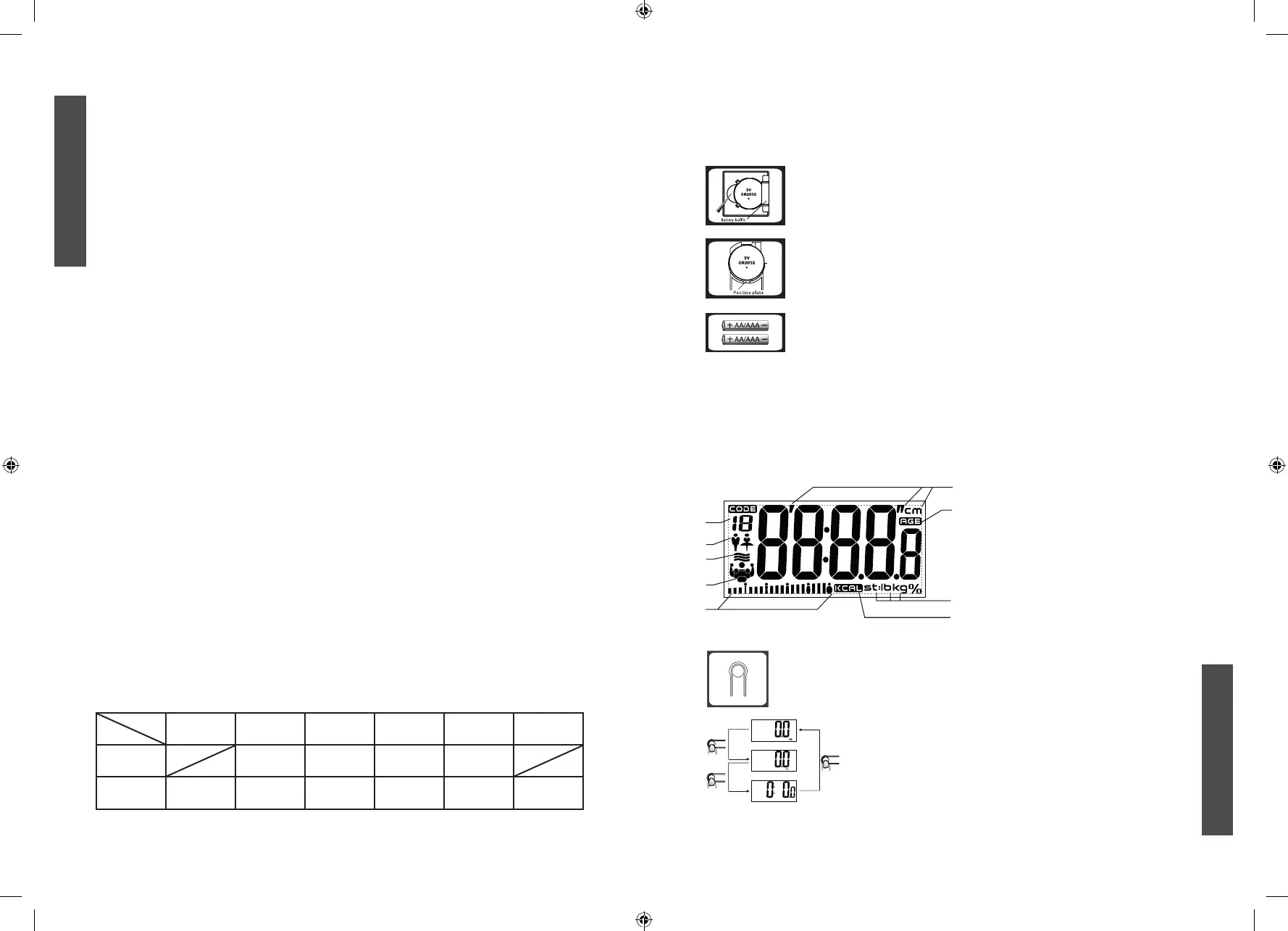
The battery type of scale depends on the product structure. Find the battery type of your scale
according to the following pictures, then install and replace battery as described.
Open the battery case cover at the bottom of scale:
A. Take out the used battery with the aid of a sharp object, as shown in picture.
and then pressing down the other side.
Open the battery case cover at the bottom of scale:
A. Press battery gently the battery will pop up automatically.
and then pressing down the other side. Please observe the polarity.
Open the battery case cover at the bottom of scale:
A. Take out used batteries, with the aid of a sharp object if needed.
KEY ILLUSTRATION
p
q
: Advance the value by one interval each press. Continuous pressing will speedup the advance
of value.
: Decrease the value by one interval each press. Continuous pressing will speed up the
decrease of value.
LCD DISPLAY
1.
2.
3.
5.
4.
7.
9.
8.
1. User memory code
2. Gender
3. Hydration%
4. Fat%/Muscle%/Bone%
5. Fat status indication
6. Height Unit
7. Age
9. Calorie Unit
TO SET WEIGHT UNIT
by pressing the unit conversion button. Press the unit conversion button when scale
is power off, LCD shows current weight unit. Press the button again to convert
weight unit.
After selecting the preferred unit, the scale will be auto-off after 3
seconds. Selected weight unit will be activated when the scale is
turned on again.
Remark: The unit system of scale depends on sales destination or the
requirement of distributor.
ENGLISH
ENGLISH
ltem


 To Next Page
 Loading...