If necessary, to restore factory settings, press and hold the SET button while the
display is off. Continue holding the SET button down and turn the display on. The
display will scroll through all elds and stop on a reset screen. After the decimal
points on the reset screen ash 10 times, all numbers will become zeros, indicating
factory settings have been restored. Release the SET button and press the power
symbol button one time to resume function.
THE FISH HAWK PROBE
Unscrew the battery cap and carefully remove the battery holder from the probe
housing [note how the battery holder is tted inside housing.] Install four high
quality AA batteries, paying attention to the polarity of each battery. Insert the
battery holder and thread the cap on nger-tight only. LO BAT will appear on the
display when the probes batteries need to be replaced.
The probe is water activated. Dry or remove the protective silicone bumper on
the front of the probe after each use to maximize
battery life.
PROBE MAINTENANCE
Follow these recommendations to insure proper
Fish Hawk Probe function for many years:
• Loosen the cap at the end of each shing day to
dry natural condensation from inside the battery
compartment to prevent corrosion.
• Press axle clips tight against paddle wheel arbor
daily.
• Do not disconnect the battery holder from the
probe.
• Apply a light coat of lubricant to the O-rings
annually. Do not over-lubricate.
• Remove the batteries from the battery holder and
store probe with the cap off during periods of
extended storage.
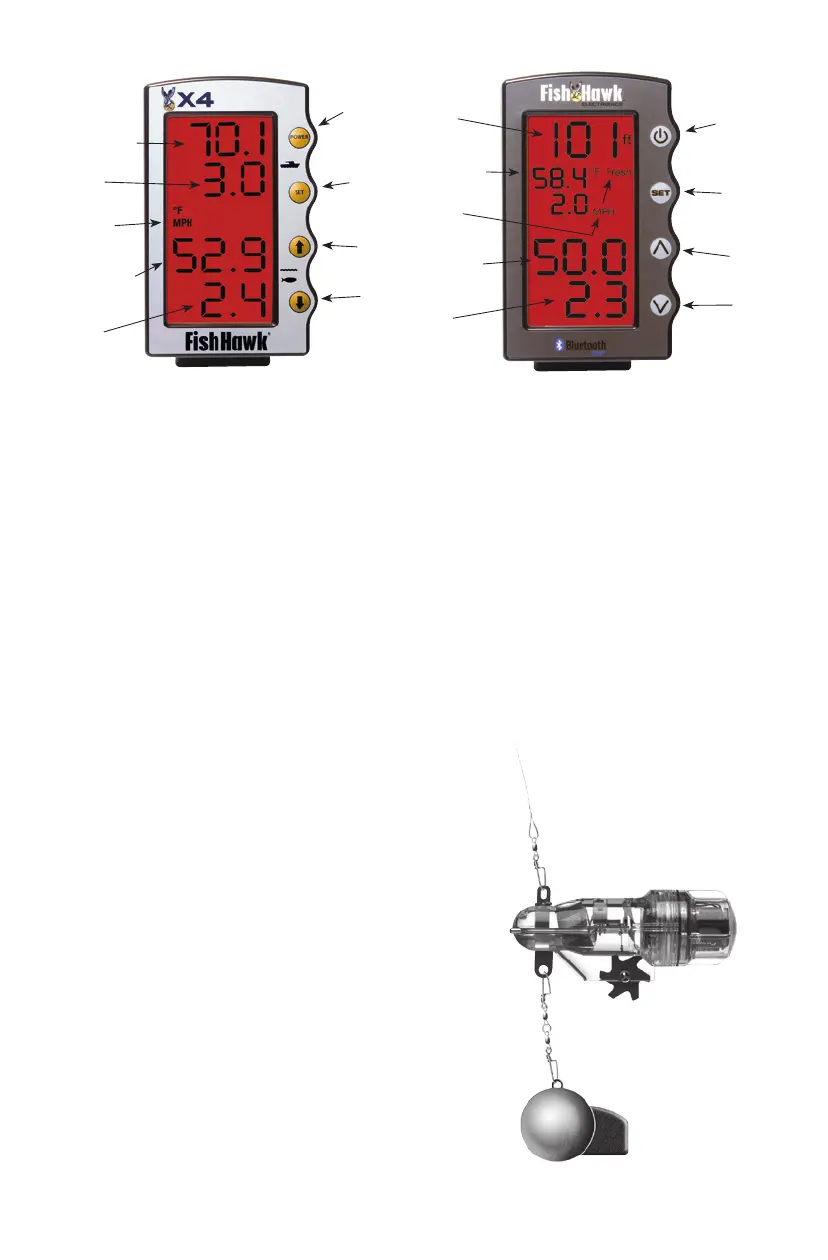
Probe
Speed
Probe
Temperature
Units of
Measure
Surface*
Speed
Surface
Temperature
POWER
Button
SET
Button
UP
Arrow
DOWN
Arrow
POWER
Button
SET
Button
UP
Arrow
DOWN
Arrow
Probe
Speed
Probe
Temperature
Units of
Measure
Probe*
Depth
Surface
Temperature
Surface
Bottom


 To Next Page