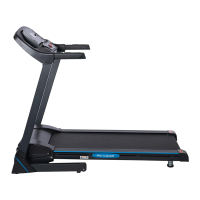
This document is a user manual for the F4H JK-06 Treadmill, identified by the model number F4H-TM-JK06. It provides comprehensive instructions for assembly, operation, maintenance, and safety.
Function Description
The F4H JK-06 Treadmill is a fitness equipment designed for domestic household use, allowing users to engage in walking or running exercises indoors. It features a motorized running belt, a control console for adjusting speed and monitoring workout data, and a folding mechanism for convenient storage. The treadmill is intended to provide a cardiovascular workout, helping users maintain a healthy lifestyle.
Important Technical Specifications
- Maximum Weight Capacity: 110 kgs.
- Power Requirements: Nominal 220-240 volt 50 Hz grounded outlet.
- Speed Range: Starts at a lowest speed of 0.8 km/h. Quick start buttons allow for speeds of 2, 4, 6, 8, or 10 km/h.
- Pre-set Programs: 12 pre-set programs are available, each with a default time of 30 minutes, divided into 20 segments of 1.5 minutes.
- Safety Features: Includes an emergency stop button (Safety Tether Key) that must be attached for the machine to operate and will instantly stop the treadmill if pulled off.
- Dimensions (Running Belt): Not explicitly stated, but adjustments for belt alignment and tension are provided.
- Motor: The motor cover can become hot during use.
Usage Features
Turning On/Off:
- To turn on, switch on the power at the wall and the red ON/OFF power switch at the back of the machine. The console will light up, indicating stand-by mode.
- To turn off, press the red ON/OFF switch at the back, turn off power at the outlet, and unplug the machine.
Starting the Machine:
- Ensure the Safety Tether Key is placed on the yellow circle on the console and the clip is attached to clothing.
- Press the START button. A 3-second countdown will begin, and the machine will start at 0.8 km/h for 60 seconds.
Changing Speed:
- Control Panel: Use the up and down buttons on the console.
- Handrail Controls: Use the buttons on the left handrail.
- Quick Start Buttons: Press buttons for speeds of 2, 4, 6, 8, or 10 km/h.
Manual Mode:
- Changing Time:
- Press the MODE button once (30 minutes displayed).
- Select desired time using speed buttons.
- Press START (machine beeps, starts at 0.8 km/h).
- Adjust speed as needed.
- LED displays remaining time.
- Changing Distance:
- Press the MODE button twice (1KM displayed).
- Select desired distance using speed buttons.
- Press START (machine beeps, starts at 0.8 km/h).
- Adjust speed as needed.
- LED displays remaining distance.
Pre-set Programs:
- Selection: Press the PROG button until the desired program (P1-P12) is shown on the LED panel.
- Time Adjustment: Select workout time between 5 and 60 minutes using the speed buttons.
- Start: Press the START button; the machine will beep and the program will begin automatically.
Folding and Unfolding:
- To Fold: Unscrew the safety lock on the bottom frame, fold the treadmill, pull out the expandable safety lock from the left upright, and release to lock it in an upright position. Screw the safety lock to the bottom and upper frames to prevent loss.
- To Unfold: Unscrew the safety lock on the bottom frame, release the expandable safety lock, and lower the bottom frame to the ground. Screw the safety lock to the bottom frame to lock the upper frame in an upright position.
Safety Precautions:
- Always hold handrails during use.
- Ensure spring knob and round knob are in place when folding/moving.
- Keep children and pets away; children under 12 should not be unsupervised near the treadmill.
- Do not operate if damaged, dropped, or exposed to water.
- Wear appropriate, enclosed athletic footwear; avoid loose clothing.
- Ensure a minimum safety area clearance of two meters around the treadmill.
- Never operate in the folded position.
- Allow the running belt to fully stop and unplug the power cord before folding.
- Always face the console; do not run backwards.
- Consult a physician before starting any exercise program, especially if over 35 or with pre-existing health problems.
Maintenance Features
Cleaning:
- After each use, wipe down the unit to remove sweat.
- Clean with a soft cloth and mild detergent.
- Avoid abrasives, solvents, and excessive moisture on the display panel.
- Keep the computer console out of direct sunlight.
Storage:
- Store in a clean, dry indoor environment.
- Ensure the master power switch is off and the power cord is unplugged.
Lubrication:
- Frequency: Apply lubricant after the first 25 hours of use (2-3 months), then every 50 hours of use (5-8 months).
- Checking Lubrication: Lift one side of the running belt and feel the top surface of the running deck. If it's slick, no lubrication is needed. If dry, apply lubricant.
- Application: Lift one side of the running belt, pour lubricant under the center of the running belt on the top surface of the running deck. Run the treadmill at a slow speed (3-5 minutes) to evenly distribute. Wipe off any excess lubricant. Do not over-lubricate.
Belt Adjustment:
- Centering the Belt:
- Turn on the treadmill and run the belt at 8-10 KPH.
- If the belt shifts left, turn the left adjustment bolt 1/4 turn clockwise using the 6 mm Allen Wrench.
- If the belt shifts right, turn the right adjustment bolt 1/4 turn clockwise.
- Continue adjusting until the belt is centered.
- Tightening a Slipping Belt:
- Turn off and unplug the treadmill.
- Turn both left and right rear roller adjustment bolts 1/4 turn clockwise using the 6 mm Allen Wrench.
- Turn on the main power switch and run the treadmill at 8-10 KPH.
- Test for slipping; repeat procedure until the belt no longer slips.
Troubleshooting Guide:
- Treadmill will not start: Check if plugged in, Safety Tether Key installed, house circuit breaker tripped, or treadmill circuit breaker tripped.
- Belt slips: Adjust belt tension.
- Belt hesitates when stepped on: Apply lubricant or adjust belt tension (if too tight).
- Belt is not centered: Centre the belt by adjusting tension across the rear roller.
Warm-Up and Cool-Down Routine:
- The manual includes recommended exercises for warm-up (2-5 minutes before aerobic exercise) and cool-down (at the end of the workout to reduce soreness and return the body to a resting state). Exercises include Head Rolls, Shoulder Lifts, Side Stretches, Quadricep Stretch, Inner Thigh Stretch, Toe Touches, Hamstring Stretches, and Calf/Achilles Stretch.
Tool Kit:
The treadmill comes with a tool kit including:
- Knob (to fold and unfold) x 1
- Handlebar Cover x 2
- Socket Head Screw x 1
- Safety Key (emergency stop) x 1
- Allen Key x 2
- Wrench x 1
The manual emphasizes reading all instructions carefully before assembly or use and retaining the owner's manual for future reference. For customer support, users can call the helpline at 0330 124 0718 (Mon-Fri 9:00am-6:00pm) or email customerservices@fit4home.co.uk. Fit4Home Ltd, the importer, is located at Unit A, Perseverance Mills, Olive Lane, Darwen BB3 3DQ, United Kingdom, and offers a 12-month warranty. The product complies with several European Directives, including EC Low Voltage, EC Electromagnetic Compatibility, Directive RoHS, Machine Directive, and EMC Directive.

 Need help?

 To Next Page
 General