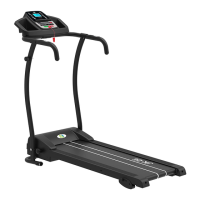
This document serves as the user manual for the TF-D2450 Treadmill, model F4H-TM-D2450, manufactured by Fit4home Ltd. It provides comprehensive instructions for assembly, operation, and maintenance, emphasizing safety precautions throughout. Users are advised to read the entire manual before assembling or using the equipment to ensure safe and correct usage.
The treadmill is designed for home use and offers a range of features to support various fitness levels and workout preferences. Before commencing any exercise program, especially for individuals over 35 or with existing health conditions, consulting a physician or health professional is strongly recommended. The manufacturer disclaims responsibility for any issues or injuries resulting from non-compliance with the provided specifications. Proper assembly, including securing the motor shield, is crucial before connecting the treadmill to power.
Safety is a paramount concern, and several guidelines are outlined to prevent accidents. Users must always attach the safety clamp to their clothing or belt before operating the treadmill. Inserting any objects into the equipment is prohibited to avoid damage. The treadmill should be placed on a clear, level surface, away from thick carpets that might obstruct ventilation, and never near water or outdoors. It is essential to avoid standing on the walking belt when starting the treadmill; users should always stand on the foot rails until the belt begins to move after power-on and speed adjustment. Appropriate exercise attire, specifically running or aerobic shoes with rubber soles, should be worn, while loose-fitting clothing that could get caught in the treadmill should be avoided. Children and pets must be kept away from the treadmill during operation. Exercising within 40 minutes after dinner is not recommended. The equipment is suitable for adults, and juveniles require adult supervision during workouts. Users should hold onto the handrails until they become comfortable and familiar with the treadmill's operation. The treadmill is intended for indoor use only, and its storage area should be clean, flat, and dry. Using the treadmill for purposes other than exercise is prohibited. For power-line issues, users should contact the distributor or the manufacturer directly, as the power-line is specifically designed for this treadmill. In the event of an electronic failure causing a sudden speed increase, the treadmill will stop abruptly if the pull pin is disengaged from the console. Users are warned against modifying the power cable, extending it, or placing heavy objects near it, and using multi-socket outlets is discouraged due to fire and injury risks. The treadmill should be unplugged when not in use, and the power line should not be pulled to disconnect it. The plug must be inserted into a grounded safety socket, and any damage to the power line necessitates professional assistance.
The assembly process is detailed in a step-by-step manner. The first step involves unpacking the main frame and spare parts and placing the main frame on a level surface. Step two focuses on installing the computer frame. Users are instructed to remove specific bolts and lock washers from the uprights, then secure the computer frame to the left and right uprights using these components. A crucial notice advises supporting the upright with a hand to prevent it from falling and causing injury. Step three involves pulling up the computer and the left and right uprights into their operational positions, with a caution to ensure wires are not pressed and to maintain hand contact to prevent falling. Step four describes locking the upright tubes to the main frame using Allen wrenches, bolts, and lock washers, with the same method applied to both sides. Step five covers attaching the right and left base covers to the uprights and base using a wrench with a screwdriver and specific bolts. The final assembly step, step six, instructs the user to place the safety key on the computer console. After completing all assembly steps, users are urged to confirm that all bolts are securely tightened and to thoroughly read the instructions before using the treadmill.
The manual also provides instructions for folding and unfolding the treadmill. To pull the treadmill up for storage, the user lifts the base frame until an audible click confirms that the air pressure bar is locked into the round tube. For pulling down, the user supports the frame with one hand while kicking the air pressure bar, allowing the base frame to descend automatically. A warning is included to keep people and pets clear of the machine during this process.
The computer operation guide details the LCD window display and button functions. The LCD displays speed, time, distance, pulse, and calories, as well as incline data. The speed range is 1.0-16.0 KM/h. The "PROG" button allows selection of programs P1-P15 and FAT mode. The "MODE" button, when the machine is in standby, enables selection of countdown modes for time, distance, or calories. The "START" button initiates the treadmill at the lowest speed or a default program speed after a 3-second countdown. The "STOP" button smoothly halts the machine. "SPEED+" and "SPEED-" buttons adjust speed and data, while "INCLINE+" and "INCLINE-" buttons adjust incline and data. Quick speed and incline adjustments are available via dedicated buttons (3, 6, 9, 12). Heartbeat data is displayed after holding the hand pulse sensors for about 6 seconds.
The main function section explains quick start (manual) by attaching the safety lock and pressing "START" after a 3-2-1 countdown. Countdown modes for time, distance, and calories can be set using the "MODE" button and adjusted with "SPEED+"/"SPEED-". The treadmill runs at the lowest speed, stopping smoothly when the countdown reaches zero or when "STOP" is pressed or the safety key is removed. Program selection (P1-P15) is done via the "PROG" button, allowing users to set running time, with each program divided into 20 sections. The treadmill starts at the first section's speed, automatically adjusting to subsequent sections' speeds. Speed can be manually changed during a program, but it will revert to the program's set speed in the next section.
User-defined programs (U1, U2, U3) allow for personalized settings of speed and incline across 20 segments. These settings are retained even after power loss. The heart beat test requires holding hand pulse sensors for 5 seconds for a reading, with a recommendation of 30 seconds for accuracy when the machine is stopped. This data is for reference only and not for medical use. The body fat test, accessed via the "PROG" button to "FAT" mode, allows users to input sex, age, height, and weight using "SPEED+/-" and "MODE" buttons. After input, holding the hand pulse sensors for 5 seconds displays BMI data.
The data display and set range table provides initial, default, setting, and showing values for time, incline, speed, distance, pulse, and calories. The safety lock function is critical: removing the safety key displays "---", triggers a buzzer, and stops the treadmill, rendering all buttons invalid. A power save mode activates after 10 minutes of inactivity, putting the system into sleep state, which can be woken by pressing any key. An optional MP3 function allows connection of audio equipment for music playback, with volume adjustable on the external device. The manual also includes a calories count formula: 20 × V(Km/h) × t(h) × (1+?%), noting that 1 km run with 0 incline burns 20 kilocalories.
Exercise instructions cover warm-up, exercise, and intensity stages. The warm-up stage advises consulting a doctor for individuals over 35 or with health issues. It recommends familiarizing oneself with the treadmill's controls before stepping on the belt, starting at a low speed (1.6-3.2 km/h) while holding handrails, gradually increasing to 3-5 km/h for 10 minutes, then stopping. The exercise stage suggests learning speed and incline adjustments, walking 1 km at a stable pace (15-25 minutes, or 12 minutes at 4.8 km/h), and gradually increasing speed and incline for a 30-minute comfortable workout. The exercise intensity section outlines a progressive warm-up from 4.8 km/h, increasing by 0.3 km/h every 2 minutes until rapid but comfortable breathing is achieved. For calorie burning, a 5-minute warm-up at 4-4.8 KM/H is followed by gradual speed increases of 0.3 KM/H every 2 minutes for 45 minutes, maintaining speed during TV programs, and increasing speed during advertisement breaks for enhanced intensity, finally slowing down over 4 minutes.
Exercise frequency is recommended at 3-5 times per week, 15-60 minutes per session, with a scientific workout schedule. Users can control intensity by adjusting velocity and incline, with incline adjustments being an effective way to strengthen exercise intensity after initial familiarization. Consulting a physician or health professional is advised to create a suitable exercise chart based on age and health, determining optimal velocity and intensity. Users should stop immediately if they experience chest tightness, pain, irregular heartbeat, breath difficulty, dizziness, or discomfort. The manual provides speed guidelines: 1-3.0 KM/H for less physical individuals, 3.0-4.5 KM/H for light movement, 4.5-6.0 KM/H for normal walking, 6.0-7.5 KM/H for fast walking, 7.5-9.0 KM/H for jogging, and 9.0-12.0 KM/H for intermediate speed walking. It clarifies that movement ≤6KM/H is considered normal walking, while ≥8.0KM/H is running.
The warm-up stage further details stretching exercises to be performed before and after workouts, five times for each leg, holding each stretch for 10 seconds or more. Specific stretches include:
- Down the stretch: Knees slightly bent, body bent forward, back and shoulders relaxed, hands reaching for toes. Hold 10-15 seconds, relax, repeat three times.
- Hamstring stretch: Sitting with one leg straight, the other leg bent inward, hands reaching for toes of the straight leg. Hold 10-15 seconds, relax, repeat three times for each leg.
- Legs and feet tendon stretch: Standing with hands on a wall or tree, one foot forward, keeping legs straight and tilting the heel towards the wall/tree. Hold 10-15 seconds, relax, repeat three times for each leg.
- Quadriceps stretch: Holding a wall or table for balance with the left hand, reaching back with the right hand to grasp the right foot, gently pulling towards the buttocks until the front thigh muscles feel tense. Hold 10-15 seconds, relax, repeat three times for each leg.
- Sartorius muscle (inner thigh muscles) stretch: Sitting with feet together, knees outward, hands grasping feet and pulling towards the groin. Hold 10-15 seconds, relax, repeat three times.
The running belt adjustment section provides crucial maintenance information. Users are warned to always unplug the treadmill before cleaning or servicing. Regular cleaning, including dusting and wiping exposed parts of the deck and side rails, prolongs the treadmill's life and reduces foreign material buildup. The motor cover should be removed and vacuumed at least once a year, but only after unplugging the treadmill.
Running belt and deck lubrication is essential for the treadmill's function and lifespan. The treadmill comes with a pre-lubricated, low-maintenance deck system, but periodic inspection and lubrication are required. The manual recommends contacting the service center if deck damage is found. Lubrication frequency depends on usage: annually for light users (less than 3 hours/week), every six months for medium users (3-5 hours/week), and every three months for heavy users (more than 5 hours/week). Users are advised to purchase lubrication from the distributor or company directly. Any repairs must be performed by a professional technician. To maintain the treadmill, it is suggested to turn off the power for 10 minutes after 2 hours of continuous running.
For optimal running and to prevent slipping or excessive abrasion, the belt should not be too loose or too tight. The ideal distance between the plates and the belt is 50-75mm on both sides.
Centering the running belt is explained with three scenarios:
- PIC A: If the belt drifts to the right while running at 6-8 KM/H, remove the safety clock and switch, turn the right adjusting bolt 1/4 turn clockwise, then restart until the belt is centered.
- PIC B: If the belt drifts to the left, remove the safety clock and switch, turn the left adjusting bolt 1/4 turn clockwise, then restart until the belt is centered.
- PIC C: Periodically adjust the belt's tightness after a period of use, removing the safety clock and switch before adjustment.
The troubleshooting section lists common error codes and their solutions:
- E1 (Message failure between computer and control board): Check connections between computer and control board, reset IC on control board if loose, or replace the bottom control board if damaged.
- E2 (Control board not detecting voltage on DC motor wire): Check and reconnect DC motor wire to control board. If connections are good, check for damaged power tube or nearby components and replace if necessary.
- E3 (DC motor not detecting speed feedback signal): If the DC motor rotates briefly then stops with E03, check if the light sensor is fixed, if its wire is damaged, or if its pin connects well to the 4-pin speed sensor. Also, check for damage to the 4-pin connector, nearby components, control board, or IC. If the DC motor does not rotate at all with E03, check if it is blocked or damaged.
- E5 (Current overload protecting): This occurs due to over-rated load or a stuck motor, causing excessive current. Adjust the machine and restart. Check for motor noise or if the motor/bottom control board is burnt out; replace if necessary and ensure correct voltage.
- E7 (Computer not detecting safety key signal): Ensure the safety key is in place. Open the computer to check if the safety key wire is connected, if the PCB is damaged, or if its position is deviated.
Finally, the manual includes a Declaration of Conformity from Fit4home Ltd, stating that the AGILEXL K245A Treadmill (which is the model TF-D2450) complies with essential health and safety requirements of specified directives and has been tested against relevant EN standards for EMC compliance.


 To Next Page
 General