
 Need help?
Do you have a question about the Flair Puck and is the answer not in the manual?
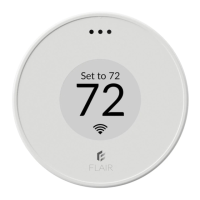
The primary Flair device for system control and sensing.
Used to connect the Puck to a power source.
Provides power for the Puck, especially in wireless configurations.
Hardware included for securely mounting the Puck door.
An alternative method for attaching the Puck door to surfaces.
Supplies power to the Puck, typically for Gateway mode.
Download and install the Flair mobile application from app stores.
Connect your Flair Puck to your home WiFi network.
Instructions for adding and setting up additional Flair devices.
Configure rooms, integrations, and user preferences within the app.
Manage your system's temperature and settings through the mobile app.
Operate the Puck by pressing its surface or rotating the collar.
How the Puck controls IR-based heating and cooling units.
Puck's role as a sensor for central heating and cooling systems.
Understanding the two main operational modes of the Puck.
The default view for adjusting room temperature setpoints.
Using the Puck's interface to access different applications.
Changing the Puck's mode and configuring other system settings.
Step-by-step process for changing the Puck's operational mode.
What to expect on the Puck after successfully changing its mode.
Features and construction of the Puck's removable door.
Differentiating between Side A and Side B for proper mounting.
How to open the Puck by pressing the designated dimple.
Securing the Puck door to a wall using adhesive.
Attaching the Puck door with screws through the designated side.
Connecting Gateway Pucks using the provided adapter and cable.
Powering Sensor Pucks with AA batteries for extended use.
Placing Pucks for accurate room temperature readings.
Ensuring clear path for IR signals between Puck and controlled devices.
Tips for hiding power cables when installing a Gateway Puck.
Allows direct control of vents and HVAC settings.
System automatically manages temperatures and vent positions.
Maintains a uniform temperature across all active rooms.
Consistent temperature in rooms identified as 'active'.
Customizes settings on a per-room basis for user preferences.
Turns off all HVAC functions when you are away.
Sets temperature and humidity ranges for the entire home.
Allows individual room temperature and humidity ranges when away.
 General
| Color | White |
|---|---|
| Connectivity | Bluetooth |
| Control | App |
| Operating Temperature | 32°F to 122°F (0°C to 50°C) |
| Temperature Range | 41°F to 95°F (5°C to 35°C) |
| Dimensions | 3.3 in x 3.3 in x 1.0 in (8.4 cm x 8.4 cm x 2.5 cm) |

 To Next Page