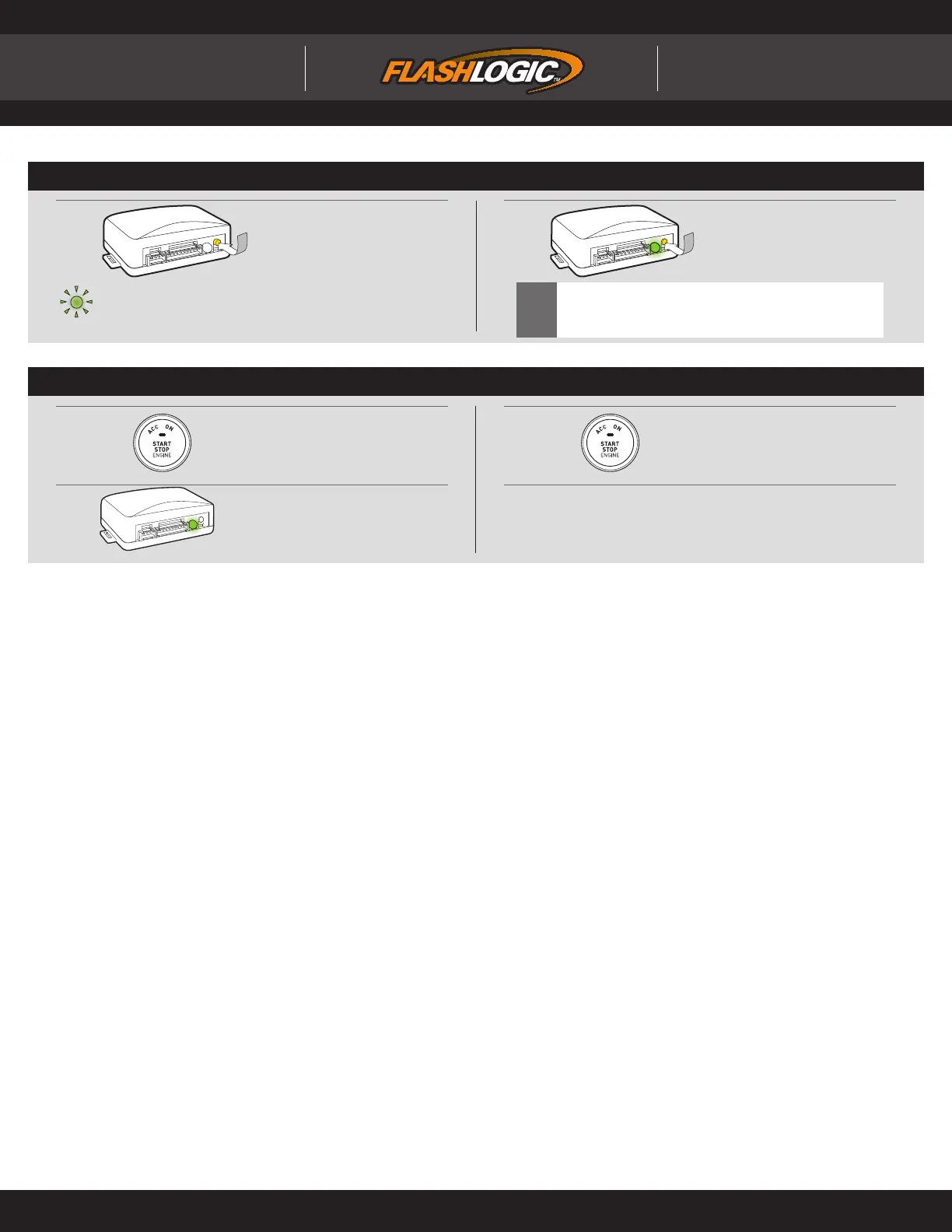
INSTALLATION MODE SELECTION
1
Press and release
programming button
to select installation mode.
2
Press and hold
programming button
until LED turns solid GREEN
to register selection.
!
After registration, follow Factory Reset Procedure to
change installation mode and restart this procedure.
LED fl ashes (1X) once = DATA MODE
LED fl ashes (2X) twice = STANDARD HARDWIRE MODE
MODULE PROGRAMMING PROCEDURE - PUSH TO START
4
Module Programming
Procedure completed.
1
DO NOT PRESS BRAKE PEDAL
Push start button twice [2x] to
ON position.
x2
3
DO NOT PRESS BRAKE PEDAL
Push start button once [1x] to
OFF position.
x1
2
Wait, LED will turn solid GREEN
for 2 seconds.
Page 10 of 12 FLC-AL(DL)-MA2-EN 20130227
INSTALL GUIDE
WWW.FLASH-IT.COM Audiovox Electronics Corp. © 2013
ALL IN ONE
Mazda
Doc. No.: ##11050##


 To Next Page