9/14/07 2/4 400-610-000-E
Setting the Time and Day
n Press D, H or M to access the menu.
o Press H and M to set the time.
p Press D to select the day.
q Press MODE/RET to exit.
NOTE: If you remove the module from its base for more than
6 hours, the time and day must be reprogrammed.
The GFCI monitors the electrical flow for any loss of current;
if there is a loss, the thermostat will cut off power to the
heating system. The GFCI must be tested upon installation,
and once a month thereafter to ensure it is operating
properly.
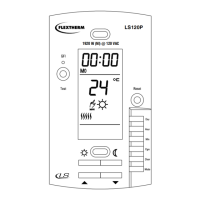
n Press TEST:
• Successful: the TEST warning
light is ON, GFI is displayed and
power to the floor heating sys-
tem is cut off.
• Unsuccessful: the TEST warning
light is OFF. Cut power to the
floor heating system from the
main power panel and call cus-
tomer service.
o When successful, reset the
thermostat (OFF/ON) to reset the GFCI circuit.
WARNING: If the test warning light comes ON during normal
operation, cut power to heating system from the main power
panel and have an electrician verify the installation.
The display is lit for 12 seconds when any button or adjustment ring
is pressed.
Comfort and Economy Setpoints
These setpoints are associated with the
schedule’s programs and are
preprogrammed as follows:
Comfort: temp. control AF: 21°C (70°F)
temp. control F: 28°C (82°F)
Economy: temp. control AF: 16.5°C (62°F)
temp. control F: 20°C(68°F)
To modify a setpoint value:
n Set the temperature using the adjustment ring.
o Press and hold the setpoint button ( or or ) until the icon
is displayed on the screen. Screen automatically returns to nor-
mal display after 5 seconds.
Vacation Setpoint
This preprogrammed setpoint is used when the Vacation mode is
activated. To modify this value, repeat above steps.
Default: 10°C (50°F) for all control types
Floor minimum and maximum limits (AF only)
The floor temperature limits prevent damage to the floor and ensure
personal safety. The thermostat generally turns heating On or Off to
control the ambient temperature. However if the floor temperature
goes outside the desired limits, the thermostat will unconditionally
turn heating On or Off to maintain the floor temperature within its
limits.
Default: min 5°C (40°F) and max 28°C (82°F)
n Turn OFF the thermostat.
o Press and hold CLR and turn ON the
thermostat. Release CLR only when the
minimum setpoint is displayed.
p Select the minimum setpoint limit using the
adjustment ring.
q Press CLR to display the maximum value.
r Select the maximum setpoint limit using the adjustment ring.
s Press MODE/RET to exit.
NOTE: For the AF temperature control (ambient with floor
limits), the setpoint will always be maintained within the
minimum and maximum floor limits.
Automatic
Executes the schedule’s programs.
Press MODE/RET until the desired program
number is displayed (1 to 4).
To temporarily bypass the current program, set a
new temperature using the adjustment ring or
press one of the predefined setpoint buttons ( or ). The program
icon will flash to indicate the bypass. The new setpoint will be main-
tained until the beginning of the next program.
Manual
Maintains a constant temperature.
n Press MODE/RET until is displayed.
o Set the temperature using the adjustment
ring or press one of the predefined setpoint
buttons ( or or ).
Vacation
Maintains the Vacation setpoint during a
prolonged absence.
There are two ways to activate this mode:
n From the thermostat: press
o Remotely (using a telephone):
see Econo Input Signal section (requires an optional control).
GROUND FAULT CIRCUIT INTERRUPTION
(GFCI) TEST
BACKLIT DISPLAY
SETPOINTS
OPERATING MODE SELECTION
400-610-000-E (Flextherm FLP12 prog CAN) ENG.fm Page 2 Friday, September 14, 2007 4:13 PM



 To Next Page
 Loading...