Making a New Recording to Replace a Previous One
To make a new recording to replace a previous one:
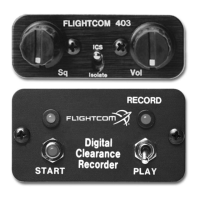
1. Set the toggle switch to PLAY and then back to RECORD.
2. Press the START button.
Stopping a Recording
To stop recording before the 32 second time limit is reached, set the toggle switch to PLAY.
Playing Back a Recording
To play back a recording:
1. Set the toggle switch to PLAY.
2. Press the START button.
The recording will replay each time you press the START button.
Stopping Playback before the End of a Message
To stop playback before the end of a message:
1. Set the toggle switch to RECORD.
2. Quickly return the toggle switch back to PLAY.
Erasing a Recording
To erase a recording:
1. Set the toggle switch to RECORD.
2. Press the START button.
Disconnecting power will also erase a recording.
NOTE: the DCR™ may be left idle and ready in either RECORD or PLAY mode.
13


 To Next Page