22
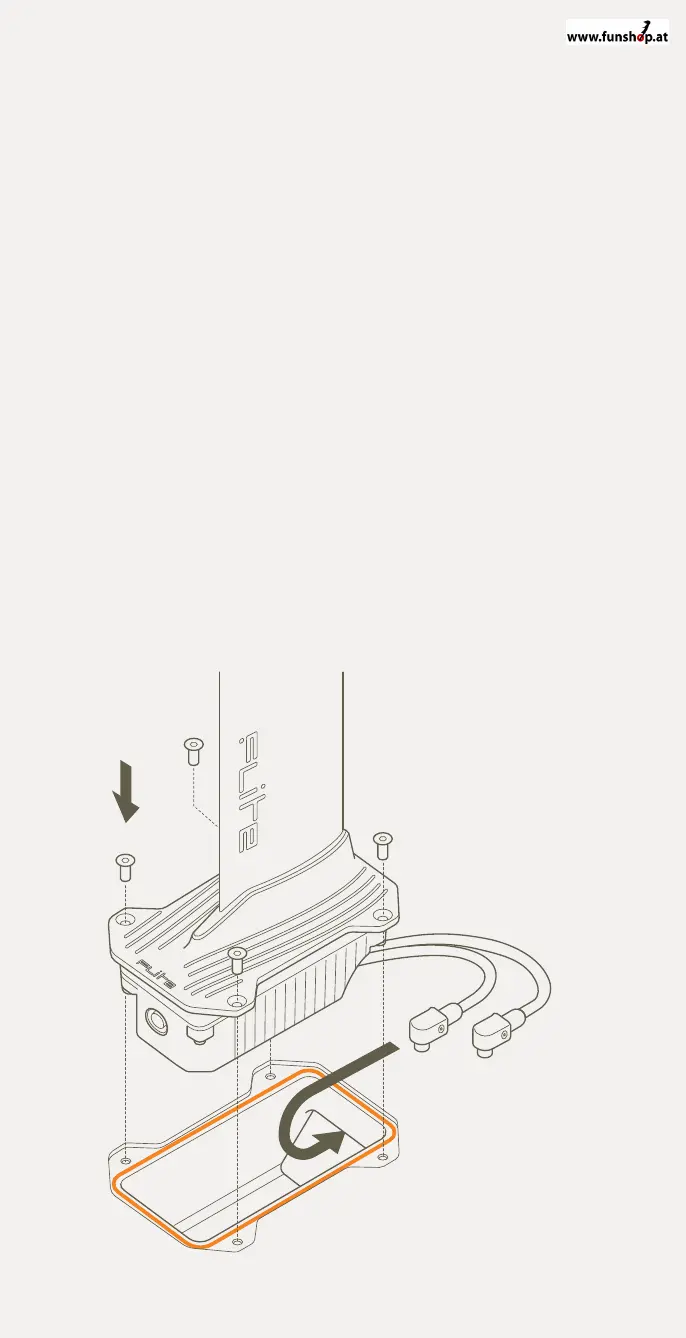
Connect the eFoil to Fliteboard
1 Remove the Fliteboard from its bag and place upside down on the
bag or other protective surface. Locate the Flitebox cavity on the
bottom of the board and ensure the 4 retaining screws are removed.
2 Check to ensure the orange o-ring is inserted, properly seated in the
Flitebox cavity o-ring groove, clean and free of sand,
grit or water.
3 Carefully lift the eFoil from its bag and place the Flitebox into the
cavity. While doing this ensure the power cables feed through into the
Fliteboard cavity.
4 Ensure the Flitebox is properly seated in the cavity and flush with the
board surface.
5 Insert the 4 x 20mm Stainless Steel Hex fasteners. Tighten them in
a cross pattern, first using your fingers to ensure the threads are
properly engaged, and then using the supplied hex key. Use a torque
of 6 Nm to tighten the fasteners.
6 Medium force needs to be applied when using the long arm of the
hex key to ensure the fasteners are tight.
7 When properly tightened, the eFoil should be secured and the o-ring
compressed. Failure to properly tighten the fasteners or fit the o-ring
will result in a board leak.
8 Be careful not to over-tighten the fasteners as this could result in
stripped threads or damaged fasteners.


 To Next Page