29
Connecting Flite App to Flite Controller
1 Turn o Fliteboard.
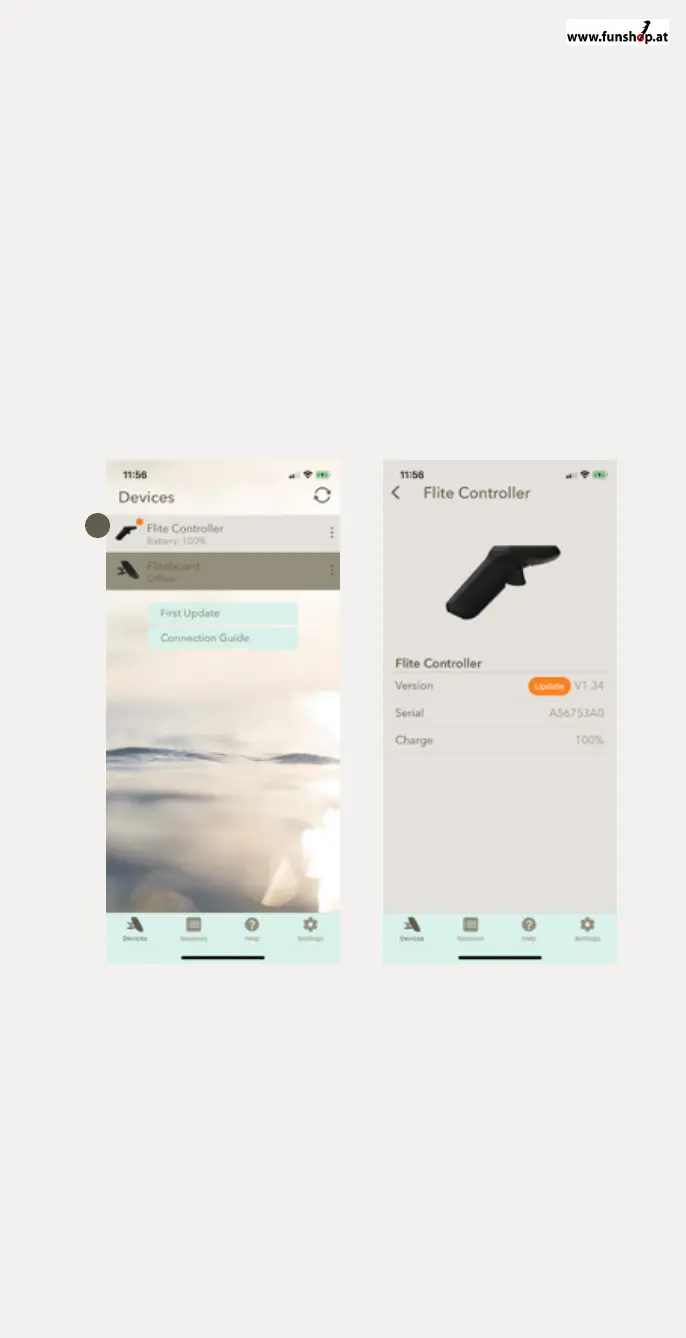
2 Ensure Flite Controller has power and within range to the phone.
3 Select ‘Flite Controller’ from the ’Devices’ list. When selected
and connected, the current state of charge will be displayed.
4 You will now be able to see software version of the Flite Controller
and perform any updates here.
Devices
1 Flite Controller is turned on
(allowing it to be discoverable
in the devices list). Updates are
denoted by the orange alert.
Devices / Flite Controller
Flite Controller is connected.
Update by pressing orange
‘update’ icon.
1
IMPORTANT: ALWAYS UPDATE
THE FLITEBOARD FIRST AND
THEN EFOIL


 To Next Page