This document is a user manual for the FIJ Dual Motor Electric Scooter, model T113. It provides detailed information on the scooter's components, technical specifications, operating instructions, and maintenance.
Function Description
The FIJ Dual Motor Electric Scooter is a personal electric vehicle designed for urban and off-road commuting. It features a dual-motor system, a folding mechanism for portability, and a multi-function high-definition instrument display for monitoring various parameters. The scooter is equipped with both front and rear hydraulic brakes for effective stopping power, and a suspension system for a smoother ride. It also includes LED headlights with a horn, side LED lights, and a back light for visibility and safety. An optional remote key or key lock system is available for security. The scooter supports both single and dual drive modes, allowing the user to switch between them for different riding conditions.
Important Technical Specifications
The scooter's technical parameters are as follows:
- Maximum Speed: Approximately 65 km/h.
- Maximum Mileage: 60-120 km, dependent on battery capacity.
- Maximum Load: Approximately 150 kg.
- Scooter Weight: Varies depending on the model and battery configuration.
- Size: Varies depending on the model and optional features.
- Start Form: Factory default zero start.
- Motor: Brushless motor, 60V/1600W x 2pcs (dual motor).
- Battery Voltage: 60V.
- Instrument: Multifunctional LCD instrument.
- Headlight: LED Headlights with Horn.
- Breaker: Front and rear Hydraulic brake.
- Break: Hydraulic brake.
- Front and Rear Wheels: Inflatable (11-inch) wheels, suitable for On Road or Off Road use.
- Plastic Parts: Environmentally friendly high-strength plastic parts.
The display parameters can be configured, including:
- P0 (Motor Diameter Setting): Default 11.
- P1 (Undervoltage Setting): Default 530 (e.g., 315 means 31.5V).
- P2 (Magnetic Pole Logarithmic Setting): Default 16.
- P3 (Speed Signal Selection Setting): Default 0.
- P4 (Speed Km/mile Selection Setting): 0 for km/h, 1 for mp/h.
- P5 (0(no speed) Start or Slide Start Setting): 0 for 0(no speed) Start, 1 for Slide Start.
- P6 (Automatic Cruise Setting): 0 for no Automatic cruise, 1 for Automatic cruise.
- P7 (Soft Start and Hard Start Selection Settings): 0 for soft start (not too fast), 1 for strong speed start.
- P8 (Speed Limited, Motor Working Power % Setting): 100 for 100% power/speed, 30 for 30% power/speed.
- P9 (Electric Brake Strength Setting): 0 for no electric brake, 1 for normal, 3 for strong electric brake.
Usage Features
Main Components:
The scooter features a display, remote key (optional), adjustable height, headlight, handle, rear mudguard, folding system, back light, suspension, front motor with hydraulic brake, side LED lights, kickstand, and rear motor with hydraulic brake.
Remote Key/Key Lock (Optional):
If equipped with a remote key, the scooter must be unlocked before riding. The unlock sequence involves pressing the "Lock" button once, then the "Unlock" button once, and finally the "Lighting" button twice.
Double Driving System:
The scooter is equipped with a double driving system, allowing users to switch between single and dual drive modes using dedicated buttons. A limit switch is also present.
Folding Operation:
- Retract the Handlebar: Pull the handlebar out of the puller, turn and fold it, then adjust it to the lowest position.
- Fold/Open the Frame: The manual provides a visual guide for folding and opening the main frame of the scooter.
- Folding: Turn the safety lock outwardly, pull it out, and place it on the screw on the edge. Press down the fold button in the locked position, and simultaneously pull down the scooter pole. Then, fold the pole.
- Opening: Turn the safety lock outwardly, pull it out, and place it on the screw on the edge. Press the fold button down by hand, push the lever upwards, and listen for a click to confirm the security lock is engaged.
Multi-function High-Definition Instrument Display:
The display features two buttons: a Power button and a Mode button.
- Power Button: Turns the display on/off, shows battery level, and real-time speed.
- Mode Button: Cycles through different content displays: TIME (time since turn on), TRIP (single mileage), ODO (accumulated mileage), DST (estimated range based on real-time battery capacity), VOL (battery real-time voltage), and CH 2:00 (countdown to automatic shutdown after 2 hours, if applicable).
- Resetting TRIP: Press and hold the Mode button when TRIP is displayed to reset the single mileage to 0.
- Gear Selection: Short press the Power button to make the Gear (Speed Gear: 1, 2, 3) position flicker. Then, press the Mode button to change gears (Gear 1: Lowest, Gear 2: Middle, Gear 3: Fastest).
- Parameter Settings: To enter parameter settings, press the Mode button and Power button simultaneously. Use the Mode button to cycle through P0-P9. Use the Power button to enter a specific parameter setting, and the Mode button to adjust values (e.g., add 1, reduce 1, add 0.5, reduce 0.5).
Safe Driving:
- Be aware of body gravity during acceleration and deceleration to avoid falling forward. Maintain a standing posture with feet one after the other for stability.
- When turning, keep the body parallel to the handle and pay attention to road conditions.
- When braking, shift the body's center of gravity backward. Proper braking technique helps prevent the scooter from tilting forward and avoids damage to the brake and steering systems.
Maintenance Features
After-sales Maintenance:
The company's products are covered by a three-pack policy. Free maintenance and replacement parts services are provided under warranty conditions, excluding delivery and shipping costs.
Warranty Exclusions (Not a quality issue and do not apply to warranty terms):
- Failure to follow instructions and precautions.
- Improper assembly or malfunction due to improper user maintenance.
- Breakdown after repair outside the company's network or replacement with non-original parts.
- Wear and tear of consumables, or failure/damage of other parts due to inappropriate or delayed replacement maintenance.
- Damage from foreign objects (puncture, tire leakage).
- Damage due to overload, obstructions, or extreme movement.
- Damage due to force majeure (e.g., fire, earthquake, lightning, water damage).
- Normal use/natural wear parts are not covered by free warranty service.
Warranty Reference for Electric Scooter:
- Pole: A year warranty.
- Footboard: A year warranty.
- Folding Handgrip: A year warranty.
- Battery: Half year warranty.
- Motor: A year warranty.
- Multifunction Instrument: A year warranty.
- Others: No warranty.
Important Warranty Notes:
- Damage caused by human factors is not covered by the warranty.
- During the free warranty period, maintenance fees are not charged (material costs are excluded).
- Transport costs for warranty service are borne by both parties.
- The company reserves the final interpretation of warranty terms.
Charging:
- Charge Steps: Connect the scooter first, then connect the plug to electricity.
- Stop Charging: Remove the plug from electricity, then remove the charger from the charge port.
- Safety: Charge in a safe place, out of reach of children.
- Indicators: Red light indicates charging, green light indicates charging is complete.
- Long-term Storage: Charge every 2 months if not used for a long time.
- Environment: Do not charge in a damp place.
- Operation: Do not run the motor while charging.
- Battery Safety: Avoid contact with any material leaking from the battery.
- Battery Damage: Failure to store or recharge correctly may result in battery damage and inability to charge.

 Need help?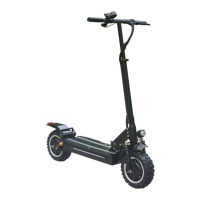

 To Next Page
 General