11 / ENGLISH ENGLISH / 12
• When told to, follow the instructions on how to prepare
the headset, as below:
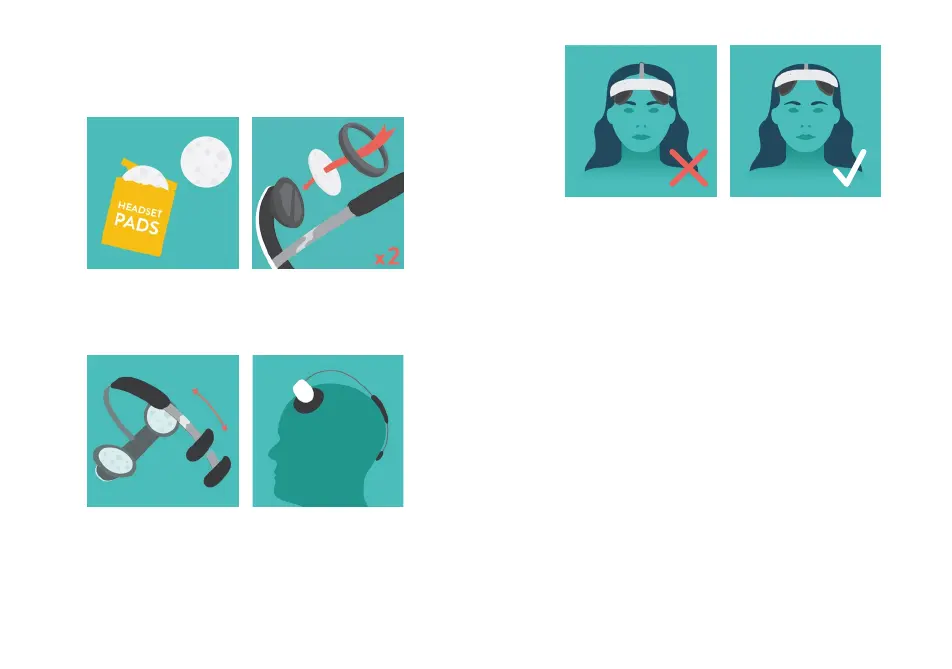
Take a new pair of
Flow Pads from a
pouch.
1.
2.
Adjust the length of the
metal arch by sliding
the back piece.
The end of the arch
should sit comfortably
on the back of your
head.
Attach them to the
electrodes using the
Pad Holder Rings.
Make sure the headset does not sit to low
The App guides you how to correctly position
the headset using the camera of your device.
Before starting the stimulation you can press and
hold the Tingle button to test how the stimulation
feels. Hold the Tingle button for at least 10
seconds.
4.
3.
Start the stimulation by pressing the
“Start stimulation” button in the App.
5
• The current will now slowly increase to its maximum of
2 mA, as shown in the App.
• You can at any point press the Pause button in the App or
the button on the headset to stop the stimulation.
• Do not remove the headset before the app indicates that
the stimulation has stopped.
• The headset also gives a “beep” signal when the
stimulation has finished.


 To Next Page