NT 3000 Series Electro-Pneumatic Transducer Module FCD VLENIM0047-05 - 01/10
18
Adjusting the Minimum Pressure
Cutoff Feature on Old Transducers
Older models of the NT 3000 Transducer have a “Minimum Pressure
Cutoff” feature. This allows the user to set a trip-point to activate when
the input signal falls below a certain point. This results in the pressure
output falling rapidly to approximately 2.0 psi, causing the valve to close
on an air-to-open valve. This feature is generally used when the service
requires a tight shutoff or to prevent throttling near the valve seat. To
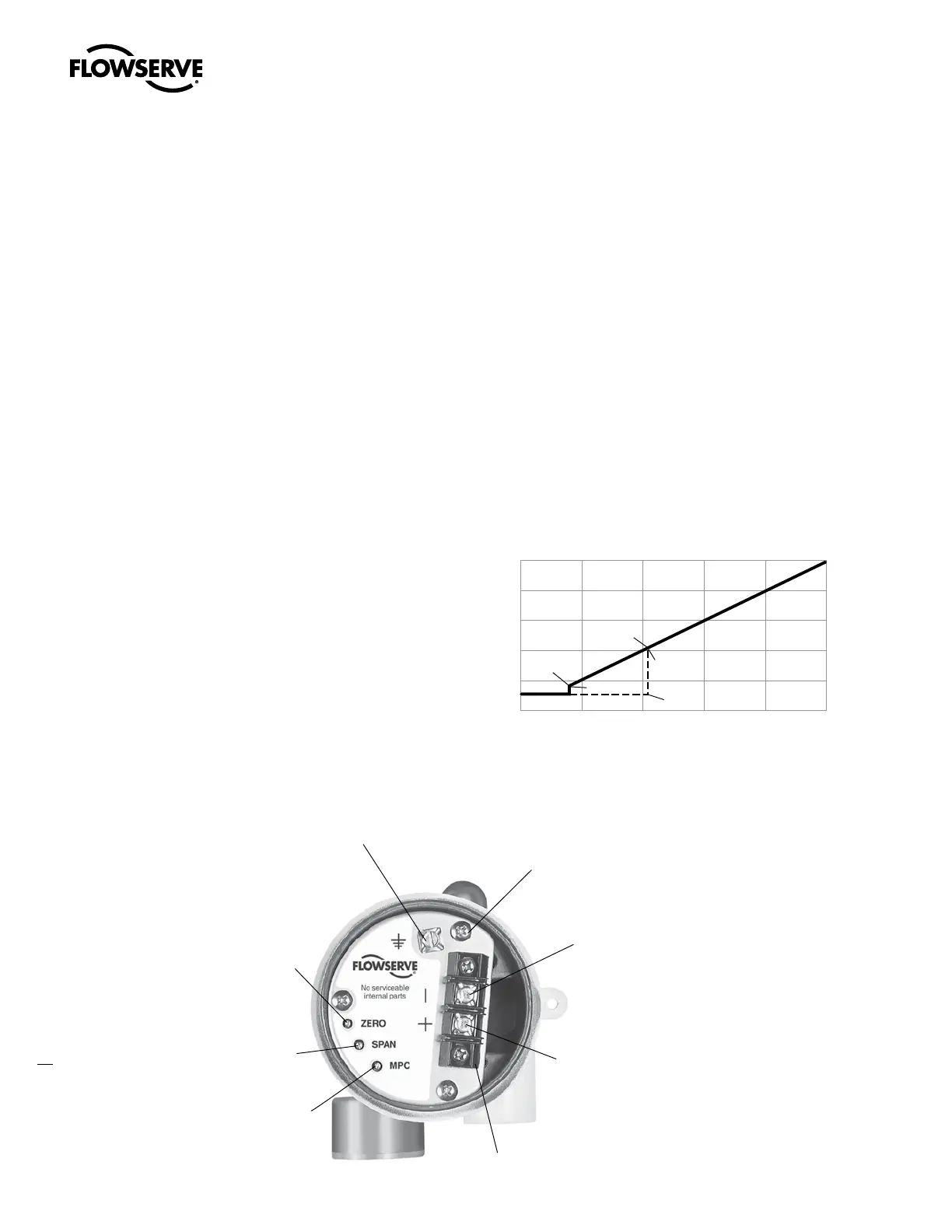
adjust this feature, refer to Figure 12 and perform the following steps:
NOTE: The zero and span settings of both the positioner and NT 3000
transducer should be verified to be accurate before the minimum
pressure cutoff feature is enabled and adjusted. Instructions for setting
the zero and span settings are described in the calibration section on
Page 4.
NOTE: Complete the following steps only when using the minimum
pressure cutoff feature.
1. Connect the NT 3000 transducer to the 30 to 150 psi air supply
pressure.
2. Remove the NT 3000 transducer housing cover.
WARNING: Disconnect I/P module power before removing
housing cover in explosive atmospheres; otherwise personal
injury may occur.
3. Connect an adjustable current source to the terminal block on
the circuit board. Apply the desired input signal to the positioner
at which the output pressure is to fall to approximately 2.0 psi.
This signal can range from the factory setting of 3.7 to 8 mA. See
Figure 11.
4. Turn the minimum pressure cutoff pot clockwise until the output
pressure drops off.
5. Fine-tune the pressure drop-off point by increasing the input signal
and then decreasing it through the desired shut off signal. Observe
the signal value at which the pressure drops off. If the pressure
drops off at a lower mA signal than desired, turn the MPC pot
slightly clockwise. If the pressure drops off at a higher signal than
desired, turn the MPC pot slightly counterclockwise.
6. Repeat step 5 until the pressure drops off at the desired input
signal.
7. To disable the MPC feature turn the minimum pressure cutoff pot
(marked “MPC”) 20 turns counterclockwise or until it makes a
clicking noise.
Figure 11 – I/P Minimum Pressure Cutoff Adjustment Range
3
0
6
9
12
15
0 4 8 12 16 20
Command Signal (mA)
I/P Output Pressure (psi)
3.45 mA
2.6 psi
6.2 psi
8.20 mA
Minimum Pressure
Figure 12 – Old Style NT 3000 Transducer Circuit Board (housing cover removed)
Grounding Screw
Mounting
Screw
Current Loop
Termination (-)
Current Loop
Termination (+)
Terminal Block
Minimum
Pressure
Cutoff
Adjustment
Span
Adjustment
Zero
Adjustment



 To Next Page