Need help?
Do you have a question about the Fluance Elite Series and is the answer not in the manual?
Provides links to videos for full setup and configuration of your speakers.
Describes the role of front left and right speakers in creating a wide soundstage for home theater.
Explains the typical placement and timbre matching requirements for a center speaker.
Details the function of a separate subwoofer in reproducing low bass frequencies for an enhanced experience.
Explains the driver configuration of bipolar speakers for omni-directional acoustics and immersive sound.
Describes the purpose of surround speakers in creating atmosphere and a sense of space in a home theater.
Lists the five audio channels required for a 5.1 surround sound configuration.
Lists the seven audio channels required for a 7.1 surround sound configuration.
Provides placement guidelines for front left and right speakers for optimal listening.
Details placement recommendations for the center channel speaker relative to the TV.
Gives placement advice for surround left and right speakers relative to the listener.
Provides placement advice for the subwoofer to avoid muddy bass.
Explains the step-by-step process for standard speaker wire connection to terminals.
Details the steps for connecting speakers using banana plugs for a secure fit.
Explains the process of bi-amping and its benefits for speaker performance and protection.
Outlines the procedure for connecting speakers using bi-amplification mode.
Describes bi-wiring, where separate cables connect amplifier outputs to speaker drivers.
Provides instructions for connecting speakers using the bi-wiring method.
Explains the amplifier's importance in providing power to drive passive speakers.
Describes how a phono preamplifier boosts turntable signals for further amplification.
Discusses using internal vs. external preamplifiers and the rule of one preamplifier.
Explains the importance of grounding for turntables to prevent interference.
Offers placement recommendations to avoid feedback in turntable setups.
Provides tips for locating wall studs to ensure secure mounting of speakers.
Avoid touching the tweeter dome as it affects sound quality and dispersion.
Prevent positive/negative speaker wires from touching to avoid shorts and amplifier damage.
Clean with dry cloth, avoid magnetic materials, and keep away from sun rays.
Ensure speaker vents are clear, maintain distance from obstructions, and avoid parallel wiring.
Addresses issues related to distorted audio, often caused by power or bass levels.
Explains how to resolve buzzing or crackling sounds by checking connections and sources.
Offers solutions for muffled bass, including speaker break-in and placement.
Troubleshoots issues with a lack of bass, checking connections and receiver settings.
Covers common speaker issues like wiring, binding posts, and power matching.
Explains the recommended break-in period for Fluance speakers for optimal performance.
Discusses the necessity and benefits of using banana plugs for speaker connections.
Details why 18-gauge speaker wire is recommended for optimal performance.
Lists recommended receiver brands for pairing with Fluance speakers.
Explains how floor spikes reduce vibration and improve sound clarity.
Describes the benefits of isolation pads for reducing vibration and improving bass.
Provides a link to Fluance's video resources for setup and product information.
Directs users to Fluance's support center for expert tips and articles.
Offers a guide for optimizing home theater surround sound setup.
Lists the warranty durations for different Fluance product types.
Details conditions and events that are not covered by the warranty.
Explains the procedure for requesting warranty service and necessary documentation.
This document is a user manual for Fluance Elite, Reference, and Signature Series speakers, providing comprehensive information on setup, usage, maintenance, and troubleshooting.
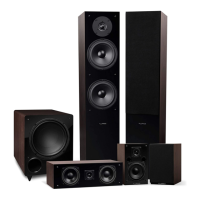
Fluance speakers are designed to deliver high-quality audio for home theater and music listening experiences. The manual covers various speaker types within a home theater system:
The manual also details how to integrate these passive speakers into a turntable setup, which requires additional electronics like a phono preamplifier and an amplifier/AV receiver.
The manual provides solutions for common audio issues:

 To Next Page
 General