Serious Performance™
7
Bi-Wire Connection
Bi-wiring
In bi-wiring, each loudspeaker has two pairs of connectors and two cables are
run from the same amplier output to the speaker cabinet – one for the high
frequency or tweeter driver and one for the low frequency driver (through two
separated crossover lters). The purported advantage of this split is that it
reduces magnetic interaction in the cable, resulting in a better soundstage.
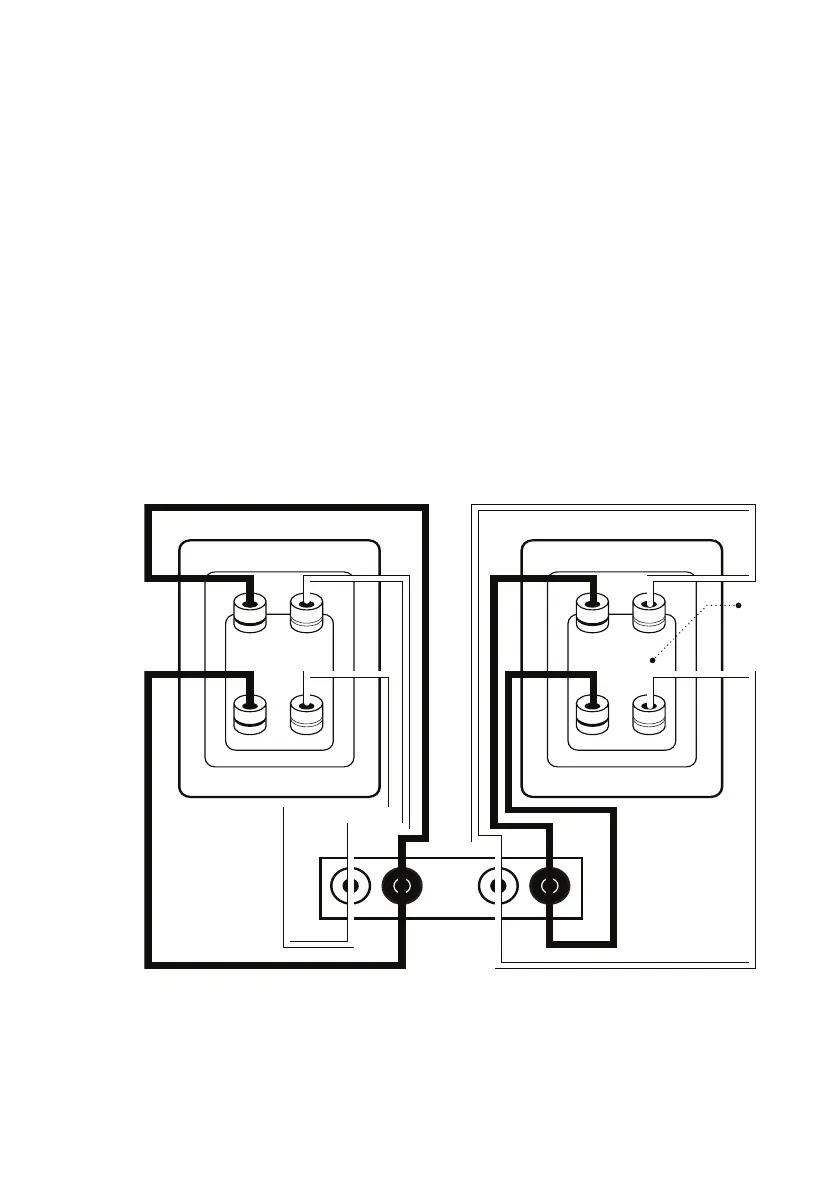
How to connect speakers in the bi-wire mode:
• Ensure that your system is powered OFF.
• Remove the bi-wire bridges from each speaker (this separates the low
pass lter & high pass lter crossovers).
• Connect each amplier channel to its respective speaker section as
shown.
LR
LEFT SPEAKER
AMPLIFIER
RIGHT SPEAKER
BRIDGES
REMOVED
Take care to maintain the correct polarity when connecting (+ or RED) to (+ or RED) and (- or BLACK) to (- or BLACK).
Before attempting the connection make sure that your amplier’s speaker wire connectors will accept a second set of
cables and that the equipment is turned OFF while you make the connections.



 To Next Page