Fluance Stylus Replacement/Upgrade Guide
B. Mounting Your New Cartridge
1. Connect the headshell wires to the posts on the cartridge. Ensure the
correct color is connected to the correct post.
Wire Channel
White Lef t (+)
Blue Left (-)
Red Rig h t (+)
Green Right (-)
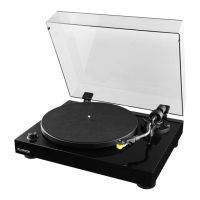
2. Position the cartridge mount-
ing holes under the slots
on the headshell. Using the
screws provided with your
cartridge, afx the cartridge
to the headshell. Do not
over-tighten.
3. Reinstall the headshell on the
tonearm.


 To Next Page