23
Cartridge Alignment Protractor
Correct cartridge alignment ensures the stylus is
positioned properly relative to the grooves on the record.
Incorrect alignment can cause distortion and can also
cause unwanted wear and tear on your stylus. Follow
the instructions below to ensure your cartridge is
mounted correctly.
A video of the cartridge installation and alignment process
is available at www.uance.com/support
Instructions
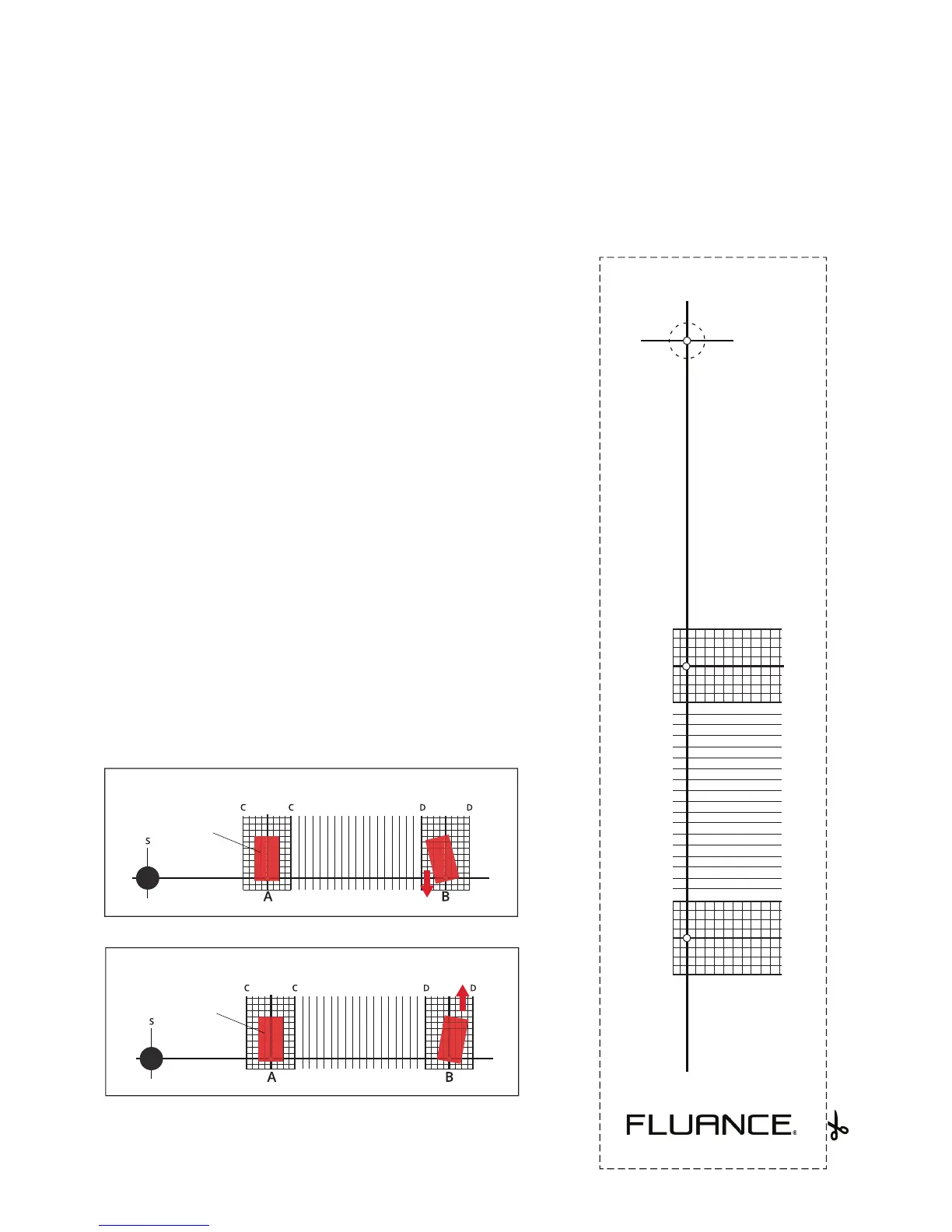
1. Cut out the Cartridge Alignment Protractor* and
carefully cut out the spindle hole (S). *See beside for
cutout.
2. Place the protractor on the spindle.
3. With the stylus protector removed, gently place the
stylus on point A.
4. Rotate the cartridge so that the sides of the cartridge
are parallel with the grid lines (C).
5. Place the stylus on point B and conrm the sides are
parallel with the grid lines (D).
6. If the cartridge sides are not parallel at point B move
the cartridge forward (g.1) or backward (g.2) and
repeat steps 4-6 until the sides are parallel at both
points.
(fig.1)
cartridge
cartridge
(fig.2)
For more information and support please visit www.uance.com/support
Cartridge Alignment
Protractor Cutout
S
A
66mm (2.6”)
B
120.89mm (4.76”)
CC DD



 To Next Page