Due to continuing product development, specifications are subject to change
without notice.
Logger LEDs
To conserve battery charge, the logger will power-off temporarily (e.g. LEDs will
stop operating) if it has been inactive for 5 minutes (see p. 24).
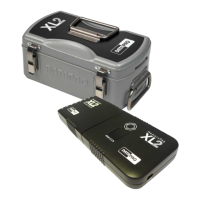
On its front face, the logger is equipped with LEDs as follows.
SmartPaq LED
If SmartPaq parameters have been setup for a pass/fail analysis on removal from
the oven (see p. 50), the LED shows green for pass, red for fail.
Logger Status LEDs
Red Green Meaning
Flashes 5 times (once
per second), then
stops
Off Communications lead has established
connection between logger and
powered-up PC, or
Logger has had hardware reset with
default reset parameters (see p. 26)
Flashing, together with
green LED, once per
second
Flashing, together with red
LED, once per second
Awaiting connection to Transducer
Interface after being reset
Flashing, alternating
with green LED, at
sample interval *
Flashing, alternating with red
LED, at sample interval *
Logger awaiting trigger (i.e. after
Transducer Interface has been
connected, if temperature trigger has
been set)
Off Flashing at sample interval * Logger acquiring data
Flashing every 5
seconds
Off Logger has data in memory which has
not been downloaded
Double flash, together
with green LED, every
5 seconds
Double flash, together with
red LED, every 5 seconds
In multiple run mode, MemoryPaq is
awaiting connection to the Transducer
Interface to start the next run
*
Flashing interval will actually fall in range 0.5–5 s.
20 Logger Specifications and Operation OVEN TRACKER XL2


 To Next Page