limited by the level of battery charge and by the performance of the thermal
barrier used.
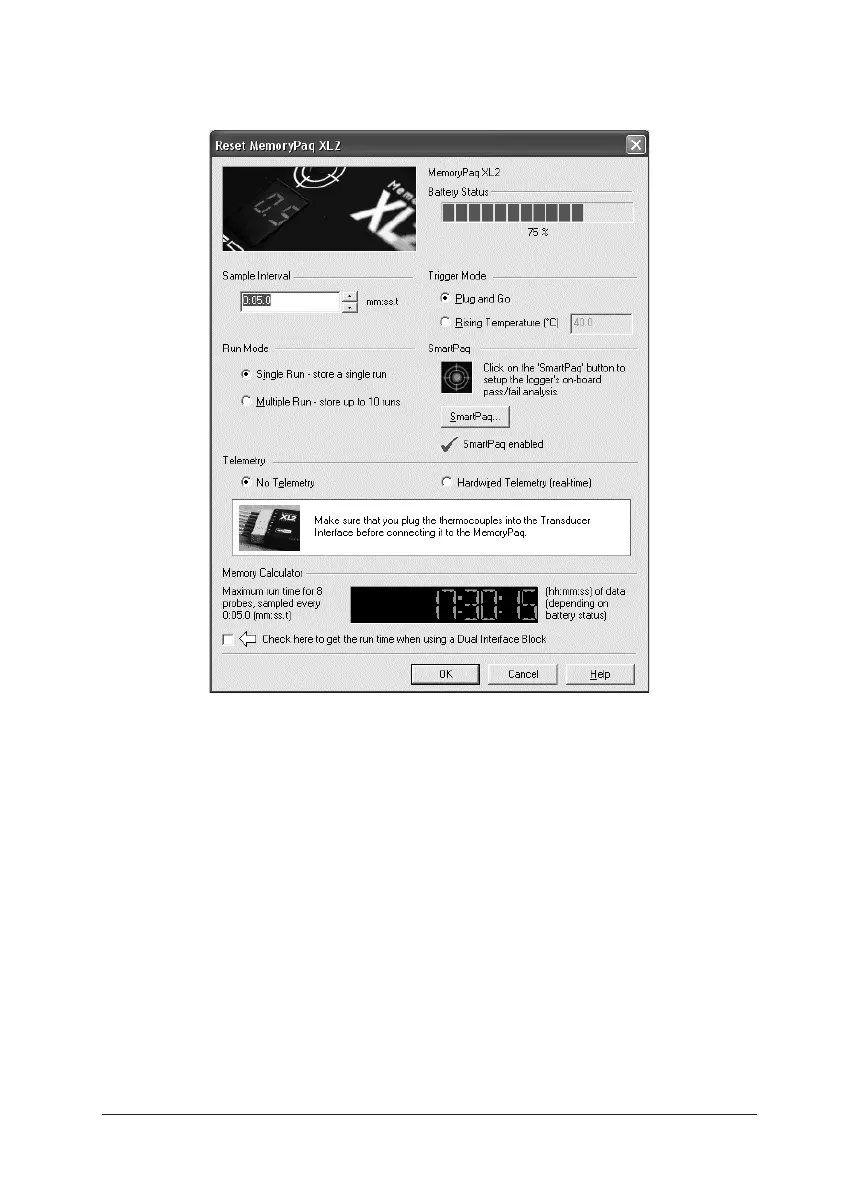
The Reset dialog for the XL2 logger.
Battery Status The charge indicator gives both the current percentage
of full charge held by the logger battery, and a color-coded report:
GREEN Sufficient charge to perform a run.
YELLOW May be enough charge for a run, but battery getting low.
RED Insufficient battery charge: recharge immediately.
The battery charge level will not be displayed if the logger is on charge: disconnect
the charger to verify battery status.
NiMH batteries discharge slowly even when not in use and will need
charging if left for more than three weeks (see p. 23).
If in any doubt, abort the procedure by clicking ‘Cancel’, and recharge the
logger.
Trigger Mode Select here a means to start the logger recording data.
OVEN TRACKER XL2 Running a Temperature Profile 49


 To Next Page