40 / 84 Attachment FLUXTRONIC Automatic Mode
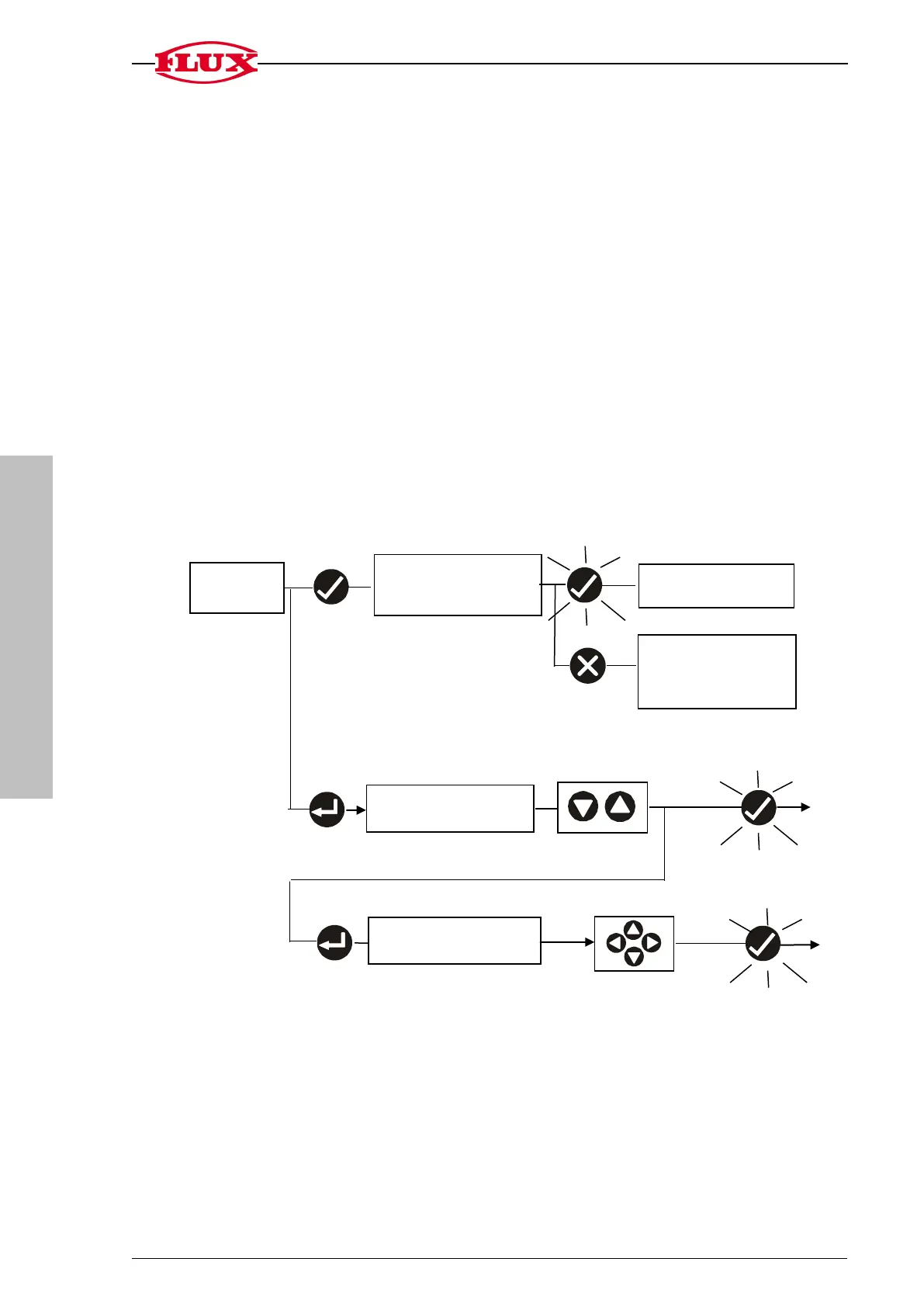
1. START
Default display in Automatic mode
Display range of volume to be filled: 9.999 to 9999
Display range of cycle counter: 0 to 999
The counter restarts at 0 when the maximum display is exceeded.
1.1 Start / pause / reset / stop filling process
1.2 Change memory location of the volume to be filled [S1] [BC] 0.
There are ten memory locations (0 .. 9 ) for the volume to be filled [S1].
The decimal place is set in [SET].
1.3 Enter the volume to be filled [S1] at the selected memory location.
Pause filling process
[STOP]
1.2 Change memory
location [BC .. S1]
Operate and
1.3 Change volume to be
filled [BC .. S1]
start
1.1 Start filling process
[START] or continue
filling following a pause
filling process [STOP]
or reset to filling volume
stop
Operate and


 To Next Page