Flight page
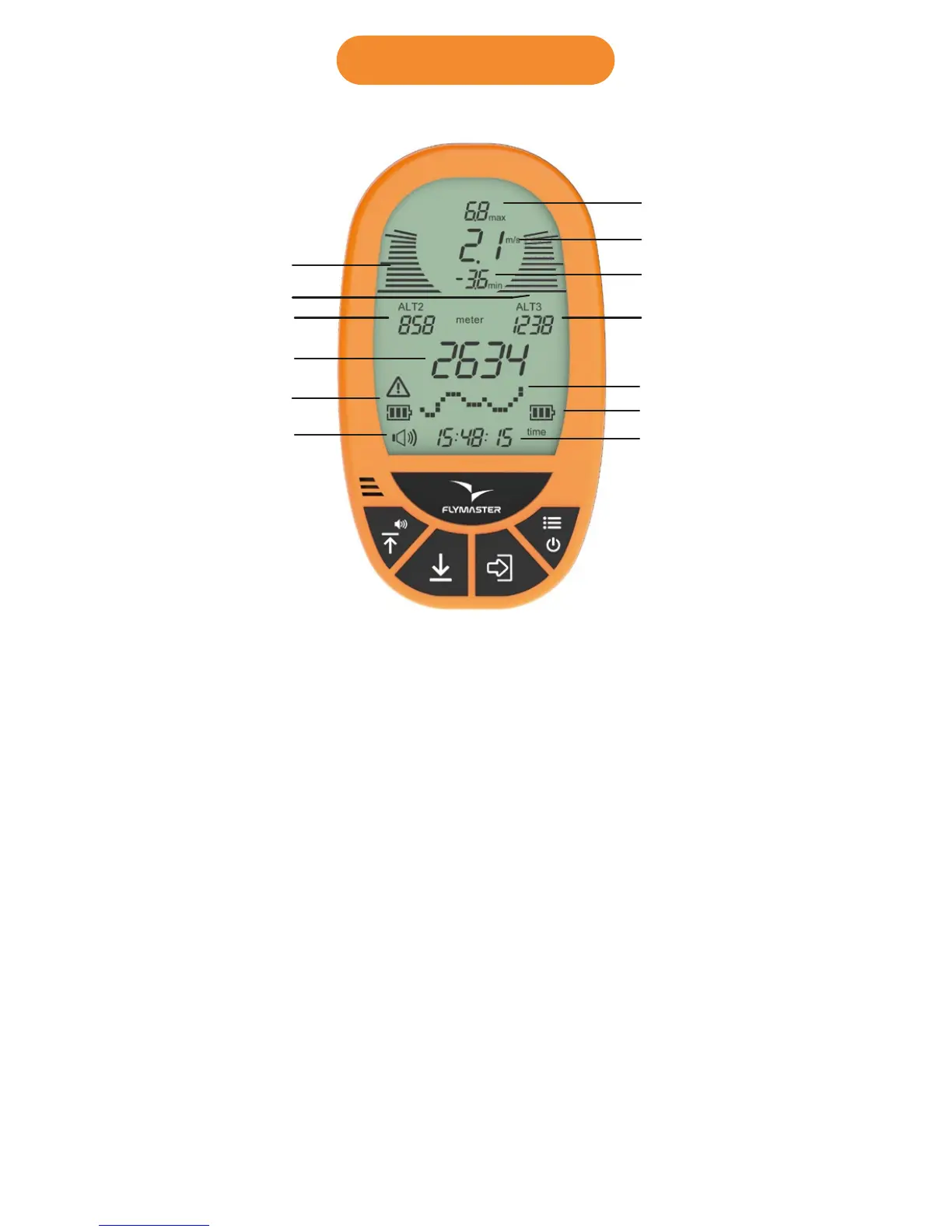
1. Max. climb rate: This value indicates the maximum climb rate
achieved during the current flight
2. Digital Integrated Vario: This value indicates the integrated climb/sink
ratio.
3. Max. sink rate: This value indicates the maximum sink rate achieved
during the current flight.
11 . Altimeter 1: Can be used as main altimeter (can be used as ASL
altitude).
10 . Altimeter 2: Second altimeter (can be used as an altimeter of any
desired reference)
4 . Altimeter 3: Third altimeter (can be used as an altimeter of any
desired reference). Can be reseted any time by pressing DOWN key.
5 . Barograph/Menu: This field can show either the altitude graph during
the flight, the options menu or any other info.
6. Battery level: This indicates the 3 level battery state (full, medium, low)
12 . Low bat. - This indicates that the battery entered in a “reserve” state.
Also have a 3 level indicator.
13 . Audio level: This indicates the volume level of the VarioLS speaker
(Mute, Low, Medium, High).
7. Time/Flight duration: This will show either the clock or the flight
duration.
21. Analog instant Vario: This value indicates the instant climb rate.
22. Analog instant Vario: This value indicates the instant sink rate.
21
22
1
2
3
4
5
6
7
10
11
12
13
2. Display layout



 To Next Page