7
(GB) USE
If you do not intend to use your trimmer
for long periods it is advisable to follow
this procedure after use:-
1. Close the fuel tank air vent screw. (Fig. G)
2. The engine will begin to stop, tilt the trimmer
(Fig M).
3. After the engine has stopped move the
start/stop switch to the stop position. (Fig. K)
4. Disconnect the spark plug lead (Fig. X) and
close the fuel tap.
5. Remove all fuel from the fuel tank.
Cleaning
● Keep your trimmer clean - grass clippings
left in any of the air intakes, around the
engine or under the deck could become a
potential fire hazard.
● Do not clean with chemicals, including
petrol, or solvents - some can destroy
critical plastic parts.
1. Remove grass from under the deck with a
piece of wood or similar.
2. Using a soft brush - remove grass clippings
from around the engine and from all air intakes.
3. Remove the fan, See 'Height adjustment',
and clean with a soft brush.
4. Wipe over the surface of your trimmer with a
dry cloth.
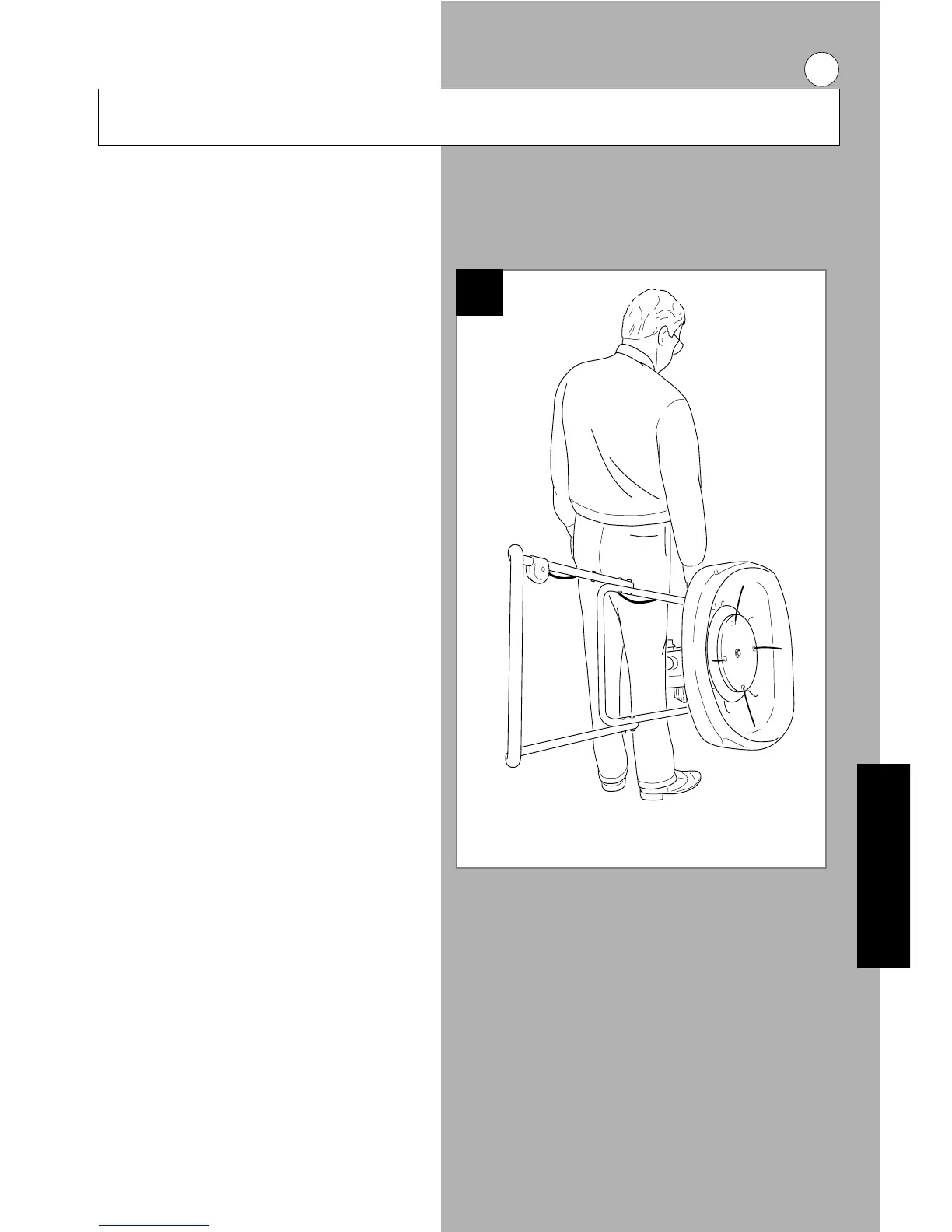
Carrying your Trimmer
● Never carry a trimmer when it is running
Carry the trimmer at the point of balance with the
cutting system facing away from you (See Fig W).
Storing Your Trimmer
Store in a cool, dry, damp-proof and safe place.
Service your trimmer after the last cut of the year
as follows:-
Caring for your Trimmer
W



 To Next Page