Caring for your Shredder
T
Q
R
1
S
Cleaning
• USE GLOVES
• IMPORTANT It is very important that you keep your product
clean. Debris left in any of the air intakes or under the product
could become a potential fire hazard.
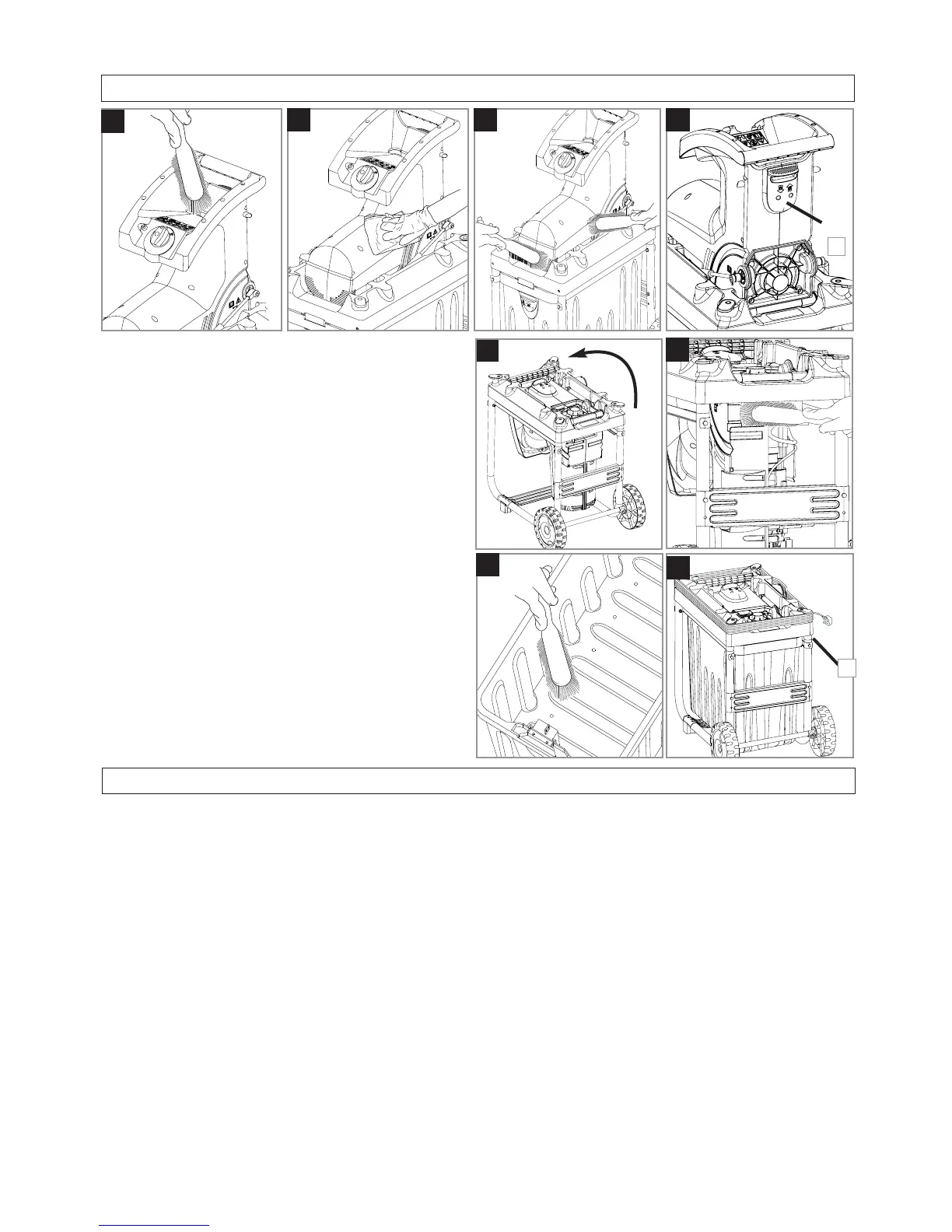
1. With a brush, remove any debris from the Feed Inlet (Q)
2. Wipe over the surface of your product with a dry cloth (R).
3. Using a soft brush remove debris from all air intakes
(S).
4. Remove the Collection Box as described in the Collec-
tion Box section above.
5. Fold the product by sliding the catch (T1) and folding through
90
o
(V) until it locks into the storage position.
6. Remove debris from the discharge area with brush.(W)
7. Remove debris from the grass box with a brush (X).
• IMPORTANT Never use water for cleaning your product.
Do not clean with chemicals, including petrol, or solvents -
some can destroy critical plastic parts.
Storing your Shredder
1. Unfold your product back into the operating position,
replace the collection box and then fold into the stor-
age position.
2. Before folding make sure that the electric cable is
wound around the product properly (Y1).
3. Replace any Bolts, Nuts or Screws, if necessary.
4. Product must be stored upright as illustrated (Y1)
V
90
o
W
X
Y
1
Fault Finding Hints
Fails to Operate
1. Is the correct Starting procedure being followed? See
‘Starting & Stopping’
2. Has the product overloaded ? See ‘Use’
3. Is the Power Turned On?
4. Is the Interlock Switch engaged?. See ‘Collection Box’
5. Check the fuse in the plug, if blown replace.
6. Fuse continues to blow?
Immediately disconnect from the mains electricity supply and
consult your local approved Service Centre.
Debris Material is not pulled into the cutter.
1. By using the Push Stick, ensure the material is fed far
enough into the Feed Inlet
2. Ensure the Cutter is adjusted correctly, see ‘Adjustment’
3. Is the product running in the forward direction.?
4. If problem persists?
Immediately disconnect from the mains electricity sup-
ply and consult your local approved Service Centre.
Poor Cutting of Debris Material
1. See ‘Adjustment’
2. If poor cutting persists.
Immediately disconnect from the mains electricity supply and
consult your local approved Service Centre.
Debris Material is jammed in the Feed Inlet
1. Set the start switch to reverse.
2. Ensure the material is not too thick for the product. Max di-
ameter of twigs and branches is 40mm.
3. If problem persists?
Immediately disconnect from the mains electricity supply and
consult your local approved Service Centre.
Excessive Vibration
1. Disconnect from the mains electricity supply.
2. Ensure the Cutter is adjusted correctly, see ‘Adjusting
the Cutting Plate’
3. If vibration persists?
Immediately disconnect from the mains electricity supply and
consult your local approved Service Centre.


 To Next Page