E-mail: info@flyrontech.com
Flyron Technology Co., Ltd. FN-BC07 MP3 Sound Module with 15W Amplifier
Notes:
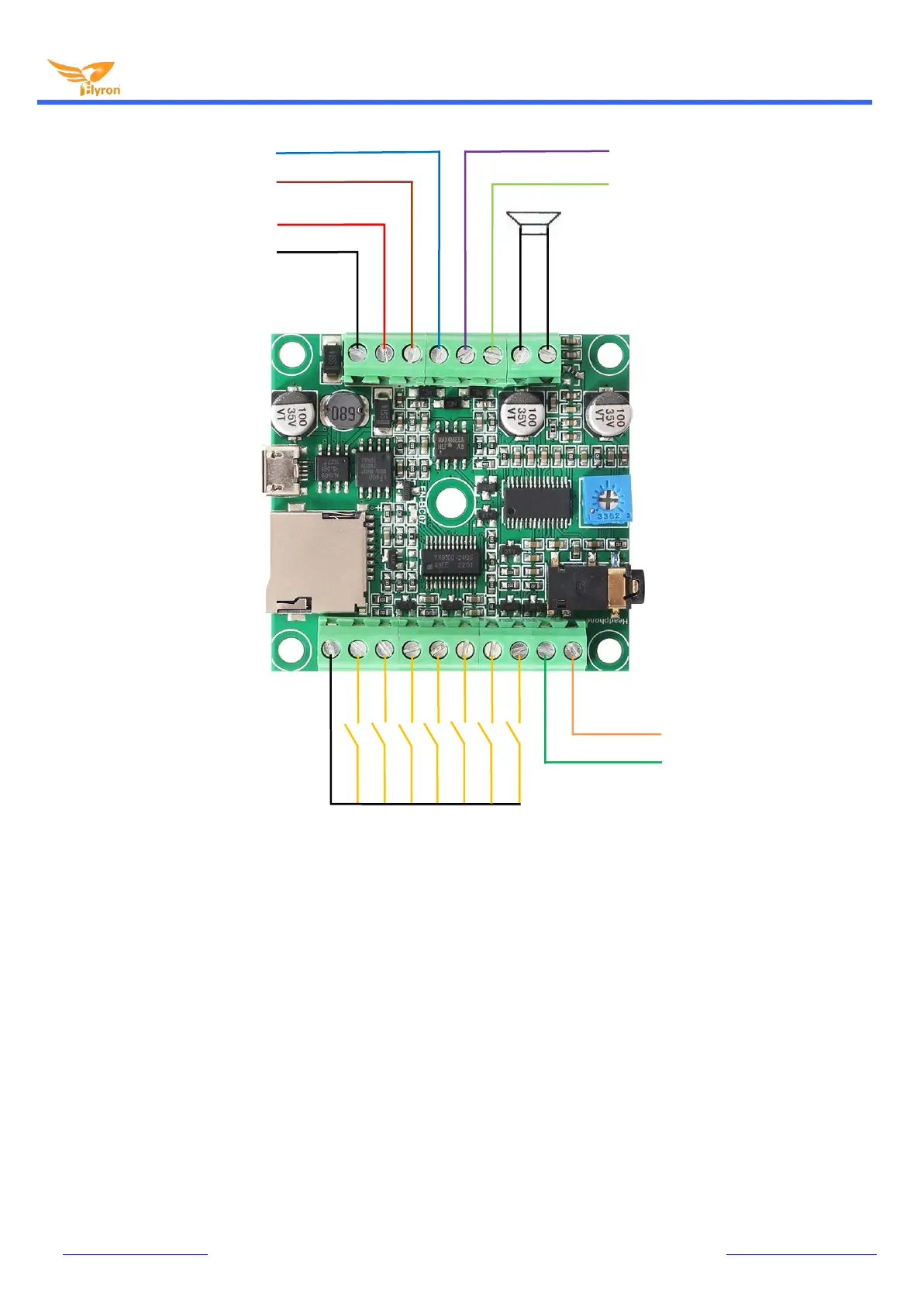
1). The output ports to an external load (equip.) have the same voltage as the power supply you use, so suppose you
need to connect with a 12V light, the power supply you need to use must be 12V. If you don’t need to connect with an
external equipment, just ignore this.
2). When you use buttons to control the module, please skip the connections for UART and RS485, and vice versa.
2. Button Control Mode
2.1. Select a Trigger Mode
In button control mode, there are 8 trigger modes available for users to choose according to the actual needs. Any of these 8
trigger modes can be set/acquired through a config file, which is a text file(.txt). Users just need to fill in a number that is
corresponding to a trigger mode in a new built text file. Save it and rename the file “Config” or any name you like, then put it in
the root directory of the micro SD card or the flash memory together with the audio files or folders. Please refer to the below
sheet about the number and the associated trigger modes.
TX port for UART Serial Control
RX port for UART Serial Control
5-15W Speaker
(4 or 8 ohms)
Output to an external load (equip.)


 To Next Page