E-mail: info@flyrontech.com
Flyron Technology Co., Ltd. FN-BC07 MP3 Sound Module with 15W Amplifier
3). Save it and close it.
4). Rename the file “Config” or any other name you like.
2.2.2. Create a config file with volume setting
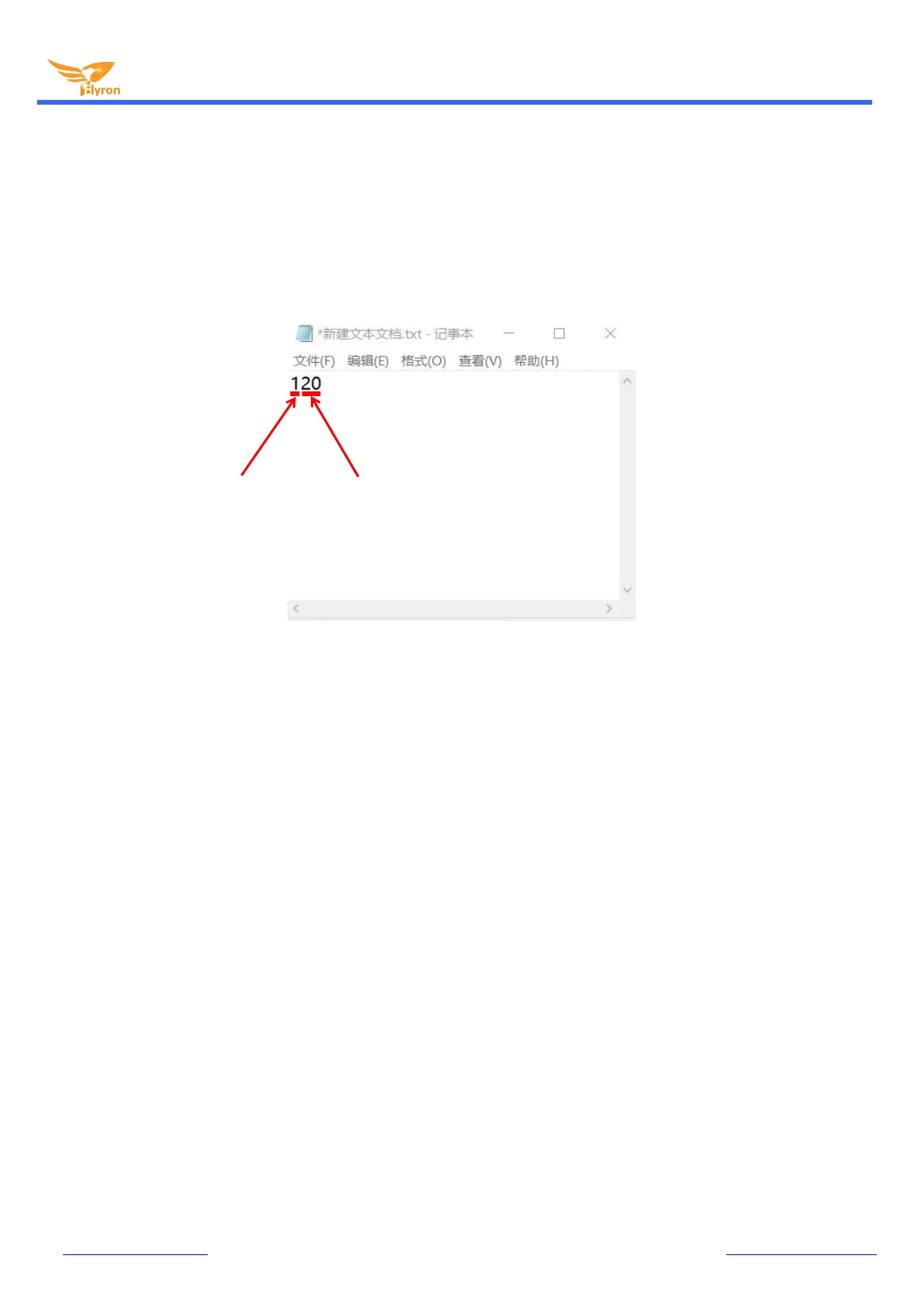
There’re thirty-one volume levels from “00” to “30”. “00” means mute while “30” means the max. volume level.
1). Firstly create a new text file on computer (desktop or somewhere else).
2). Open it and enter a number (mode) you need, and enter a volume level right after the mode number. See below.
3). Save it and close it.
4). Rename the file “Config” or any other name you like.
2.3. Audio Files Loading/Updating
Users can use a micro USB data cable to connect the board to computer. The built-in flash memory will be detected as a USB
flash drive on computer. If the built-in flash memory is not large enough to store your audio file, you can use a micro SD card
instead. When there is an inserted micro SD card on the board, there will be two simulated USB flash drives on computer (one is
the built-in flash memory and the other one is the micro SD card), so please note to recognize.
2.3.1. For Trigger Mode 0-3
To these four modes, the audio files need to be placed on the root directory of the storage device (built-in flash memory or micro
SD card). The arrangements of the audio files are managed by a physical index order. In other words, the file that is to be loaded
first in the storage device will be associated with input “K1”. The last file to be loaded in the storage device will be associated with
input “K7”. In order to guarantee a correct ‘one-on-one’ order, please refer to the following steps.
1). Build a new folder on the computer and put the 7 audio files in this new folder.
2). Rename the audio files from 001.mp3 to “007.mp3”, and make sure they are ranked from “001.mp3 to “007.mp3” in order.
3). Connect the module to computer through a USB data cable.
4). Delete the pre-loaded audio files for tested purpose at factory, or empty the micro SD card if it has other files inside.
5). Go back to the folder and select all of the 7 audio files in the folder.
6). Right click on the first file (001.mp3) and choose "Send to removable disk" or “Send to USB flash drive”.
7). This will send the 7 audio files to the on-board flash memory or micro SD card one by one in a correct sequence.


 To Next Page