9
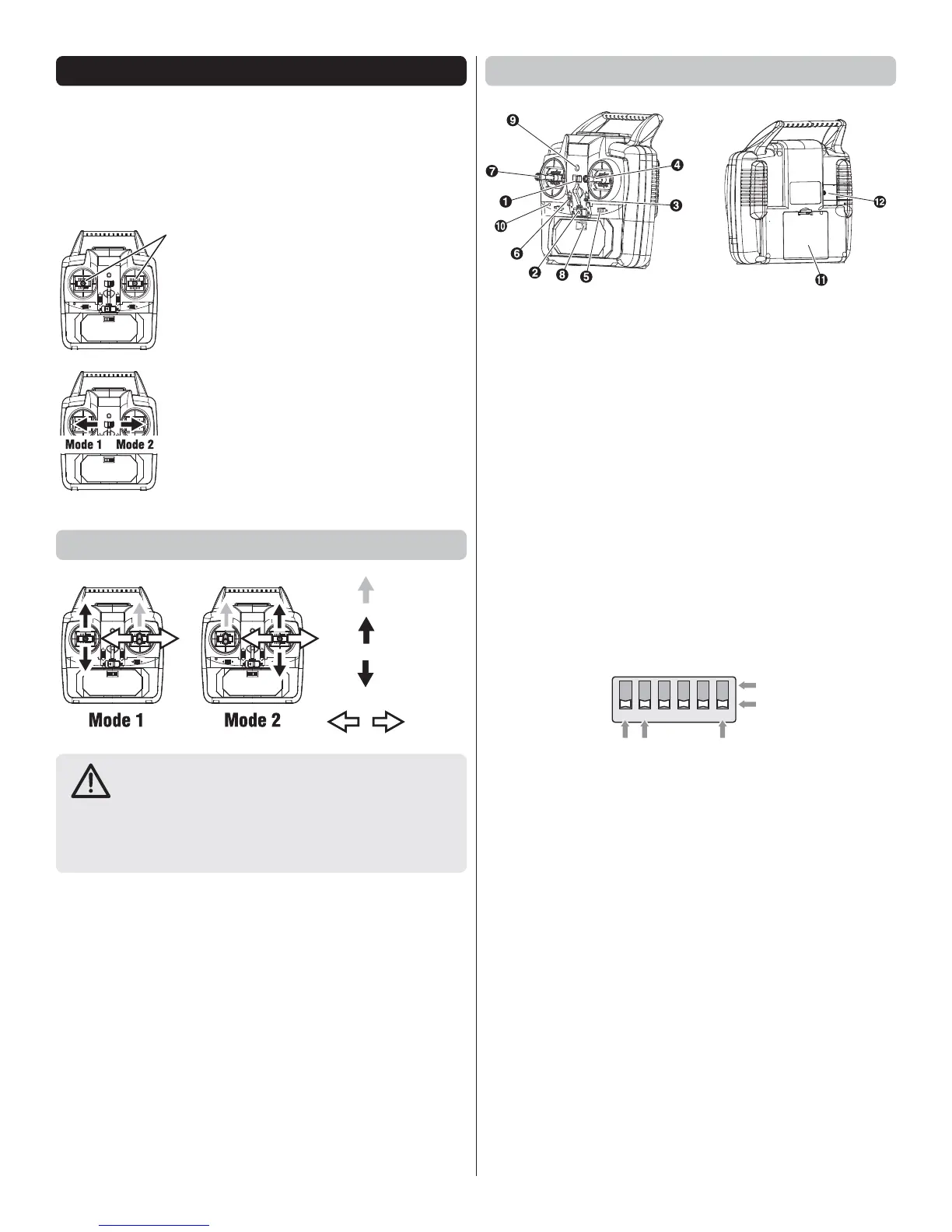
TRANSMITTER MODE SELECTION
As supplied, the transmitter is in Mode 2.
NOTE: The transmitter can be used in Mode 1 or Mode
2 with the mode change switch. After the Mode has been
changed, the throttle stick spring is cancelled.
1. Move the left and right sticks
to the neutral position.
2. Make sure the Mode change
switch is moved all the way to
the end.
Mode Stick Functions
Throttle
Elevator
Rudder
● The Mode change switch will only slide if the
throttle stick is in neutral.
● Be sure to slide the Mode change switch all the way to
the end. The sticks will not move correctly unless the
switch is moved all the way to the end.
eu
ra
Position
Mode 1 Transmitter Information
1 Mode Change Switch
2 Power Switch
3 Throttle Trim (Up/Down) MODE 1 SHOWN
Adjusts throttle so motor will not move at the down
position.
4 Throttle Stick (Up/Down) MODE 1
Controls propeller speed.
Rudder Stick (Left/Right) MODE 2
Controls plane’s left/right movement.
5 Rudder Trim (Left/Right)
Adjust left/right so plane flies straight.
6 Elevator Trim (Up/Down) MODE 1 SHOWN
Adjust left /right so plane flies straight.
7 Elevator Stick (Up/Down) MODE 1 SHOWN
Controls plane’s upwards/downwards movement.
8 Function Selector
123456
REVERSERREVERSER
RUDDER ELEVATOR CH1 CH2
D/R-Dual Rate
LOW
HIGH
9 On/Off Indicator
10 Charge Lamp
11 Battery Cover
12 Charger Terminal Cover




 To Next Page