4
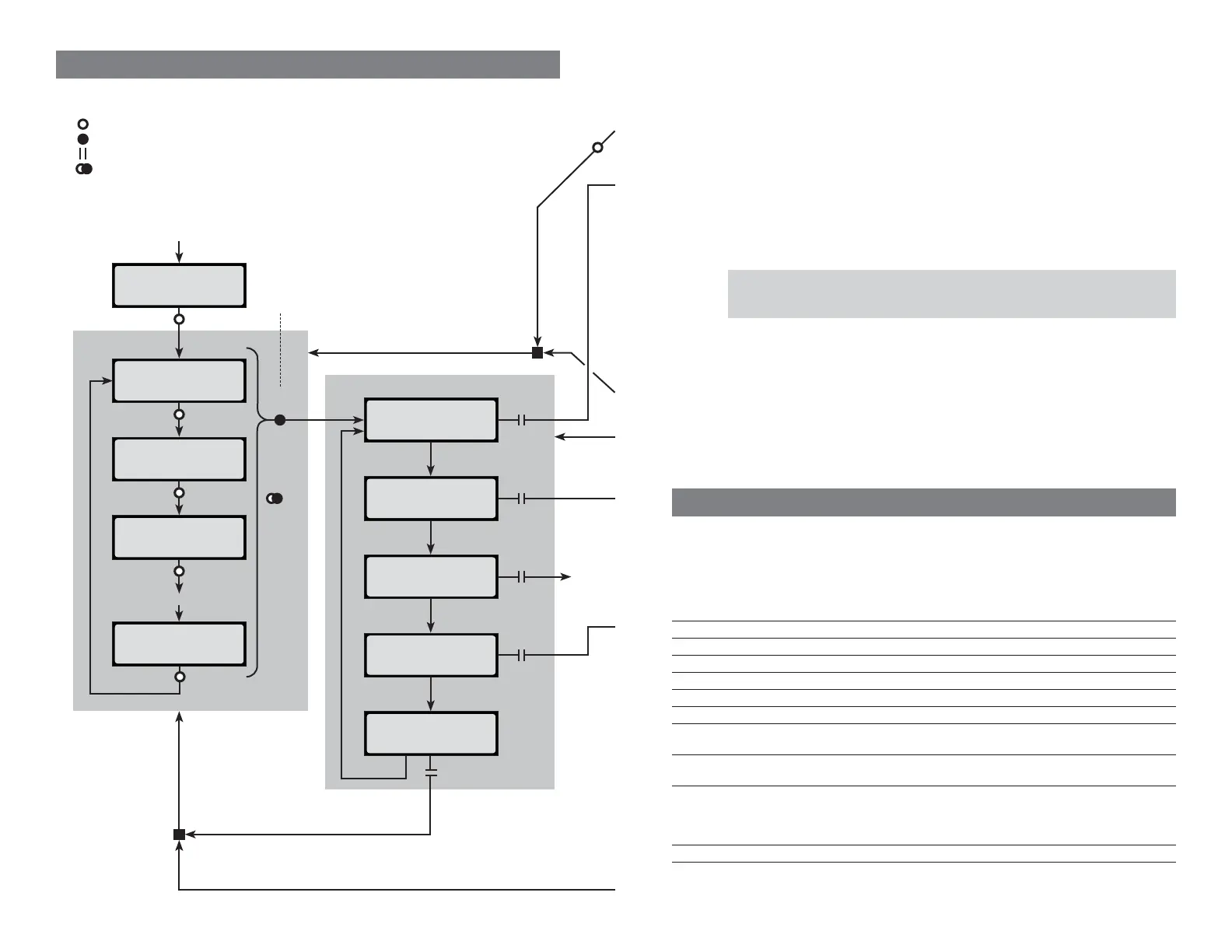
Navigating the charger’s screens
This diagram will help you understand how to move from screen to screen using the Mode but-
ton. There are four basic things you can do with the Mode button, as indicated in the diagram:
Press: press and release the Mode button. In most cases, the next screen is displayed.
Press & Hold: press and hold the Mode button.
Release: release the Mode button after you press and hold it.
“Reverse Press”: Quickly press and release the Mode button, then press and
hold it, then release it to reverse the sequence items are displayed in certain lists
(high tone = forward, low tone = reverse).
[last-used
user preset†]
Cellpro Multi4
Firmware vX.XX
Press
Press
[next preset†]
Press
[next preset†]
Press
Etc.
[next preset†]
Press
START CHARGE
Press
& Hold
CHOOSE CHG. RATE
CLEAR PRESET
EXIT
Preset Menu
Operations Menu
Release
Release
Return to preset previously
selected in Preset Menu
Release
Return to preset previously
selected in Preset Menu
Note: Operations selected in Operations Menu apply to
preset selected when you Press & Hold in Preset Menu.
Apply power
“Reverse Press” to
reverse sequence*
*Tone changes to
indicate direction:
High tone = forward
Low tone = reverse
Press
PRESET LIBRARY
Release
Release
See
page 6
†If slot is empty,
display shows
EMPTY PRESET
17
Charger specifi cations
For battery types Lithium Polymer (1s to 4s balanced, 1s to 2s unbalanced)*
Lithium Ion (1s to 4s balanced, 1s to 2s unbalanced)
Lithium Manganese (1s to 4s balanced, 1s to 2s unbalanced)
A123 (2s to 4s balanced, 1s to 5s unbalanced)*
NiCd (1s to 12s)
NiMH (1s to 12s)
6V and 12V Lead Acid batteries
Pack capacity 5mAh to 32Ah (charge time limited to maximum of 8 hours)
Input voltage 10 to 16VDC, reverse polarity protected
Input current 5A maximum
Power conversion 125kHz switcher operating at 90% effi ciency
Output current Up to 4A
Cell balancing To within 5mV for 2s to 4s LiPo, Li-Ion, Li-Mn or A123 packs
Voltage calibration Cell voltage measurements are factory calibrated to a standard
traceable to NIST; calibration is to ±6mV
Current calibration Charge current is factory calibrated on a 4A standard; calibration is to
±1mA
Measurement accuracy Voltage: ±6mV
Charge current: ±1%
Capacity added to pack: ±1%
Percent capacity (“Fuel”): ±5%
Serial data output 19.2kbps, 8 bits, 1 start bit, 1 stop bit, no parity
*charger can be used with balanced 2s to 4s packs having a node connector (an
appropriate FMA adapter may be required)
Working with fi les
To save a single preset: In the Presets tab, select the preset, then File > Save Preset n to
File... .
To load a single preset: In the Presets tab, select the preset, then File > Open File to
Preset n... .
To back up all User Presets: File > Backup User Presets... .
To restore User Presets: File > Restore User Presets... .
To back up all Library Presets: File > Backup Library Presets... .
To restore all Library Presets: File > Restore Library Presets... .
CCS fi le types
.pst Single preset fi le .psk User Presets backup fi le
.lpb Library Presets backup fi le .cp4 Charge graph fi le


 To Next Page
 Loading...