FOCUS 4010/HT Dental Porcelain Furnace Page 22 Manual version 4.2.2013
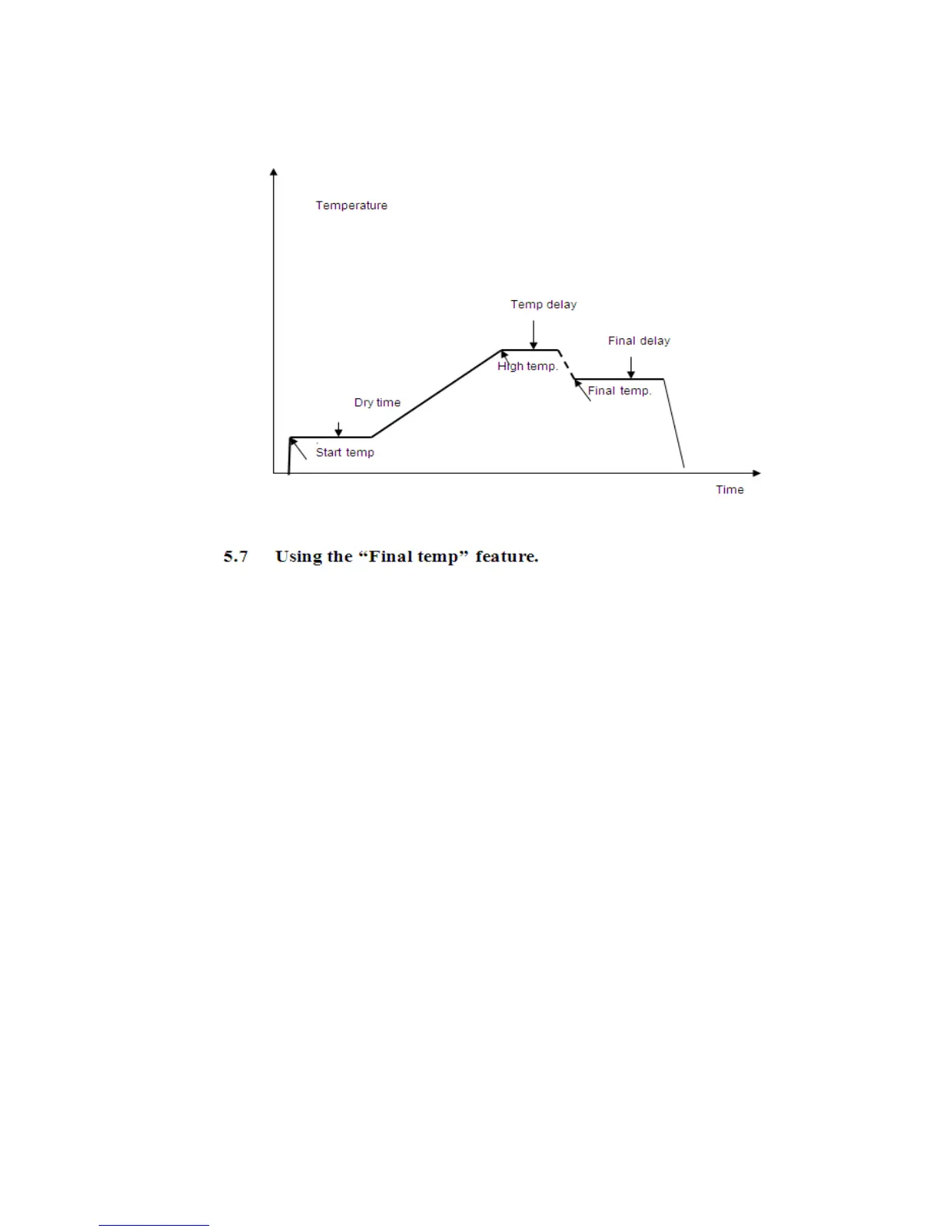
Using the “Final temp” feature.
To enable the 13 parameters first go to the option screen and chose the 13 parameter
option- Menu- Options-Enter+ go to program parameters 11 while the 11 is high light
press ENT again.
Now when editing the program When the FINAL TEMP parameter will be lower than
HIGH TEMP , then FINAL TEMP and FINAL DELAY parameters can act like TEMPERN
effect i.e. temperature will drop down to FINAL TEMP and will remain at that
temperature for the defined FINAL DELAY period.
POINTS TO NOTE
When programming data into a parameter, check that the data is correct and that it
correlates with the other parameters.
Remember that parameters have limits, if you enter data above or below these limits
the data will not be entered.
In the event of an error, the warning tone will sound by pressing START and the
firing cycle will not start. The erroneous parameter will blink indicating the source of
the problem. This parameter isn’t logical or it is out of the permitted limits.


 To Next Page