FOCUS 4010/HT Dental Porcelain Furnace Page 11 Manual version 4.2.2013
By pressing the ON/OFF button on the front panel, the furnace is turned on. This mode is
called the Idle Mode. The temperature would rise and will maintain on 200ºC.
3.3 Set-Up possibilities:
In order to enter the Diagnostic mode you have to turn the furnace on from the front
panel by pressing the ON/OFF key. Now the furnace is in the stand-by mode (the display
is showing “Focus ”Logo ).
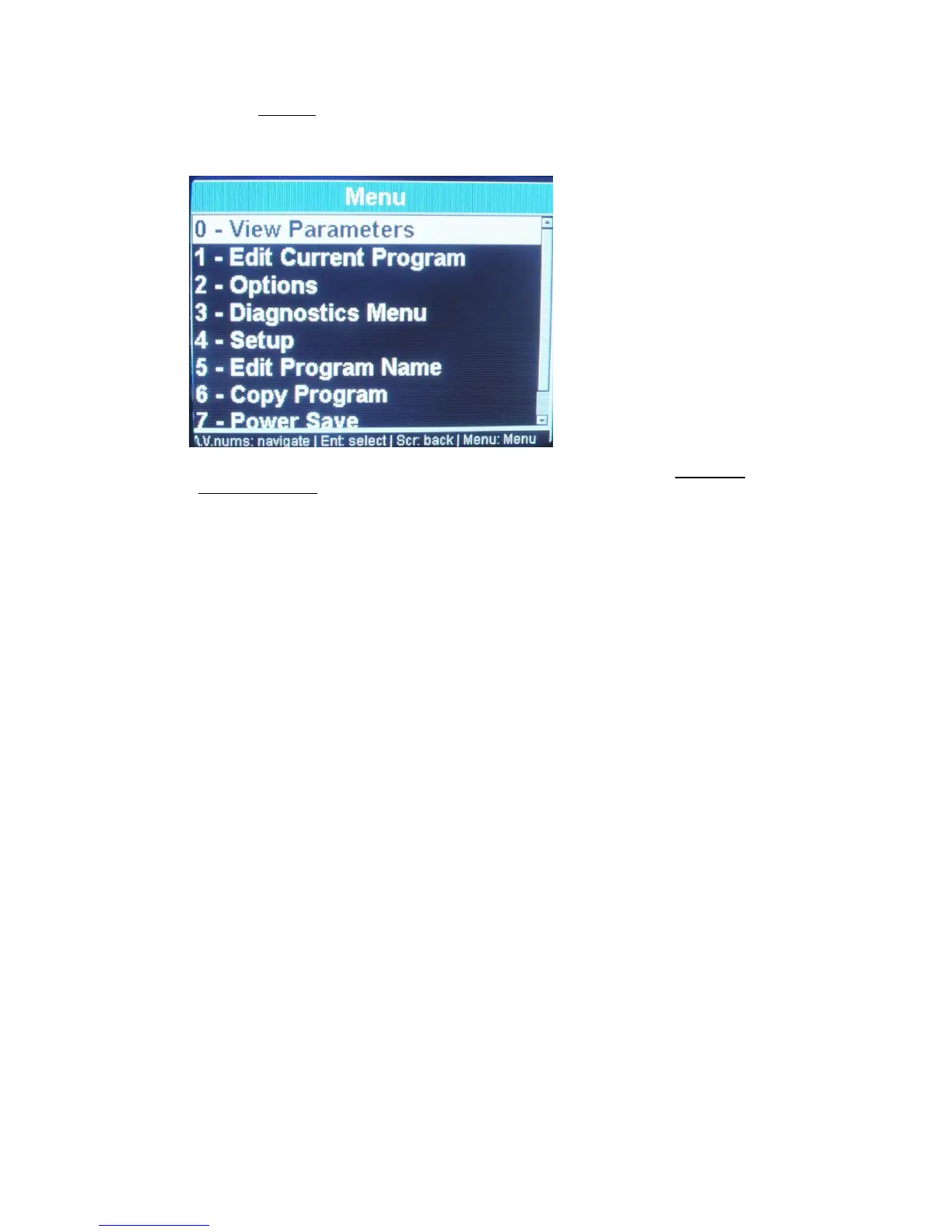
Press menu button:
By pressing the arrows you can browse through the
options/Diagnostics/setup
By pressing number 2 you will be able to set your preference:
By pressing the arrows you can navigate between the different options
By pressing the enter button you will change your choice
PIC 1/1
3.4 Idle Mode :
Press the [ON/OFF] key located on the front panel, the furnace is now ready for
Program selection.
POINTS TO NOTE
Idle mode is provided for use during long time intervals, when the furnace is not in
operational use.
It is very important that you keep the firing chamber closed to
prevent moisture from entering the muffle.
3.5 Programming mode:
Press the "PROGRAM" key [PROG].
Using the number keys enter any number from 0-249 or scroll with the arrows to the
chosen program.
Press the "ENTER" key.
POINTS TO NOTE
When editing is required press menu button and press option 1- edit program.


 To Next Page