EasyManua.ls Logo

Focus TOUCh P10 - Remote Control

Focus TOUCh P10
20 pages
Print Icon
To Next Page IconTo Next Page
To Previous Page IconTo Previous Page
Loading...
14
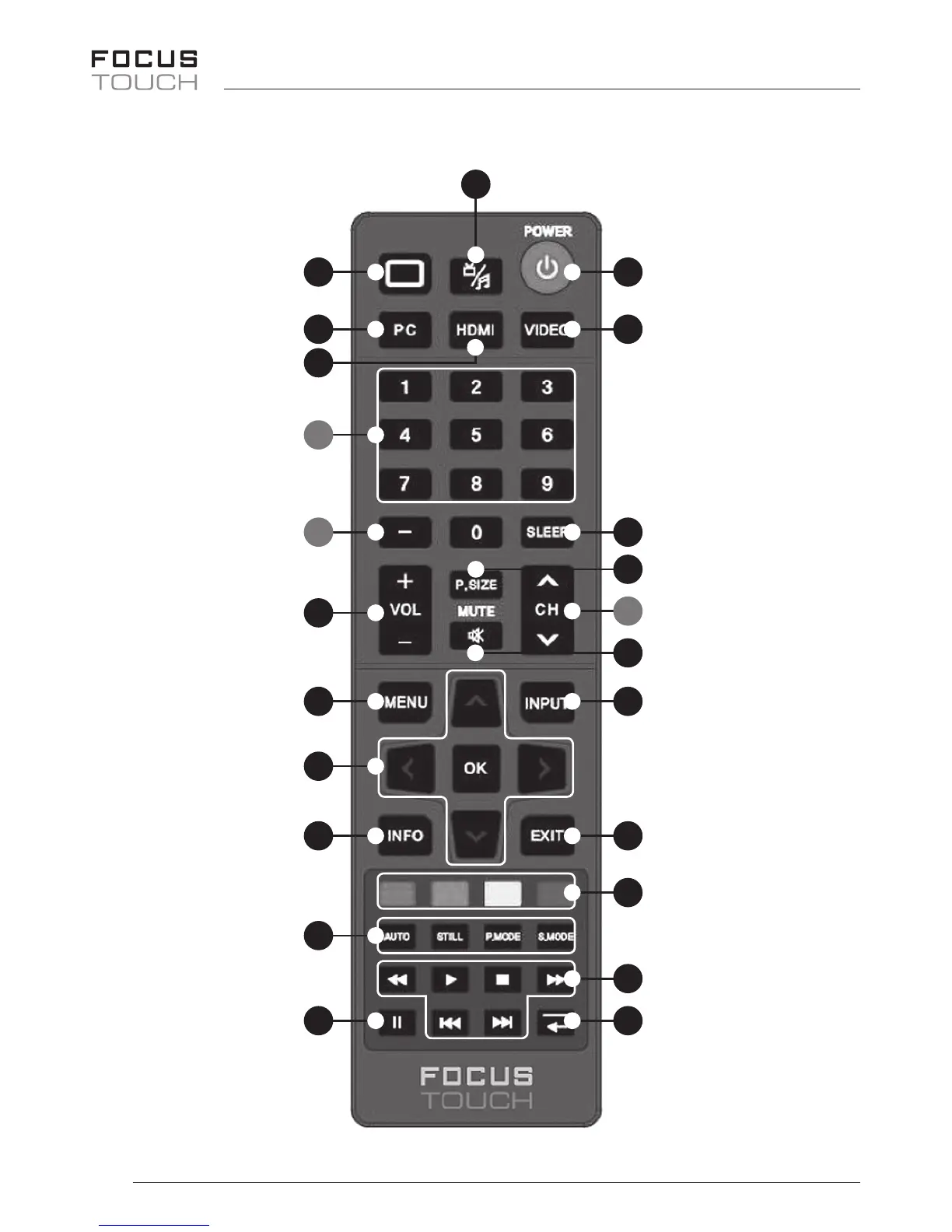
Remote Control
0 Function
Notdene
1 PC
SelectsthePCmode
directly
2 HDMI
SelectstheHDMI
modedirectly.
3* Number buttons
Presstochangethe
channel.
4* –
Presstoselect
additionalchannels.
5 Volume
Presstoincreaseor
decreasethevolume.
6 Menu
Openstheon-screen
menuandexitsfrom
themenu.
7 Up-Down Left-Right
buttons OK
Controlthecursorin
themenu.
8 INFO
Presstodisplayinfor-
mationontheTV
screen.
9 Auto
PCScreenAdjust
STILL
Presstotemporarily
stilltheVideo
P.MODE
Picturemode
selection
S.MODE
Soundmode
selection
10 Multi Media
SelectstheMulti
Mediamodedirectly.
11 POWER
Turnstheproduct
On/O.
12 VIDEO
SelectstheVIDEO
modedirectly.
15* CH
Presstochange
channels.
13 SLEEP
Powerotime
selection.
14 P.Size
Picturesizeselection.
16 Mute
Presstotemporarily
cutothesound.
17 INPUT
Presstodisplayand
selecttheavailable
videosources.
13 EXIT
Exitsfromthemenu
screen.
19 COLOR Botton
Notdene.
20 Media Play
Usethesebuttonsin
theMediaPlay.
21 Function
Notdene.
* #3, #4 and #15: Use only TV Model
11
10
0
1
2
3
4
5
6
7
8
9
21
12
13
14
17
16
15
18
19
20
21