7
4. CONNECTIONS
1. Beforeconnectturnoyourmonitorandunplugitspowercord.
2. Placethemonitoronaathardsurface,likeatableoradesk.
3. Pluginthemainpowercable.Useofmulticontentsisrecommendedtoavoid
damagingthemonitorduetoabnormalelectricityow.
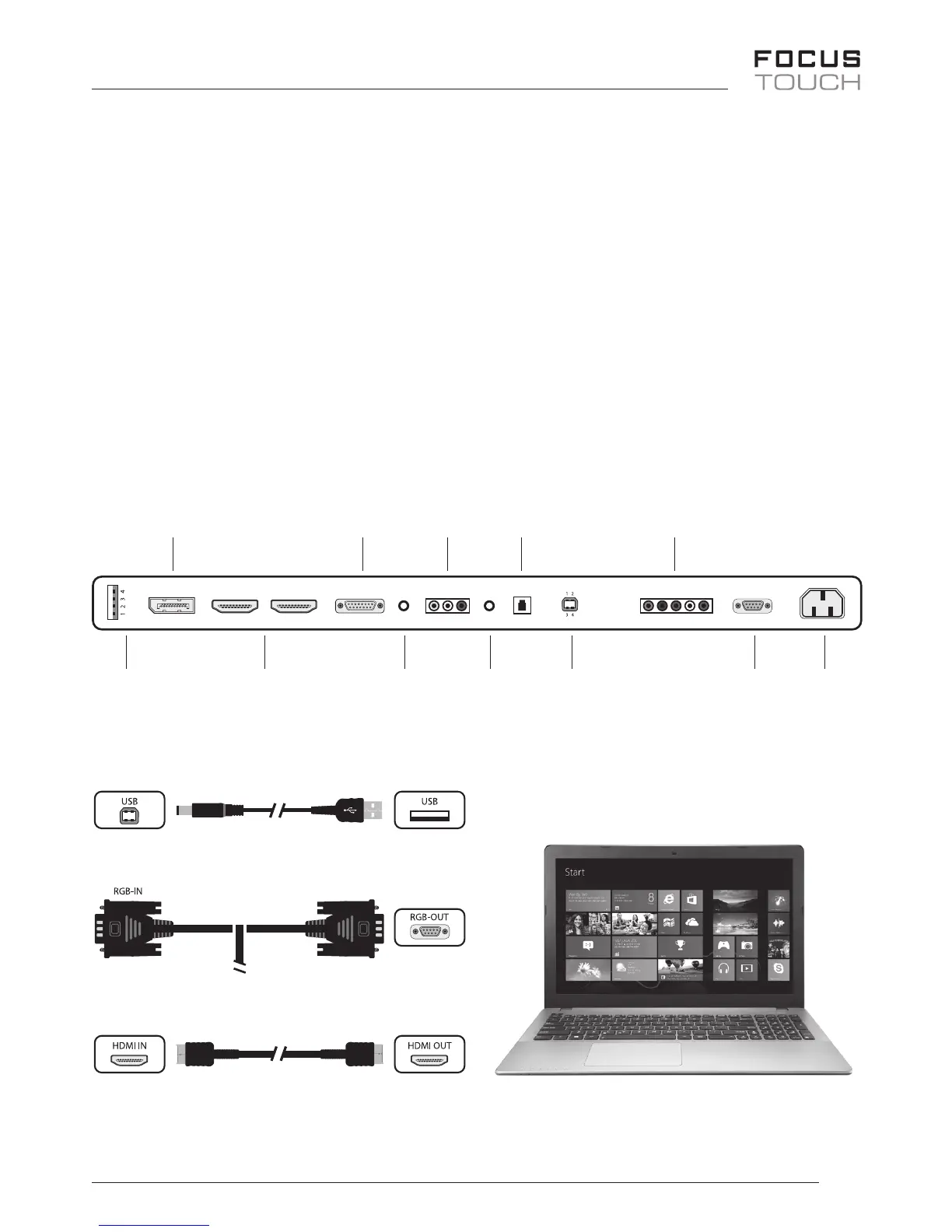
4. Pleaseconnectthesignalcable.Whenconnecting,pleasetightenthescrewverywell,
withoutusinganytoolsbutbyusingyourhand.
5. TurnonMonitorpowerandthenturnonComputerpower.
6. Pleaserefertothediagrambelowforconnection.
HDMICable
D-SubCable
Touch&Cam,andMicCable
USB
MediaPlayer
&FW
2xHDMI PC
Audio
In
Audio
Out
USB
Touch/Cam
RS-232 AC
Input
Display
Port PC RGB VideoL/R
SPDIF
Out
Component
Y/Pb/Pd/L/R


 To Next Page