Operating system compatibility
Windows Macintosh
WindowsXP(SP3),Vista,7 OSX10.5Leopard(Intelonly,PPCnotsupported),OSX10.6SnowLeopard.
Formoreinformationoncompatibilityvisitwww.focusrite.com/vrm_box
Installing the software
TheVRMBoxisaclasscompliantdevice,meaningthatthereisnoneedtoinstalldriversforthedevicetoworkasanaudiooutput.However,you
mustruntheinstallertobeabletousetheVRMsoftware.
InserttheCDintothecomputerandclickontheinstallericon.FollowtheinstructionsonscreentoinstalltheVRMControlPanelsoftwareand
drivers.
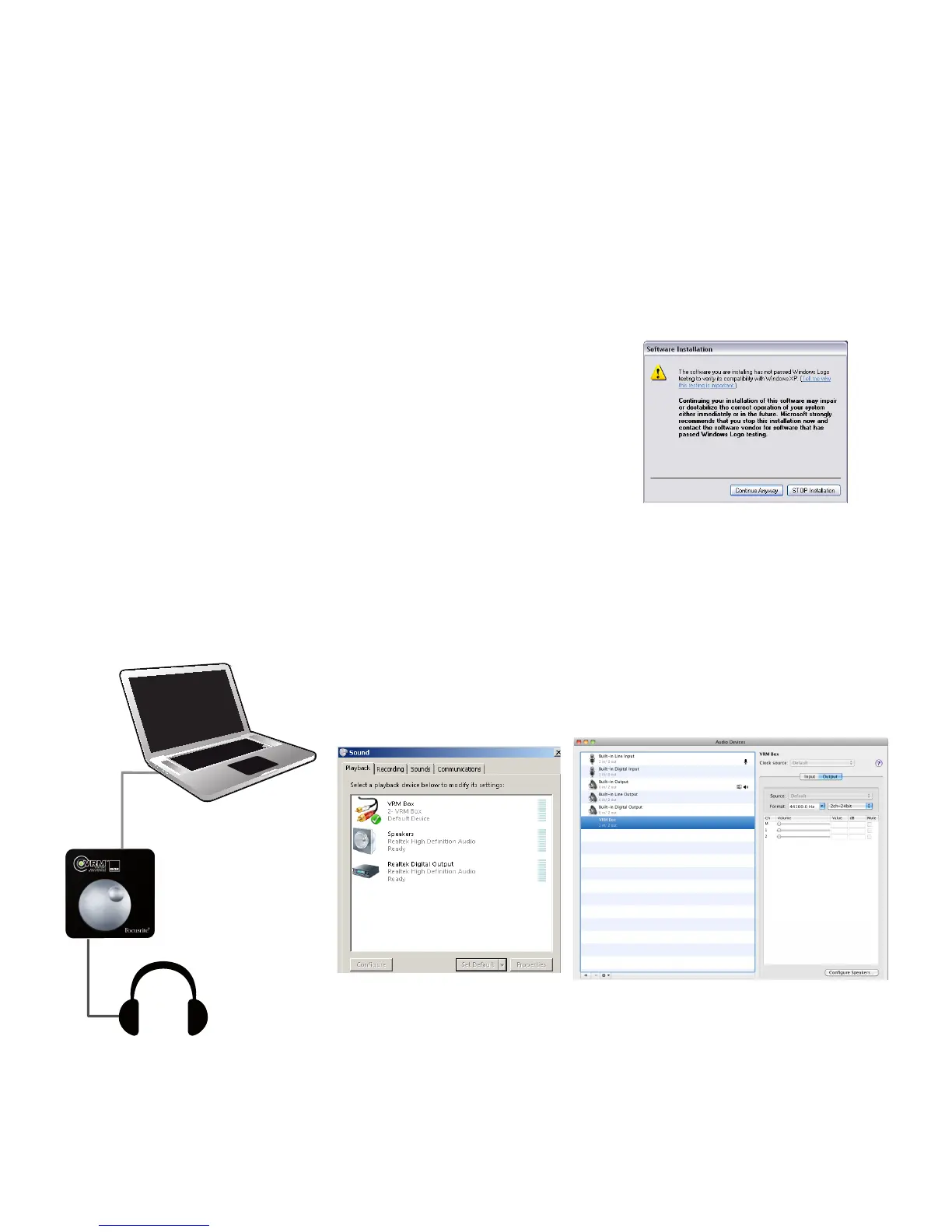
Note for Windows users:Ifthismessageorsimilarappearsduringtheinstallationprocess,
press‘ContinueAnyway’tosuccessfullyinstallthedrivers.
VRM Box hardware setup
TheVRMBoxcanbeusedasthemainaudiointerface,orinconjunctionwithyourexistingaudiointerface,providingthisinterface
hasaRCAS/PDIFoutput.
VRM Box as the main audio interface
1. UsingtheUSBcableprovided,connecttheVRMBoxtotheUSBportofyourcomputer
2. SetuptheVRMBoxasyouraudioplaybackdevice
TousetheVRMBoxastheplaybackdeviceofyourDAWsoftwareyouwillneedtoselecttheVRM
ASIOdriver(Windows)orVRMCoreAudiodriver(Mac)intheaudiosettingsofyourDAWsoftware.
Formoreinformationpleaserefertopage8.
3. Withthevolumecontrolturneddown,connectyourheadphonestoVRMBox
4. LoadtheVRMsoftware.ThiscanbefoundinyourApplicationsfolder(Mac)orfromtheStartmenu>AllPrograms>Focusrite(Windows)
5. StartplayingaudiofromyourDAWsoftwareoranymediaplayer
6. Turn up the volume control on the VRM Box until you have a healthy level in your headphones


 To Next Page