EasyManua.ls Logo

Follett Edge Series - User Manual

Follett Edge Series
16 pages
Print Icon
To Next Page IconTo Next Page
Loading...
Order parts online:
www.follettice.com
01519719R00
801 Church Lane • Easton, PA 18040, USA
Toll free (877) 612-5086 • +1 (610) 252-7301
www.follettice.com/healthcare
Installation Guide
Please visit https://www.follettice.com/technicaldocuments
for the Operation and Service manual for your unit
Follett Edge Series™
REFNAT5-SD, REFNAT5-GD Refrige
rators
Welcome to Follett
Follett equipment enjoys a well-deserved reputation for excellent performance, long-term reliability and outstanding
after-the-sale support. To ensure that this equipment delivers that same degree of service, review this guide
carefully before you begin your installation.
Should you need technical help, please call our Technical Service group at (877) 612-5086 or (610) 252-7301.
Please have your model number, serial number and complete and detailed explanation of the problem when
contacting Technical Service.
Getting Started
After uncrating and removing all packing material, inspect the equipment for concealed shipping damage. All
freight is to be inspected upon delivery. If visible signs of damage exist, please refuse delivery or sign your delivery
receipt "damaged." Follett Customer Service must be notied within 48 hours. Wherever possible, please include
detailed photos of the damage with the original packaging so that we may start the freight claim process.

Questions and Answers

  • J
    Janet BlackburnAug 16, 2025
    What to do if my Follett Refrigerator is too warm?
    • K
      Kyle TaylorAug 16, 2025
      If your Follett Refrigerator is too warm, you should first adjust the temperature control. Ensure the refrigerator door is closing properly and that the ambient temperature isn't too high. Also, inspect the door gasket for any damage or obstructions that might prevent a tight seal.
  • S
    Stephanie PatelAug 19, 2025
    Why is my Follett Refrigerator alarm on?
    • J
      jessica15Aug 19, 2025
      The alarm on your Follett Refrigerator may be triggered upon start-up if the internal temperature doesn't match the set value on the control panel. During regular use, the alarm could activate if the door has been left open for an extended period.
  • L
    loristoneAug 22, 2025
    Why does moisture collect on the outside of my Follett Refrigerator?
    • J
      jbennettAug 22, 2025
      Moisture can collect on the outside of your Follett Refrigerator due to frequent door openings in highly humid conditions. To address this, reduce how often you open the door and how long you leave it open. Also, ensure the door seal is tight.
  • S
    Sierra CraigAug 25, 2025
    How to reduce noise from my Follett Refrigerator?
    • D
      derekmcgeeAug 26, 2025
      To reduce noise from your Follett Refrigerator, ensure the cabinet is level and not touching any walls or other surfaces. It should rest squarely on the floor or on all four corners. Keep in mind that some noises, like refrigerant gurgling or the compressor clicking, are normal.
  • M
    Mary JacobsAug 28, 2025
    What to do if there is an odor in my Follett Refrigerator?
    • B
      Bryan HarrisonAug 28, 2025
      If you notice an odor in your Follett Refrigerator, start by checking the stored items to make sure they are not the source of the smell. You should also clean the interior of the refrigerator thoroughly.
  • N
    nicholas14Aug 31, 2025
    Why is the Follett Freezer alarm on?
    • R
      Robert HarringtonAug 31, 2025
      If the Follett Freezer alarm is activated, especially after starting the unit, it might be because the internal temperature hasn't yet reached the set value on the control panel. During regular use, check if the door has been left open for an extended period.
  • S
    samuel06Sep 3, 2025
    How to fix a Follett Edge Freezer that is too warm?
    • A
      Amy WilliamsSep 3, 2025
      To address a Follett Freezer that is too warm, start by adjusting the temperature control. Ensure the door is closing correctly and that the ambient temperature isn't excessively high. Also, inspect the door gasket for any damage or obstructions that might prevent a proper seal.
  • L
    ljohnsonSep 6, 2025
    Why is my Follett Edge Freezer so noisy?
    • J
      Jenny GuerreroSep 6, 2025
      If your Follett Freezer is making excessive noise, ensure the cabinet is level and not in contact with any walls or other surfaces. It should rest firmly on the floor or all four corners. Keep in mind that gurgling sounds from refrigerant and the compressor clicking on and off are normal.
  • C
    Carolyn RobinsonSep 9, 2025
    What to do if moisture collects on the outside of my Follett Edge Freezer?
    • K
      Kevin BishopSep 9, 2025
      If moisture is collecting on the outside of your Follett Freezer, it could be due to frequent door openings in humid conditions. Try to reduce how often and how long the door is opened. Also, make sure the door seal is tight.
  • A
    Alexandra JamesSep 12, 2025
    How to get rid of odor in Follett Edge Freezer?
    • J
      Jose JonesSep 12, 2025
      If there is an odor in your Follett Freezer, start by checking the items stored inside to make sure they are not the source. As a next step, clean the interior of the freezer.

Summary

Getting Started

Preliminary Information and Safety

Flammable Refrigerant Safety

Critical safety warnings regarding flammable refrigerant and fire risks.

Installation and Cleaning Procedures

Control Panel Operations

Controller Button Functions

Explanation of each button on the control panel and its function.

Display Indicators

Description of the temperature display, alarm lights, and door indicators.

Control Panel Functionality Check

Basic Operating Instructions

Calibration and Key Lock

Alarms and Safety Functions

Alarm Types and Indications

Details on different alarm conditions, their indications, and safety operations.

Troubleshooting Guide

Common Malfunctions and Solutions

Potential causes and solutions for common refrigerator issues like temperature, alarms, and noise.

Overview

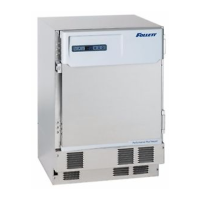
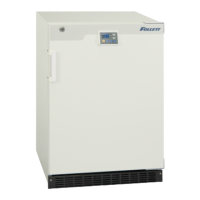
This document describes the Follett Edge Series™ REFNAT5-SD and REFNAT5-GD Refrigerators, which are laboratory refrigerators designed for commercial use.

Function Description

The Follett Edge Series refrigerators are designed to maintain a consistent temperature within a programmable range of 2°C to 8°C, with a factory preset temperature of 5°C. The cooling system operates based on the cabinet air temperature. These units feature an automatic defrost cycle to keep the evaporator coil frost-free, eliminating the need for manual defrosting. The defrost cycle is initiated every 18 hours of cumulative compressor run time, during which the compressor, evaporator fan, and condenser fan power down, and the defrost heater is energized. The system is designed to keep the cabinet within the 2°C to 8°C range even during defrost.

The refrigeration system utilizes a capillary tube and is critically charged with R600a refrigerant (isobutane), which is flammable. The system is designed for long-term, trouble-free service, with minimal maintenance required beyond routine cleaning of the air-cooled condenser.

Important Technical Specifications

  • Product Name: Laboratory Refrigerator
  • Model Numbers: REFNAT5-SD (solid door) / REFNAT5-GD (glass door)
  • External Dimensions (H x W x D): 34.16" x 23.84" x 23.66" (86.7 cm x 60.6 cm x 60.0 cm)
  • Internal Dimensions (H x W x D): 25.59" x 19.94" x 17.09" (65.0 cm x 50.7 cm x 43.4 cm)
  • Effective Capacity: 5.01 ft³ (142 liters)
  • Exterior Material: White PCM galvanized steel, polyester resin baked finish
  • Interior Material: HFO vacuum formed plastic
  • Door Material: Electro galvanized steel
  • Insulation: HFO foamed-in place
  • Shelves: 3 coated steel wire pieces, Size: 19.19" W x 14.75" D (48.7 cm x 37.5 cm). Weight: 2.2 lb (1 kg) each. Maximum load capacity per shelf: 33 lb (15 kg).
  • Access Port: Inner diameter 1.19" (30 mm), 1 port on the right side.
  • Cooling Method: Forced air circulation
  • Compressor: Reciprocal type, output: 40 W
  • Evaporator: Flat fin type
  • Condenser: Wire type
  • Refrigerant: R600a; 52 g (0.114 lb)
  • Defrosting: Automatic heater defrost
  • Defrost Heater: 115 V/106 W (125Ω ±0.7Ω @ 25°C)
  • Temperature Controller: Microprocessor control system
  • Temperature Display: Digital display
  • Alarm and Safety Features: High temperature alarm, low temperature alarm, defrost sensor abnormality, power failure remote alarm, door alarm, key lock, thermal sensor abnormality.
  • Memory Backup: Nonvolatile memory
  • Weight: Solid door: 100 lb (45 kg), Glass door: 106 lb (48 kg)
  • Accessories: 1 set of keys
  • Temperature Control Range: 5°C ±3°C (programmable 2°C to 8°C)
  • Rated Voltage: 115 V AC
  • Rated Frequency: 60 Hz
  • Power Consumption: 106 kWh per year
  • Climatic Class: 7
  • Installation Specifications:
    • Altitude: up to 6561.68 ft (2000 m)
    • Ambient Temperature for maximum efficiency: 68°F to 75°F (20°C to 24°C)
    • Maximum Ambient Temperature: 100°F (39°C)
    • Maximum Relative Humidity: 75% for temperature up to 24°C, decreasing linearly to 50%
    • Clearance: At least 12" (30.48 cm) in front of the louvered panel for proper ventilation.

Usage Features

  • Temperature Control: The microprocessor control system allows for precise temperature setting within the 2°C to 8°C range, adjustable in 0.1°C increments. The digital display shows the current chamber temperature.
  • Loading: After initial power-up and reaching the desired temperature, products should be introduced into the cabinet slowly, in small batches, to allow the temperature to recover.
  • Door Handle Installation: The door handle can be mounted at a higher location for floor-level installation or a lower location for stacking above another compatible unit.
  • Access Port: A 1.19" (30 mm) access port is provided on the right side for routing temperature sensor cables into the cabinet. Proper sealing with the rubber cap and insulation is crucial to prevent temperature uniformity issues and condensation.
  • Leveling: Adjustable legs ensure the unit is level in both directions for optimal performance.
  • Key Lock: A key lock feature is incorporated to prevent unauthorized tampering with the control panel settings. This feature can be activated or deactivated as needed.
  • Alarms and Safety Functions: The unit includes comprehensive alarm and self-diagnostic functions:
    • High/Low Temperature Alarm: Activates if the chamber temperature exceeds the set temperature by more than 3°C or falls below it by more than 3°C, with an intermittent tone after a 15-minute delay.
    • Power Failure Alarm: The display shuts off in the event of a power failure or disconnection.
    • Door Alarm: Activates if the door remains open for more than 2 minutes, with an intermittent tone after a 2-minute delay.
    • Auto Return: If no key operation is performed for 90 seconds in setting mode, the display returns to temperature display mode, and setting changes are canceled.
    • Thermal Sensor Abnormality (E10/E1S): Indicates an open or short-circuited thermal sensor.
    • Defrost Sensor Abnormality (E20/E2S): Indicates an open or short-circuited defrost sensor. If defrost is taking place, it will stop; otherwise, the unit will not enter defrost.
  • Internal Design: Features a circulation fan for consistent temperature, powder-coated wire shelves for adjustable storage, and a magnetic door gasket for an optimum seal. Powder-coated side wire barriers and specially designed shelves with rear bends prevent product from touching the evaporator and ensure proper air circulation.

Maintenance Features

  • Cleaning: The unit should be cleaned once a month. Dust and particulates from air intake areas and the condenser should be removed regularly, more frequently in dusty environments.
    • Exterior/Interior Cleaning: Use a diluted neutral dishwashing detergent, wiping thoroughly with a wet cloth, then a dry cloth. Avoid scrubbing brushes, acid, thinner, solvents, powdered soap, cleanser, or hot water, as these can damage the paint, plastic, and rubber parts.
    • Condenser Cleaning: The condenser should be cleaned regularly (every other month) using a vacuum cleaner with a brush attachment.
  • Shelf Removal: Wire shelves and side wire barriers can be removed for cleaning. Side wire barriers are removed by lifting, compressing the top inward, and sliding down.
  • No Lubrication Required: The compressor and other mechanical parts are completely sealed and do not require lubrication.
  • Refrigerant System Service: If service hoses are connected to the refrigeration system, Follett recommends recovering the refrigerant, evacuating the system, and recharging by weighing in the correct refrigerant charge (52 g of R600a).
  • Safety Precautions for Service: Always disconnect power before servicing. Repairs on R600a systems must be done in a well-ventilated area using a combustible gas leak detector. Technicians must be properly trained and certified in refrigerant handling and servicing procedures, following all lockout and tag-out procedures.

Follett Edge Series Specifications

General IconGeneral
BrandFollett
ModelEdge Series
CategoryFreezer
LanguageEnglish

Related product manuals