EN
- 3 -
MANDO A DISTANCIA
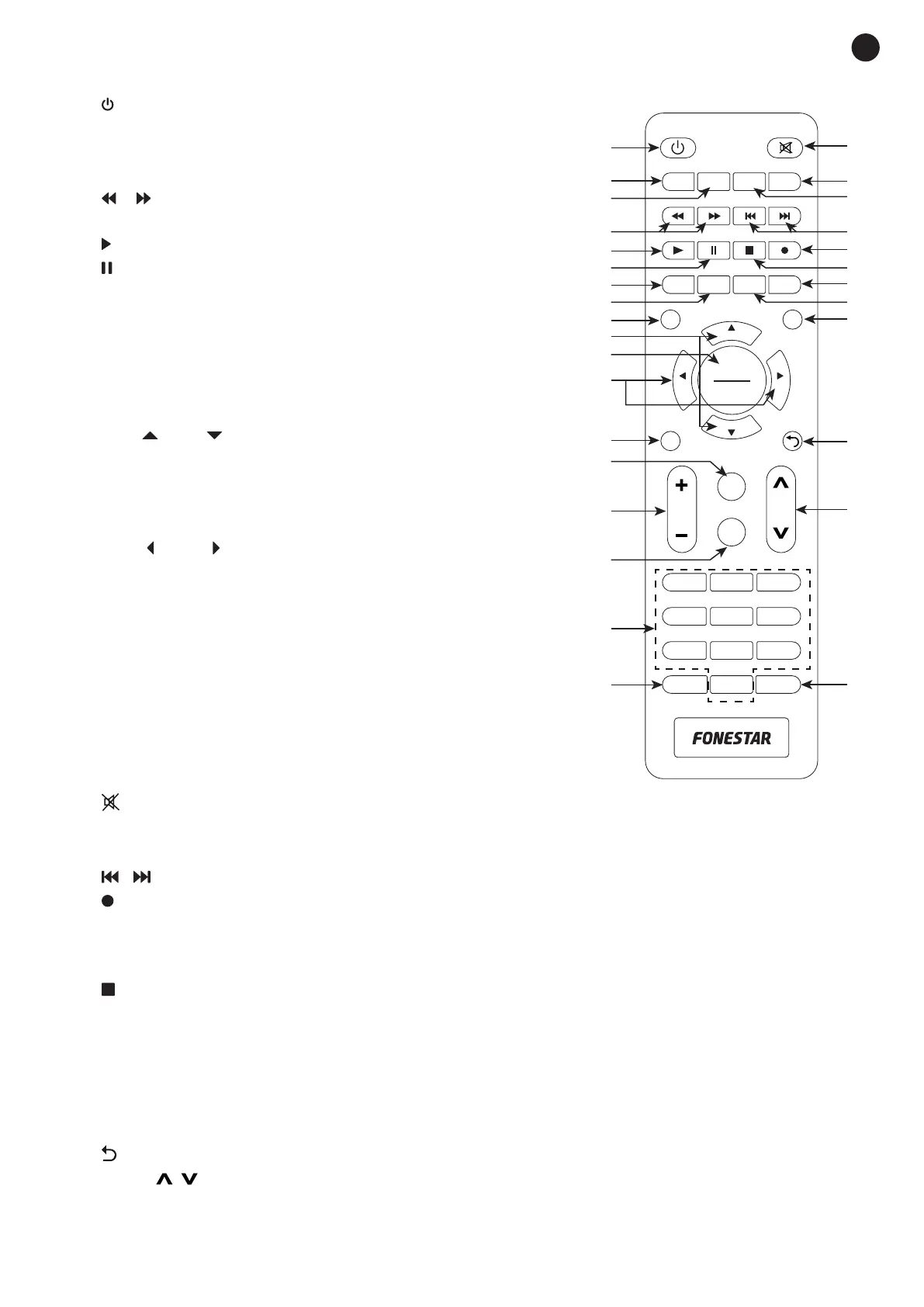
1.- : on/StandBy button on the receiver.
2.- GOTO: opens options in the PVR recording player.
3.- REPEAT: in the USB file playback allows the repeat setting to
be made: REPEAT ONE, SEQUENCE, OR ONLY ONCE.
4.-
/ : enables you to reverse/fast forward playback. Press
repeatedly to increase the setting speed.
5.-
: starts the image reproduction.
6.-
: pauses the image reproduction.
7.- PVR: displays the recorded PVR files and allows viewing.
- In teletext and menu, red function key.
8.- V.FORMAT: allows you select the screen resolution.
- In teletext and menu, green function key.
9.- MENU: displays the main menu on the screen and allows you
to go back to the menu.
10.- CH+
/CH- : these buttons allow you to change channels
and navigate through menus.
11.- OK/LIST : displays the channel information being viewed. A
second press shows the technical characteristics of the signal.
- In the menu, confirms the selected option.
12.- VOL-
/VOL+ : volume adjustment and navigation buttons for
the menus.
13.- i: displays current channel information. A second press shows
the technical characteristics of the signal.
- In the menu, confirms the selected option.
14.- EPG: displays the channel programming guide.
15.- VOL+/-: adjusts the volume.
16.- TXT: displays the teletext on the screen. Press EXIT to exit.
17.- 0-9: number buttons.
18.- TV/RADIO: select among the available TV channels or the
radio stations.
19.-
: turns the audio output on/off.
20.- AUDIO: audio language setting, displays the list of available audio.
21.- SUBTITLE: settings, displays the list of available subtitles.
22.-
/ : buttons to play previous/next file.
23.-
: record button. Press once to start recording the channel being viewed. Press a second time to set
the recording duration (hours:minutes) (optional); at the end of this time, the recording will be stored
automatically and the player will switch to StandBy if it is not stopped by the warning message on the
screen. You can change the channel after recording is started.
24.-
: stops the current recording or playback.
25.- TIMER: direct access to the list and configuration of scheduled events. For more information, please
refer to the section OPERATION / MENU / MENU / TIME.
- In teletext and menu, blue function key.
26.- ASPECT: allows the aspect ratio to be changed.
- In teletext and menu, yellow function key.
27.- EXIT: allows you to exit or go back in the menu.
28.-
: button to go back to the previous channel.
29.- PAGE
1
3
2
4
5
6
8
7
10
11
12
13
14
15
16
17
18
30
29
28
19
25
26
27
9
24
23
21
22
20
OK
1 2 3
4 5 6
7 8 9
TV/RADIO
0
FAV
CH+
CH-
VOL-
VOL+
MENU
LIST
EXIT
VOL
EPG
TXT
PAGE
i
REPEAT
ASPECT TIMER
GOTO
PVR
SUBTITLE
V-FORMAT
AUDIO
/
1
3
2
4
5
6
8
7
10
11
12
13
14
15
16
17
18
30
29
28
19
25
26
27
9
24
23
21
22
20
OK
1 2 3
4 5 6
7 8 9
TV/RADIO
0
FAV
CH+
CH-
VOL-
VOL+
MENU
LIST
EXIT
VOL
EPG
TXT
PAGE
i
REPEAT
ASPECT TIMER
GOTO
PVR
SUBTITLE
V-FORMAT
AUDIO
: these buttons allow you to change the channel. In the channel list allows to go to the
previous/next page.
30.- FAV: displays favourite channel list.
1
3
2
4
5
6
8
7
10
11
12
13
14
15
16
17
18
30
29
28
19
25
26
27
9
24
23
21
22
20
OK
1 2 3
4 5 6
7 8 9
TV/RADIO
0
FAV
CH+
CH-
VOL-
VOL+
MENU
LIST
EXIT
VOL
EPG
TXT
PAGE
i
REPEAT
ASPECT TIMER
GOTO
PVR
SUBTITLE
V-FORMAT
AUDIO


 To Next Page