EN
- 6 -
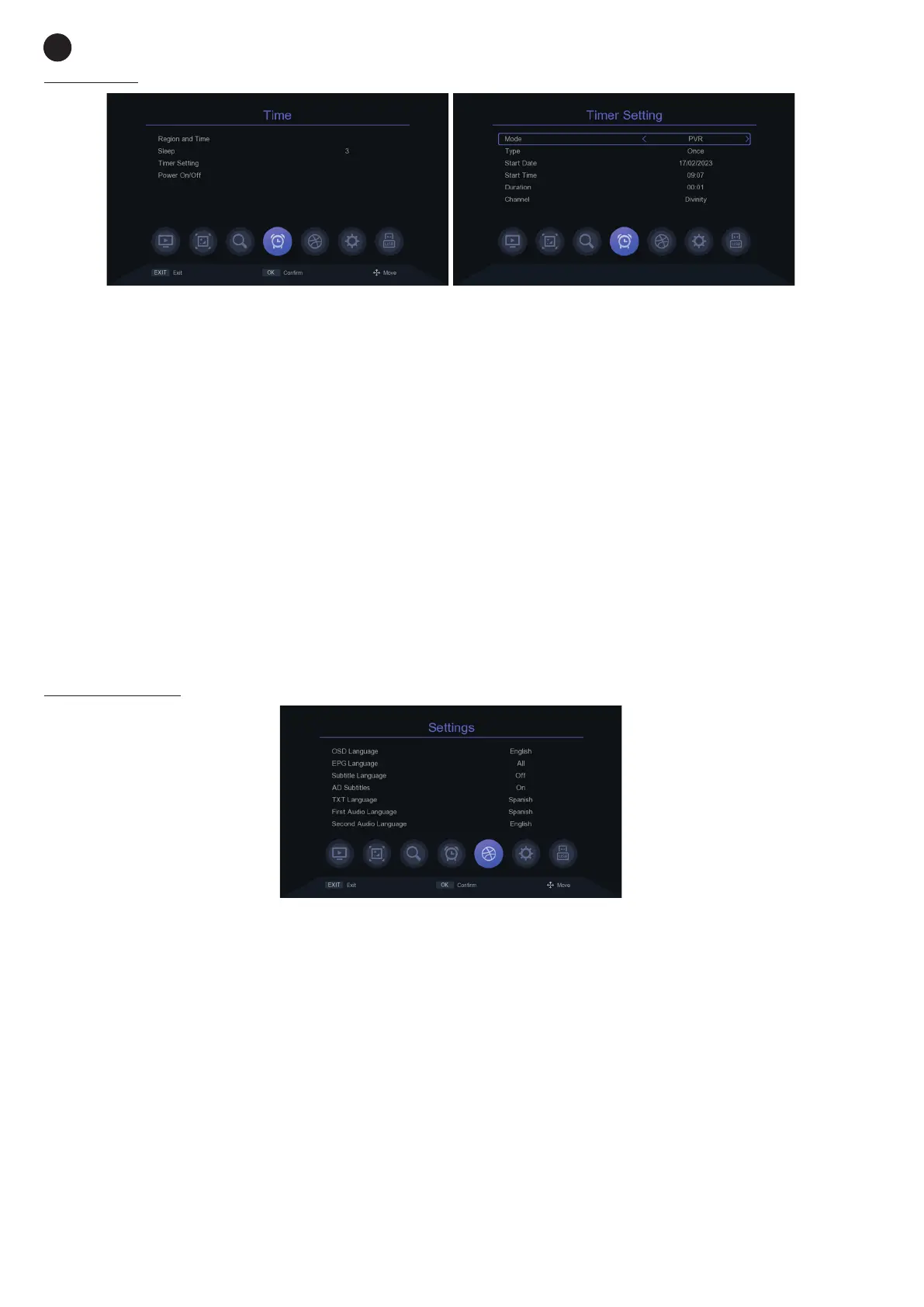
TIME MENU
- REGION AND TIME: setting for the time setting on the receiver.
- SLEEP: time for automatic shut-down. This value will remain active in the receiver every time you switch
it on, i.e. if you set a 2, the receiver will always switch off 2 hours after it has been switched on.
- TIMER SETTING: list of scheduled events. Using the colour buttons, you can delete, add or edit new
events. The created events are of 2 types: PVR (record) or PLAY (switch to a specific channel). For both
you must configure the following settings:
- MODE: PVR (recording) or PLAY (switching to a specific channel)
- TYPE: repetition of this action: ONCE, DAILY, or a specific day of the week.
- START DATE: day/month/year in which you want to start the event.
- START TIME: hours:minutes in which you want to start the event.
- DURATION: (for PVR mode only) duration of recording.
- CHANNEL: channel that you want to record or play in this event.
- POWER ON/OFF: programmer for automatic on and off of the receiver. You will need to enter the
hours:minutes of the day you want it to turn on or off.
SETTINGS MENU
- OSD LANGUAGE: language of all system menus and information blocks.
- EPG LANGUAGE: language of the program guide.
- SUBTITLE LANGUAGE: activation and desired language of the subtitles.
- AD SUBTITLES: enable/disable audio description in subtitles for people with hearing problems.
- TXT LANGUAGE: teletext language.
- FIRST AUDIO LANGUAGE: setting of the desired default language for the audio.
- SECOND AUDIO LANGUAGE: setting of the desired second default language for the audio.
- DIGITAL AUDIO: audio type: PCM or BYPASS.


 To Next Page